



ShipIt is an enterprise-grade, zero-dependency deployment engine engineered specifically to bridge local development environments with Hostinger Shared Hosting architectures.
It handles the entire deployment pipeline in under a minute — staging your git changes, pushing code upstream, establishing secure trust handshakes, streaming compiled UI bundles, and firing remote Laravel optimizations over strict circuit-breaking SSH channels.
And since v2.1, it protects you when things go wrong: every deployment first snapshots your production database, uploads, built assets and .env on the server, keeps a per-site deploy journal, and gives you a one-command rollback — so a failed deploy is an inconvenience, not a disaster.
- Dual-Protocol Smart Switching: Keeps your local machine on HTTPS while forcing the Hostinger server to communicate over SSH via private deployment identities — no conflicts, no credential clashes.
- Agnostic Privacy Detection: Pre-flights repository visibility automatically. Public repos clone and pull over HTTPS without any key setup. Private repos activate the token injection core.
- Automated Deploy Key Injection: Uses your
GITHUB_API_TOKENto handle remote RSA key creation and GitHub handshaking end-to-end. Falls back to a guided manual card if token access is unavailable. - Compressed Asset Streaming: Skips slow FTP uploads entirely. Locally built Vite/Mix bundles are archived and streamed as compressed binaries directly over your active SSH session — now with an atomic swap, so a broken stream never leaves production without assets.
- Circuit-Breaker Pipeline: If any remote step fails, the engine halts immediately to protect your live site from partial deployments — and prints a recovery report telling you exactly what state the site is in and the exact command to recover.
- Pre-Deploy Backups: Before any deploy changes anything, ShipIt snapshots the site on the server — full database dump (
mysqldumpfast path, PHP/PDO fallback),storage/appuploads,public/buildassets,.envcopy and a manifest. If the backup fails, the deploy stops before touching production. - One-Command Rollback:
php artisan shipit:rollbackreturns a site to any snapshot: code (exact git commit), assets, and — only when you explicitly ask — uploads,.env, and the database. A safety snapshot is taken before rolling back, so even a rollback is reversible. - Deploy Journal: Every deploy, rollback, backup and env sync is recorded per site on the server (
~/shipit-backups/<site>/journal.json) — including failures and the exact step they died on. - Deploy Lock: Two terminals can never deploy the same site at the same time; other sites on the same account are unaffected.
- Maintenance-Mode Migration Window: The site shows Laravel's maintenance page while migrations run — never a half-migrated app — and always comes back up, even when a step fails.
- Post-Deploy Health Check: After deploying, ShipIt verifies your site answers HTTP 200. If it doesn't, it immediately offers a rollback to the previous known-good deploy.
- Doctor Pre-Flight:
php artisan shipit:doctorinspects everything a deploy depends on — locally and on the server — and prints the exact fix for every problem.
Working on 20 files but need one urgent fix live? push:hostinger --only (or --files="path/one.php,path/two.php") commits and deploys only the files you choose through the normal GitHub → server pipeline. Everything else stays uncommitted on your machine, untouched. See Selective Deployments.
One Hostinger account, many websites? Define named site profiles in config/shipit.php and deploy with --site=blog. Backups, journals, locks and rollbacks are strictly per-site — rolling back one site can never touch another. See Multiple Websites.
On the first deploy of a new app, ShipIt needs a local .env.production — the production values it uploads to the server as .env. Instead of discovering it missing halfway through the deploy, it now walks you through creating it in two steps, right after the server handshake and before anything is built, pushed or backed up:
- Step 1 — create the file: copy your local
.envand make it production-ready (APP_ENV=production,APP_DEBUG=false,APP_URL=https://yourdomain.com, existingAPP_KEYkept, a fresh one generated only when missing), copy.env.exampleinstead, or stop. - Step 2 — set up the values: the wizard checks the production values a deploy actually needs — database first (
DB_HOST/DB_DATABASE/DB_USERNAME/DB_PASSWORD; on Hostinger the host islocalhostand the values come from hPanel → Databases), thenAPP_URLandAPP_KEY, everything else as warnings — and pauses so you can edit the file and press ENTER to re-check, continue anyway, or stop.
The wizard also makes sure .env.production is in .gitignore so it can never be committed, never overwrites an existing file without confirmation, and never shows values — only key names. The same wizard is offered by shipit:doctor (which also scans an existing file for production safety) and by shipit:env (instead of a hard error when the file is missing). In --dry-run or a non-interactive run it never prompts: a dry run reports what it would do, and a real run fails with a clear message telling you to create the file first.
composer require zerofyi/shipitThe package uses Laravel's auto-discovery — no manual provider registration needed.
Optionally publish the configuration file (needed for site profiles, hooks, and backup/health settings):
php artisan vendor:publish --tag=shipit-configThis creates config/shipit.php. Every setting has a safe default and an .env override, so publishing is only required for profiles and hooks.
Before using ShipIt, make sure both of the following are in place on your Hostinger account:
ShipIt communicates with your server entirely over SSH. Your local machine must be able to connect without being asked for a password or passphrase.
If that's not set up yet, see the SSH Setup Guide ↓
ShipIt runs remote shell commands via PHP's exec() function. Hostinger disables it by default — you must remove it from the disabled functions list before ShipIt can operate.
hPanel → your website → Advanced → PHP Configuration → PHP Options → Disable Functions
Find exec in the list and remove it, then save.
📖 Official guide: How to Enable Disabled PHP Functions in Hostinger → hostinger.com
⚠️ Without this, ShipIt will silently fail during the server sync phase regardless of SSH or any other configuration being correct.
💡
php artisan shipit:doctorchecks this (andsymlink,proc_open,shell_exec) for you and prints the fix if anything is disabled.
Add the following to your local .env file:
# ------------------------------------------------------------------------------
# GitHub
# ------------------------------------------------------------------------------
GITHUB_REPO_URL=https://github.com/your-username/your-repo.git
# GITHUB_API_TOKEN=<redacted>

# ------------------------------------------------------------------------------
# Hostinger
# ------------------------------------------------------------------------------
HOSTINGER_SSH_HOST=12.34.56.78
HOSTINGER_SSH_USERNAME=u123456789
HOSTINGER_SSH_PORT=65002
HOSTINGER_SITE_DIR=yourdomain.com

# ------------------------------------------------------------------------------
# ShipIt (all optional — sensible defaults shown)
# ------------------------------------------------------------------------------
# SHIPIT_BACKUP=true              # take a pre-deploy snapshot before deploys
# SHIPIT_BACKUP_RETENTION=3       # snapshots kept per site
# SHIPIT_BACKUP_DOWNLOAD=false    # also download each snapshot to this machine
# SHIPIT_HEALTH_CHECK=true        # verify the site answers after a deploy
# SHIPIT_HEALTH_TIMEOUT=15        # health check timeout in seconds
💡
GITHUB_API_TOKENis optional. If your repository is private and you want ShipIt to handle GitHub deploy key registration fully automatically — with no manual steps — add a Fine-grained Personal Access Token here. See how to generate one ↓
📡 Not sure where to find your Hostinger SSH details? See Step 1 of the SSH Setup Guide ↓
🔒
HOSTINGER_SITE_DIRis strictly validated (plain domain-style names only) before any remote operation runs — path traversal and shell metacharacters are refused outright.GITHUB_REPO_URLmust be a realhttps://orgit@repository URL.
php artisan push:hostingerThe master deployment command. Builds assets locally, commits and pushes to GitHub, snapshots the current production state, then syncs your server and runs all remote optimizations in one shot. See the full pipeline for the exact sequence.
| Flag | Description |
|---|---|
--dry-run |
Simulates the entire pipeline — checks environments, builds assets, and tests the server connection — without touching your live server. Backup, journal and remote steps report what they would do. Perfect for testing before a real deploy. |
--debug |
Prints raw network payloads, shell command statuses, and step-by-step error traces directly in your terminal. |
--site=blog |
Deploy the named site profile from config/shipit.php instead of the .env defaults. |
--branch=develop |
Deploy this branch. Must match your local checkout (ShipIt refuses to deploy a different branch than the one you are standing on). Defaults to your current branch. |
--message="..." |
Commit message for the Git wizard — skips the interactive prompt. |
--timeout=60 |
Maximum execution time in seconds for the Git push operation. Defaults to 60. |
--skip-assets |
Skips local frontend compilation (npm run build). |
--skip-backup |
Skips the pre-deploy backup snapshot for this deploy. The journal records the deploy as unprotected, and rollback will warn you the nearest database restore point is older. |
--only |
Selective deploy — interactively choose which changed files to commit and deploy. |
--files="a.php,b.php" |
Selective deploy — comma-separated list of changed files to commit and deploy. |
php artisan push:githubStandalone Git command. Scans for uncommitted changes, prompts for a commit message, and pushes to your remote branch.
| Flag | Description |
|---|---|
--dry-run |
Checks your uncommitted changes and active branch, and reports exactly what it would stage, commit and push — without doing any of it. |
--debug |
Streams raw Git execution output directly to your terminal. |
--skip-assets |
Bypasses local asset compilation (npm run build). Used internally by push:hostinger to ensure assets are only built once per full run. |
--timeout=60 |
Maximum execution time in seconds for the Git push operation. Defaults to 60 if not specified. |
--site=blog |
Use the named site profile's repository URL/token. |
--message="..." |
Commit message — skips the interactive prompt. |
--only |
Selective commit — interactively choose which changed files to commit and push. |
--files="a.php,b.php" |
Selective commit — comma-separated list of changed files to commit and push. |
🔒 Wrong-repo protection: before pushing, ShipIt compares your local git
originwithGITHUB_REPO_URL. If they point at different repositories, it stops and asks — code can never silently land in the wrong repo.
🔑 Local auth first, token as fallback:
push:githubpushes with your laptop's own git credentials — no token needed. If the push is denied (bad credentials, missing SSH key), it asks whether to retry with a GitHub Personal Access Token instead. The token is typed in hidden, used for that one push only, and the origin remote is restored to the token-free URL immediately afterwards, so it never stays in.git/config. The token needs Contents: Read & Write to push. In a non-interactive run the push simply fails with the auth hint.
php artisan shipit:doctor [--site=blog]Inspects everything a deployment depends on and prints a PASS / WARN / FAIL report with the exact fix for every problem:
- Local: PHP ≥ 8.1, git binary, npm (when
package.jsonexists), repository reachability - Server (over SSH): PHP version,
exec/symlink/proc_open/shell_execenabled, git, composer,mysqldump, site directory exists + writable, free disk space, free inodes, database reachable (and how many tables it sees) - First deploy: when the server has no
.envyet, doctor also checks your local.env.production— that it exists and is production-safe (APP_ENV,APP_DEBUG,APP_URL,APP_KEY, database credentials) — and offers to create it with the setup wizard when it is missing
Exit code is non-zero when any FAIL is found, so it can gate scripts. Run it after setting up a new site, or whenever a deploy misbehaves.
php artisan shipit:backup [--site=blog]Takes a snapshot of the site's current production state without deploying anything. Useful before manual server changes, or to create a known-good restore point on demand.
php artisan shipit:backups [--site=blog] [--delete=<snapshot-id>] [--prune]Lists every snapshot stored for the site (date, commit, reason, database method, size). --delete=<id> removes one snapshot (with confirmation). --prune enforces the retention limit immediately.
php artisan shipit:rollback [--site=blog] [--to=<snapshot-id>] [--with-storage] [--with-env] [--with-db | --migrate-rollback] [--yes]Returns the site to a previous snapshot. Without --to, it lists the available restore points (from the deploy journal) and lets you pick. Code and built assets are always restored; everything else is opt-in:
| Part | Default | Flag |
|---|---|---|
Code (exact git commit) + composer install |
✅ restored | — |
Built frontend assets (public/build) |
✅ restored (if captured) | — |
Uploaded files (storage/app) |
kept | --with-storage |
.env |
kept | --with-env |
| Database | kept | --with-db (full restore) or --migrate-rollback (reverse last migration batch) |
Safety design:
- A safety snapshot of the current state is taken first — rolling back is itself reversible (skip with
--skip-safety, not recommended). --with-dbis destructive: it drops all tables and replays the snapshot dump, discarding everything written after the snapshot. It always requires you to type the site directory name to confirm — no flag bypasses this.- Maintenance mode wraps the restore, and a health check runs afterwards.
- The rollback itself is recorded in the deploy journal.
See Rollback in Detail and Recovery Scenarios below.
php artisan shipit:env [--site=blog] [--yes]Pushes updates to a site's server .env after the first deploy (previously impossible without manual editing). ShipIt:
- Compares your local
.env.productionwith the server.envand shows an exact key-by-key diff —+ ADD,~ CHANGE,- REMOVE— values are never displayed. - Backs up the current server
.envon the server (~/shipit-backups/<site>/env-backups/). - Uploads the new
.env, clears the config cache, and records the sync in the journal.
If no local .env.production exists, shipit:env offers the setup wizard instead of a hard error (unless you pass --yes, which keeps the old fail-fast behaviour for scripts).
Every snapshot (pre-deploy or manual) captures, on the server:
| Piece | Why |
|---|---|
Database dump (db.sql.gz) |
The irreplaceable part — orders, users, everything git doesn't know about. Taken with mysqldump --single-transaction (consistent snapshot, no table locks, the live site keeps working) when available, otherwise with ShipIt's own PHP/PDO dumper uploaded to the server. Supports MySQL/MariaDB and SQLite. |
Uploads tarball (storage.tar.gz) |
Everything under storage/app — user uploads are not in git. Stored as ONE compressed file so thousands of small uploads cost a single inode, not thousands. |
Assets tarball (build.tar.gz) |
The compiled public/build belonging to that exact version — without it, a code rollback would pair old PHP with new CSS/JS. |
.env copy (env.snapshot) |
The exact configuration that version ran with. |
Manifest (manifest.json) |
Timestamp, site, reason, git commit, database name/method/table count, and every file size. This is what rollback reads. |
The code itself is not duplicated into snapshots — git already stores every version forever.
Database credentials are read on the server, from the site's own .env. They are never typed by you, never printed, never cross the network, and never appear on a command line (the mysqldump fast path uses a 0600 MySQL option file that is deleted immediately).
Outside every site's folder and outside the web root — a database dump under public_html would be downloadable by anyone who guesses the URL:
/home/u123456789/
├── domains/
│   ├── shop.com/                 ← your websites
│   └── blog.com/
└── shipit-backups/               ← never web-accessible
    ├── shop.com/
    │   ├── journal.json
    │   ├── env-backups/
    │   └── snapshots/
    │       ├── 20261020-140000/  (manifest.json, db.sql.gz, storage.tar.gz, build.tar.gz, env.snapshot)
    │       ├── 20261019-183000/
    │       └── 20261019-091500/
    └── blog.com/
        └── ...
Everything is per site: each website has its own snapshots, journal and lock, derived from its own directory and database.
The newest 3 snapshots per site are kept by default (shipit.backup.retention / SHIPIT_BACKUP_RETENTION); older ones are pruned automatically after each successful new snapshot. Optionally, shipit.backup.download also downloads every snapshot to your local machine — the only copy that survives losing the whole hosting account.
journal.json is an append-only history of everything ShipIt did to that site: deploys (from-commit → to-commit, branch, partial/file list, backup id, success or the exact failed step), rollbacks, manual backups and env syncs. Rollback offers its restore points from the journal, and the health-check auto-rollback uses it to find the previous known-good state. If the journal is ever lost or corrupted, ShipIt starts a fresh one — a broken journal never blocks a deployment.
Each site has a .deploy.lock in its data directory. A second ShipIt operation against the same site refuses to start while a lock younger than 2 hours exists (older locks are treated as stale leftovers of a crashed run). Different sites lock independently.
The situation: you're mid-feature with 20+ changed files locally — unfinished work that must not go live — but one or two files (a hotfix, a text change) need to ship now.
# Interactive: shows a numbered list of every changed file; pick 1,3,5 or 2-4 or "all"
php artisan push:hostinger --only

# Direct: name the files
php artisan push:hostinger --files="app/Http/Controllers/PaymentController.php,resources/views/checkout.blade.php"

# Same for GitHub-only pushes
php artisan push:github --only
How it works:
- ShipIt lists your changed files from
git status. - It stages only the selected files (
git add -- <paths>), commits them with your message, and pushes. The server pulls that commit through the completely normal pipeline — backup, journal, maintenance window, health check. - Your other changes stay exactly as they are: uncommitted, unstaged, untouched.
- The journal records the deploy as partial, with the file list.
Why not just upload the files directly? Because then the server would hold files matching no git commit — the next deploy's git pull would fail or silently overwrite them, and rollback history would stop meaning anything. Selective deploy keeps one invariant: production always equals a git commit.
⚠️ Dependency warning (shown before every selective deploy): make sure the selected files work without the changes you're leaving behind. If the controller you ship calls a new method in a file you didn't select, production breaks. ShipIt cannot detect code dependencies for you.
Notes:
- Renames are handled correctly (git already stages detected renames; ShipIt stages the new path for any further edits).
- Conflicted files (merge in progress) cannot be deployed selectively — resolve the conflict first.
- If a selected file lives under
resources/, frontend assets are built as usual.
Shared hosting accounts usually host several websites. ShipIt handles this in two ways:
Option 1 — one Laravel app per website (classic): each project has its own .env with its own HOSTINGER_* values. Nothing changes.
Option 2 — site profiles: publish the config and define profiles in config/shipit.php:
'sites' => [
    'shop' => [
        'site_dir' => 'shop.com',
        'repo_url' => 'https://github.com/you/shop.git',
        // any of: ssh_host, ssh_user, ssh_port, github_token
    ],
    'blog' => [
        'site_dir' => 'blog.com',
        'repo_url' => 'https://github.com/you/blog.git',
    ],
],
Then every command accepts --site:
php artisan push:hostinger --site=blog
php artisan shipit:rollback --site=shop
php artisan shipit:doctor --site=blog
Every profile value falls back to the matching .env variable when omitted, so a profile only needs the keys that differ. Isolation is total: separate snapshots, journals, locks, databases — a rollback of shop.com physically cannot touch blog.com.
Publish with php artisan vendor:publish --tag=shipit-config.
| Setting | Env override | Default | Meaning |
|---|---|---|---|
backup.enabled |
SHIPIT_BACKUP |
true |
Take a pre-deploy snapshot before every deploy. |
backup.retention |
SHIPIT_BACKUP_RETENTION |
3 |
Snapshots kept per site. |
backup.download |
SHIPIT_BACKUP_DOWNLOAD |
false |
Also download each snapshot to this machine after a deploy. |
backup.download_path |
SHIPIT_BACKUP_DOWNLOAD_PATH |
storage/app/shipit-backups |
Where local snapshot copies go. |
health_check.enabled |
SHIPIT_HEALTH_CHECK |
true |
Verify the site answers after a deploy. |
health_check.urls |
— | [] |
Extra paths (relative to the site root) to check as well. |
health_check.timeout |
SHIPIT_HEALTH_TIMEOUT |
15 |
Seconds per health check request. |
hooks.before |
— | [] |
Shell commands run on the server after the backup, before the code sync. A failing hook aborts the deploy. |
hooks.after |
— | [] |
Shell commands run on the server at the very end. Failures are warnings only. |
sites |
— | [] |
Named site profiles (see above). |
Hooks example:
'hooks' => [
    'before' => [
        // 'php artisan cache:clear',
    ],
    'after' => [
        // 'curl -s https://monitoring.example.com/ping/deploy-done',
    ],
],push:hostinger runs these phases in strict sequence:
- Environment Scan — Resolves the site profile /
.envvalues and validates every one of them (URL shape, port range, strict site-directory rules) before any network activity begins. - Server Handshake — Opens a passwordless SSH tunnel to Hostinger and confirms the target site directory exists. Moved before the asset build, so connection problems fail fast instead of after a minute of local compilation.
.env.productionSetup Wizard (first deploy only) — When the server has no.envyet and there is no local.env.production, the wizard offers to create it (copy.envand make it production-ready, copy.env.example, or stop) and then verifies the production values — database first — before the deploy continues. A stopped wizard leaves nothing half-deployed. In--dry-runit only reports what it would do.- Asset Compilation — Detects
package.json, installs dependencies if needed, and runs a production build (unless--skip-assets). - Deploy Lock — Takes the per-site lock so no second operation can interleave.
- Git Commit & Push — The
push:githubwizard: stages changes (or only your--only/--filesselection), collects a commit message, verifiesoriginreally isGITHUB_REPO_URL, and pushes. - Pre-Deploy Backup — Snapshots the current production state (DB + uploads + assets +
.env+ manifest) and journals the deploy. Backup failure = deploy aborted, server untouched. Skipped only with--skip-backup(journaled as unprotected) or when disabled in config. - GitHub Trust Check — Evaluates repository visibility. Generates and registers an RSA deploy key for private repos, or skips for public ones. If the token rescue fallback is used, the token is scrubbed from the server's git configuration immediately after the sync — it never persists on shared hosting.
- Pre-Deploy Hooks — Your
hooks.beforecommands, on the server. - Sync — Pulls (or clones) the code on the server, then streams the compiled asset bundle with an atomic swap (stage → verify → move into place).
- Environment Provisioning — Preserves the production
.env. On first deploy, uploads.env.production— the wizard in phase 3 already made sure it exists — generating anAPP_KEYonly if the file doesn't already carry one (existing keys are never rotated silently). Only if the upload itself fails does it fall back to.env.examplewith an interactive setup pause. - Optimize (circuit-breaker loop) — Each step must pass or the pipeline halts:
composer install --no-dev --optimize-autoloader- Maintenance mode ON →
php artisan migrate --force→ (mode always brought back down afterwards, success or failure) php artisan storage:link(with native-symlink fallback wizard if the host blocks it)ln -sfn public public_htmlphp artisan optimize:clear→php artisan optimizephp artisan queue:restart
- Post-Deploy Hooks — Your
hooks.aftercommands (warnings only on failure). - Journal + Prune — The deploy is recorded as successful, old snapshots beyond retention are pruned, and the snapshot is downloaded locally if configured.
- Health Check — The site URL (plus any configured extra URLs) must answer with a 2xx/3xx status. On failure, ShipIt immediately offers a rollback to the previous known-good deploy.
If anything fails from phase 7 onward, you get a Recovery Report: which steps completed, whether migrations ran, whether maintenance mode may still be on, where the backup lives, and the exact recovery command.
A rollback restores, in order:
- Safety snapshot of the current state (so the rollback itself can be undone).
- Maintenance mode on.
git checkout <branch>+git reset --hard <snapshot commit>— the exact recorded commit.composer installagainst that commit's lock file.- The snapshot's
public/buildrestored (exact assets for that version). - Optional:
.envrestored (--with-env), uploads restored (--with-storage). - Database, your choice of:
- keep (default) — right for most bad deploys; extra newer tables/columns rarely hurt older code;
--migrate-rollback— artisan reverses the last migration batch; gentle, no data loss beyond the migration's owndown();--with-db— full restore: every table dropped, snapshot dump replayed, exact point-in-time state. Data written after the snapshot is lost — this is why the snapshot being minutes old (taken right before the deploy) matters. Requires typing the site directory name to confirm.
- Storage link + cache rebuild, maintenance mode off, health check, journal entry.
Code rollback is not limited to the retention count: snapshots bound only database restore points, while git retains every commit — restore points offered come from the journal (deploys with backups), and any snapshot in shipit:backups can be targeted with --to=<id>.
Sites deployed with older versions have no journal and no snapshots yet. The first deploy with 2.1+ creates both — from then on, every deploy is protected. To create a restore point for a site before its first 2.1 deploy, just run php artisan shipit:backup once after upgrading.
A deploy failed during composer install — code is new, vendor is old. The recovery report at the end of the failed run names the snapshot. Run php artisan shipit:rollback, pick the newest restore point. About a minute later the site is exactly where it was.
A migration died halfway — the database may be partially migrated. Roll back with --with-db (type the site name to confirm). You lose only the data written between the pre-deploy snapshot and the failure — minutes, not the week since Hostinger's last account backup.
The deploy "succeeded" but the site is broken — the health check would have caught an HTTP failure immediately and offered a rollback. If you notice later, shipit:rollback to the previous restore point, code-only (default). Data written since stays intact.
You rolled back too far — roll forward again: the state you left was safety-snapshotted before the rollback and appears as a restore point.
Two people deploy at once — they can't. The second one is refused by the deploy lock until the first finishes (locks go stale after 2 hours if a run truly crashed).
A selective deploy broke production (shipped a file that depended on unfinished work) — same answer: shipit:rollback. The journal marks the partial deploy and its file list, so you can see exactly what went in.
One-time setup. Once done, ShipIt connects to your server automatically on every deploy.
Official Hostinger reference: How to Generate SSH Keys and Add Them to hPanel → hostinger.com
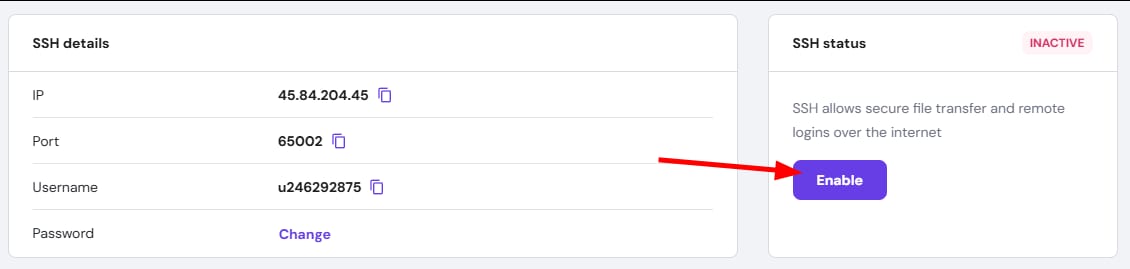
Log into hPanel → SSH Access and make sure SSH is enabled for your plan. Your SSH host, username, and port are all listed on this page — copy them into your .env. Hostinger's SSH port is usually 65002, not the standard 22 — the single most common setup mistake.
Run one of these commands on your local machine:
Ed25519 (recommended — modern, faster):
ssh-keygen -t ed25519 -N "" -f ~/.ssh/id_ed25519 -C "shipit"RSA 4096 (broader compatibility):
ssh-keygen -t rsa -b 4096 -N "" -f ~/.ssh/id_rsa -C "shipit"The -N "" flag sets an empty passphrase automatically — no prompts, no hanging.
Ed25519:
cat ~/.ssh/id_ed25519.pubRSA:
cat ~/.ssh/id_rsa.pubSelect and copy the entire output — it starts with ssh-ed25519 or ssh-rsa and ends with shipit.
- In hPanel → SSH Access, click Add SSH Key.
- Paste the copied key into the public key field.
- Give it a name (e.g.
shipit) and save.
ssh -p YOUR_SSH_PORT YOUR_SSH_USERNAME@YOUR_SSH_HOSTIf you land in the remote shell with no password prompt, you're all set. ShipIt is ready to deploy.
If it still asks for a password, confirm the correct key was saved in hPanel and that SSH is enabled on your plan.
✅ Afterwards, run
php artisan shipit:doctor— it verifies the whole chain (connection, functions, disk, database) in one shot.
A Fine-grained Personal Access Token is required only if your repository is private and you want ShipIt to register the server's deploy key on GitHub automatically without any manual steps.
1. Go to GitHub token settings: https://github.com/settings/personal-access-tokens/new
2. Fill in the basics:
- Token name — e.g.
shipit-deploy - Expiration — set to your comfort level (90 days recommended)
- Resource owner — select your account or org
3. Under Repository access:
- Choose Only select repositories
- Select the specific repo ShipIt will deploy
4. Under Permissions → Repository permissions:
- Find Administration and set it to Read and Write
This is the only permission ShipIt needs — it uses it solely to register the server's deploy key on your repo so the server can pull code.
- (Optional Fallback Support) Find Contents and set it to Read-Only.
💡 Why add this? If another project on your server is already using your public SSH key, ShipIt will automatically use an alternate HTTPS fallback method to pull your code. This fallback requires Contents: Read-Only access to copy your files over.
🔒 Token hygiene (2.1): when the HTTPS rescue fallback is used, the token is embedded in the sync URL only for that one pull — ShipIt rewrites the server's git remote to the clean, token-free URL immediately afterwards. Your token never sits in the server's
.git/config.
5. Click Generate token, copy it immediately, and add it to your .env:
GITHUB_API_TOKEN=github_pat_yourTokenHere| Symptom | Likely cause & fix |
|---|---|
Connection Failure during a deploy |
SSH not enabled in hPanel, wrong port (65002, not 22), or your public key isn't in hPanel → SSH Access. shipit:doctor pinpoints which. |
Doctor: exec / symlink FAIL or WARN |
hPanel → PHP Configuration → remove them from disable_functions. ShipIt has a native fallback for storage:link, but artisan needs exec. |
| Deploy aborts: "Another ShipIt operation is already running" | A deploy/rollback/backup for that site is in progress, or one crashed within the last 2 hours leaving a lock. Wait, or check for a genuinely running process first. |
| Deploy aborts at the backup step | Disk full, inode quota exhausted, or DB credentials in the server .env are wrong. Run shipit:doctor — it checks space, inodes and database reachability. |
| Push succeeds but code lands in the "wrong" repo | Your local origin ≠ GITHUB_REPO_URL. ShipIt now stops and asks before pushing — update one of them. Fix permanently: git remote set-url origin <correct-url>. |
| Health check fails right after deploy | The new release is erroring (check storage/logs on the server), or the domain's SSL/DNS isn't pointing at this hosting yet. ShipIt offers an immediate rollback when a previous restore point exists. |
| Rollback says "no restore points" | The site was never deployed/backed up with ShipIt 2.1+. Run one deploy (or shipit:backup) to start the safety history. |
mysqldump missing on the server |
Not fatal — ShipIt automatically uses its PHP/PDO dump fallback. Doctor reports it as informational. |
| Site stuck on the maintenance page | A deploy/rollback was killed mid-window. Run php artisan shipit:rollback (it always ends with maintenance off) or SSH in and run php artisan up. |
- Assets: the streamed bundle is Vite's
public/build. Laravel Mix outputs (public/js,public/css) and custom ViteoutDirs are not streamed (they never were) — build those intopublic/buildor commit them to git. - Database backups cover MySQL/MariaDB and SQLite. Other drivers (e.g. PostgreSQL) deploy normally but are not snapshotted; the doctor warns you.
- Backups live on the same hosting account (except optional local downloads). They protect against bad deploys — not against losing the account. Hostinger's own account backups remain your last resort.
- No persistent queue workers exist on shared hosting, so
queue:restartis included in the pipeline for completeness but only matters if you run workers some other way. - Native Windows is best-effort: the local side is cross-platform, but the asset pipeline and server commands assume POSIX tools — WSL2 is recommended for Windows users.
- Atomic releases (Capistrano-style symlinked release directories) are deliberately not implemented: the inode cost and
public_htmllayout conflicts on shared hosting aren't worth it next to snapshot + one-command rollback.
ShipIt ships with a full test suite — pure unit tests, command-flow tests against a stateful fake server, byte-exact database dump/restore roundtrips against the real server-side helper, and real-git integration tests for selective commits:
composer test
# or
vendor/bin/phpunit
CI (GitHub Actions) runs the suite on PHP 8.1–8.4 across Laravel 10–13.
The MIT License (MIT). Please see the License File for more details.