



Tip
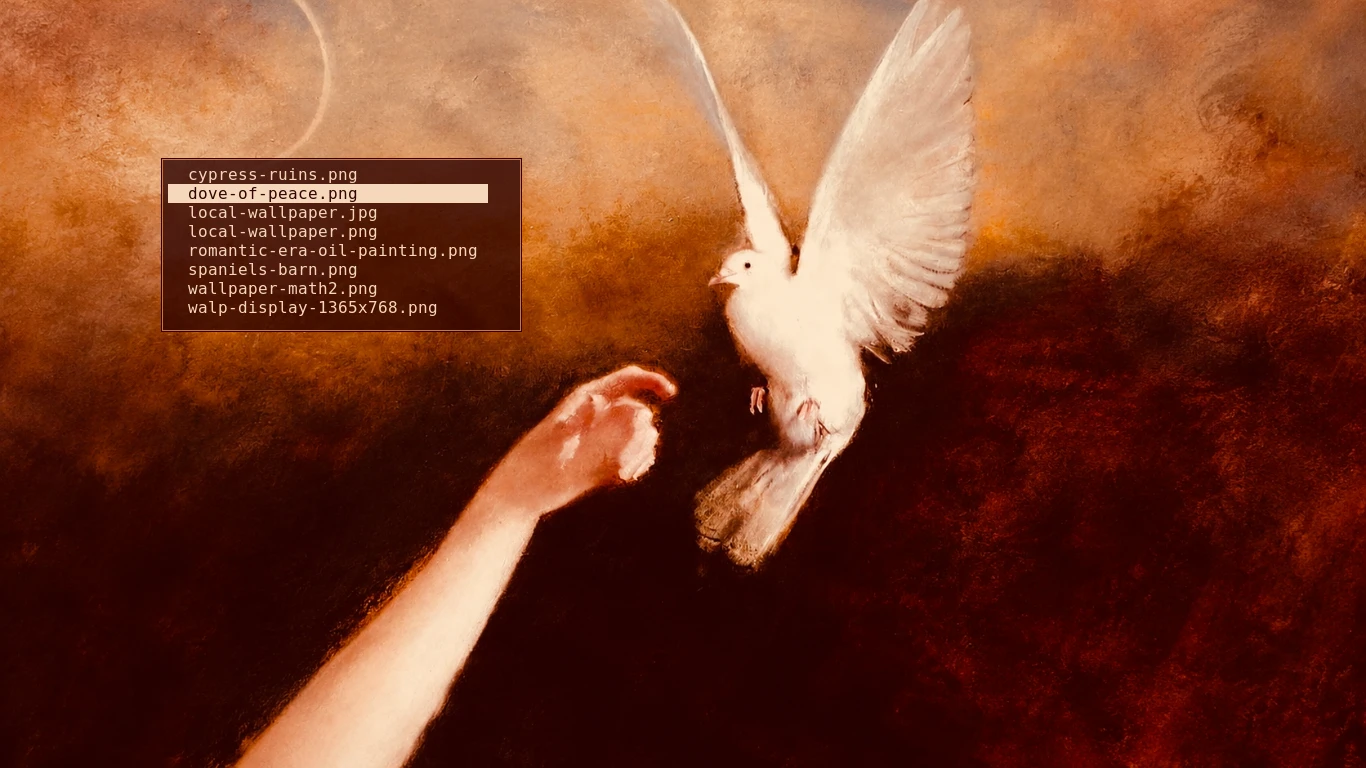
twall does not draw the wallpaper. It picks a file and runs the apply command from config.h. The default command uses swaybg, so there is no daemon and no transition. If swww or awww is still running, its layer sits above swaybg and hides every change. The default command stops that daemon first. See How It Works.
- Quick Start
- Why small
- Features
- Installation
- Packaging
- Usage
- Key Bindings
- Configuration
- How It Works
- Contributing
- Related
git clone https://github.com/tinyopsec/twall
cd twall
make
sudo make install
twall
Note
You need a Wayland session and a wallpaper backend. swaybg is used by the default config. Edit config.h before compiling if you use another backend. Add twall -r & to your compositor startup script to restore the last image
twall does one job: show files and apply one. The compositor and backend do the rest
| Area | twall |
|---|---|
| Lines of code | about 1150, one .c file |
| Runtime dependencies | libc and POSIX only |
| Config | single flat config.h, no parser, no IPC |
| Preview | none, no chafa, no image decoding |
| Daemon | none, the apply command exits after swapping the image |
| Rendering | delegated to swaybg |
| TUI | list only, no header, footer or help text |
| State | one absolute path in $XDG_STATE_HOME/twall/last |
No animations, no patch stack, no generated config file.
What is actually there, nothing extra:
| Category | Details |
|---|---|
| File list | regular files with configured extensions, natural sort, scrollbar |
| Selection | full width inverse line, j/k, arrows, g/G, half page and full page moves |
| Filter | / prompt, Enter keeps the query, Esc clears it, r picks from the visible list |
| Outputs | Tab cycles targets, -o chooses one, needs cmd_out[] |
| Apply | Enter or Space runs the command and keeps the picker open |
| Quiet exit | q, Esc or Ctrl-C |
| Print only | -p writes the chosen path to stdout and does not apply it |
| Restore | -r reapplies the saved path, -R picks a random file with no UI |
| Version | -v or --version |
| Build | clean under gcc -std=c99 -pedantic -Wall -Wextra |
A C compiler, make and a Wayland compositor. The default apply command needs swaybg, sh, pgrep, pkill and setsid, all provided by a normal Linux userland. No X11, no image library, no runtime config parser.
make
sudo make install   # installs to /usr/local/bin/twall
Change PREFIX in the Makefile to install elsewhere. To stage the install, use make DESTDIR=/tmp/stage install
FreeBSD / OpenBSD / NetBSD / DragonFly
The Makefile keeps commented path lines for these systems. Uncomment the pair that matches yours if a dependency needs it, then build normally:
# FreeBSD / DragonFly
X11INC = /usr/local/include
X11LIB = /usr/local/lib
NetBSD (pkgsrc) uses /usr/pkg/include and /usr/pkg/lib. OpenBSD uses /usr/X11R6/include and /usr/X11R6/lib.
sudo make uninstallThe source is one C file plus config.h and a POSIX Makefile. There is no generated configuration, no vendor tree and no build system beyond make
| Command | Action |
|---|---|
twall |
pick and apply, stay open |
twall -d ~/pics |
use another wallpaper directory |
twall -o DP-1 |
choose an output, needs cmd_out[] |
twall -p |
print the selected path, do not apply it |
twall -r |
reapply the saved wallpaper, useful at startup |
twall -R |
pick a random wallpaper with no UI |
twall -h, --help |
print flags and keys |
twall -v, --version |
print the version |
-p, -r and -R are mutually exclusive. The picker UI writes to /dev/tty, so stdout stays clean for -p. Cancelling -p exits with status 1. The list is all you see in the UI, and key help is printed only by -h or --help.
twall -r &
exec your-compositortwall only restores the wallpaper when something runs twall -r. Add that command to the compositor startup.
Sway:
# ~/.config/sway/config
exec twall -r
dwl:
dwl has no built-in autostart. Use a startup script or the autostart patch, then run:
twall -r &
exec dwl
vindle:
autostart = {
    "twall -r",
}
Other compositors:
Run twall -r once after the Wayland socket is available. Keep it in the background if the compositor exits when the last client closes.
| Key | Action |
|---|---|
j / Down |
next file |
k / Up |
previous file |
g / Home |
first file |
G / End |
last file |
PgUp / PgDn |
one page |
Ctrl-D / Ctrl-U |
half page |
Enter / Space |
apply and stay open |
/ |
filter prompt, Enter keeps it, Esc clears it |
r |
random file from the visible list |
Tab |
cycle output target |
q / Esc / Ctrl-C |
quit |
All bindings are fixed in twall.c. There is no keymap file.
twall is configured by editing twall/config.h and rebuilding. There is no runtime config file, no reload and no IPC
twall itself is backend agnostic. Only cmd[] runs the wallpaper command. The default uses swaybg for Wayland, but you can point it at feh, xwallpaper, nitrogen or any other setter.
Important
After any change to config.h, run make && sudo make install
| Option | Default | Description |
|---|---|---|
cmd[] |
sh -c with swaybg |
runs when no output is selected, exactly one %s token |
cmd_out[] |
empty | runs with -o, one %s plus at least one %o, empty rejects -o |
outputs_cmd |
NULL |
shell command printing one output name per line for Tab, NULL accepts a literal name |
exts[] |
jpg jpeg png webp bmp tif tiff avif jxl |
file extensions shown in the list |
default_dir |
NULL |
NULL uses $HOME/.local/share/backgrounds, a leading ~ is expanded |
twall scans one directory, keeps regular files with the configured extensions and sorts them by a natural comparison. The list is drawn on /dev/tty with a dirty flag, so an idle picker produces no output.
The filter folds case for ASCII only in the C locale. Names outside ASCII are matched byte by byte. Character cell width for CJK and emoji is counted as one, so a long name with wide glyphs can wrap. These are limitations, not security issues. File names are sanitized before display, so control bytes cannot inject escape sequences
State is an absolute path in $XDG_STATE_HOME/twall/last, falling back to ~/.local/state/twall/last. It is written only when the apply command exits 0. With setsid -f, that means the launcher succeeded, not that the backend rendered the image. If the saved file no longer exists, -r fails and leaves the current wallpaper alone. Per output state is not stored
The default command stops a leftover swww or awww daemon, because its layer would hide swaybg. It then starts the new swaybg immediately and kills the old one as soon as a new swaybg process appears. There is no fixed sleep, so the swap takes about 60 ms. The poll is bounded to 100 attempts, so a swaybg that fails to start leaves the old image in place instead of causing an endless loop.
Something broke? Open an issue with repro steps and your setup.
Code requirements
- one C99 source file, NO dependencies beyond libc and POSIX
- the picker has NO preview, NO chafa, NO animations and NO daemon
- NO runtime config parser or patch stack
- must build without warnings using
gcc -std=c99 -pedantic -Wall -Wextra -Wshadow -Wformat=2 -Werror
| Project | Link |
|---|---|
| dwm | dwm.suckless.org |
| dmenu | tools.suckless.org/dmenu |
| suckless.org | suckless.org |
| Project | Link |
|---|---|
| swaybg | github.com/swaywm/swaybg |
| Wayland protocol | wayland.freedesktop.org |
| wlr layer shell | wayland-protocols |