Skip to content
th86Public

About

This Google Chrome extension shows the GeneCards, GenomeBrowser, PubMed, and BioStar search result of seletected text.

Resources

Stars

3 stars

Watchers

1 watching

Forks

Latest commit


History

6 Commits

Folders and files

Repository files navigation

BioSearch

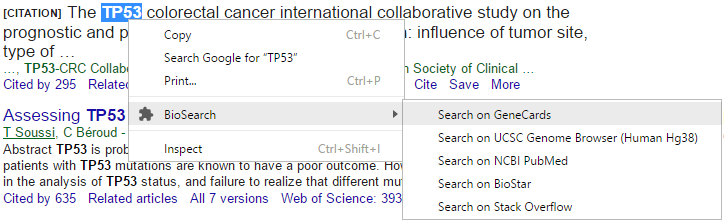
alt tag

This Google Chrome extension shows the GeneCards, UCSC GenomeBrowser, PubMed, Google Scholar, BioStar, Stack Overflow, Wikipedia search result of selected text.

Usage

Select some text and right click, move the cursor to 'BioSearch' in the context menu, then click the desired operation.

Install

  1. Uncompress the files into a directory.
  2. Click Menu button->More Tools->Extensions->Developer mode.
  3. Click Load Unpacked Extension and navigate to the directory.
  4. Turn off Developer mode.

License

This project is licensed under the MIT license.

About

This Google Chrome extension shows the GeneCards, GenomeBrowser, PubMed, and BioStar search result of seletected text.

Resources

Stars

3 stars

Watchers

1 watching

Forks

Releases

Packages

Contributors

Languages