

Install · Quick start · Screens · Architecture · Engineering tools · Roadmap
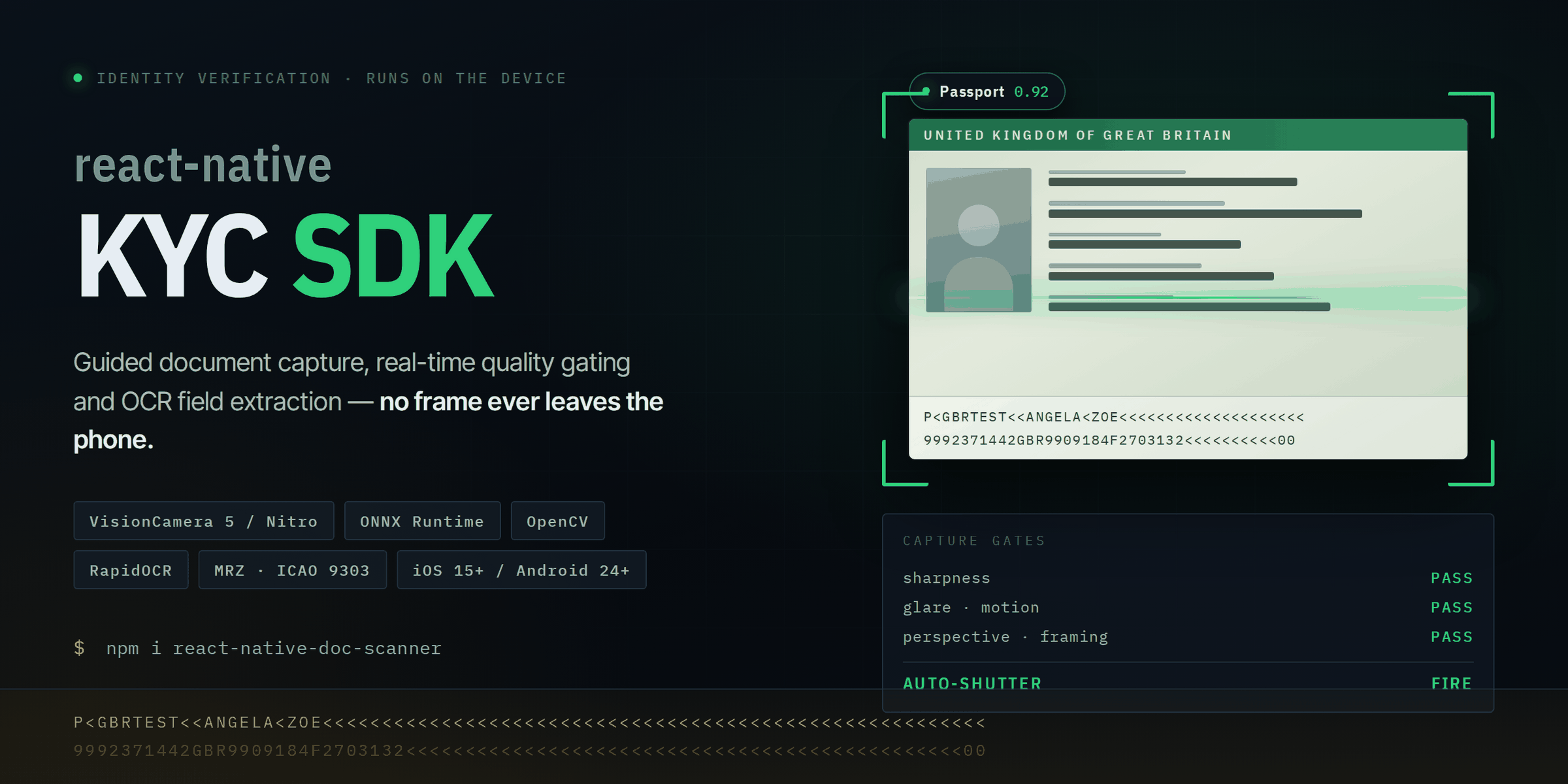
A React Native identity-document scanning SDK for iOS and Android. It watches the camera stream, finds the document, decides whether the frame is actually good enough, fires the shutter itself, corrects perspective, and reads the fields — all natively, on the device.
The point of the SDK is the part between "a rectangle is visible" and "capture": glare, motion, sharpness, framing and skew are each measured per frame and gated, so you get one usable image instead of a roll of near-misses.
Frames never leave the phone. Detection, quality analysis and OCR all run locally; only structured results cross back into JavaScript.
npm i react-native-doc-scanner📦 Live on npm: react-native-doc-scanner
| Screen | What it does |
|---|---|
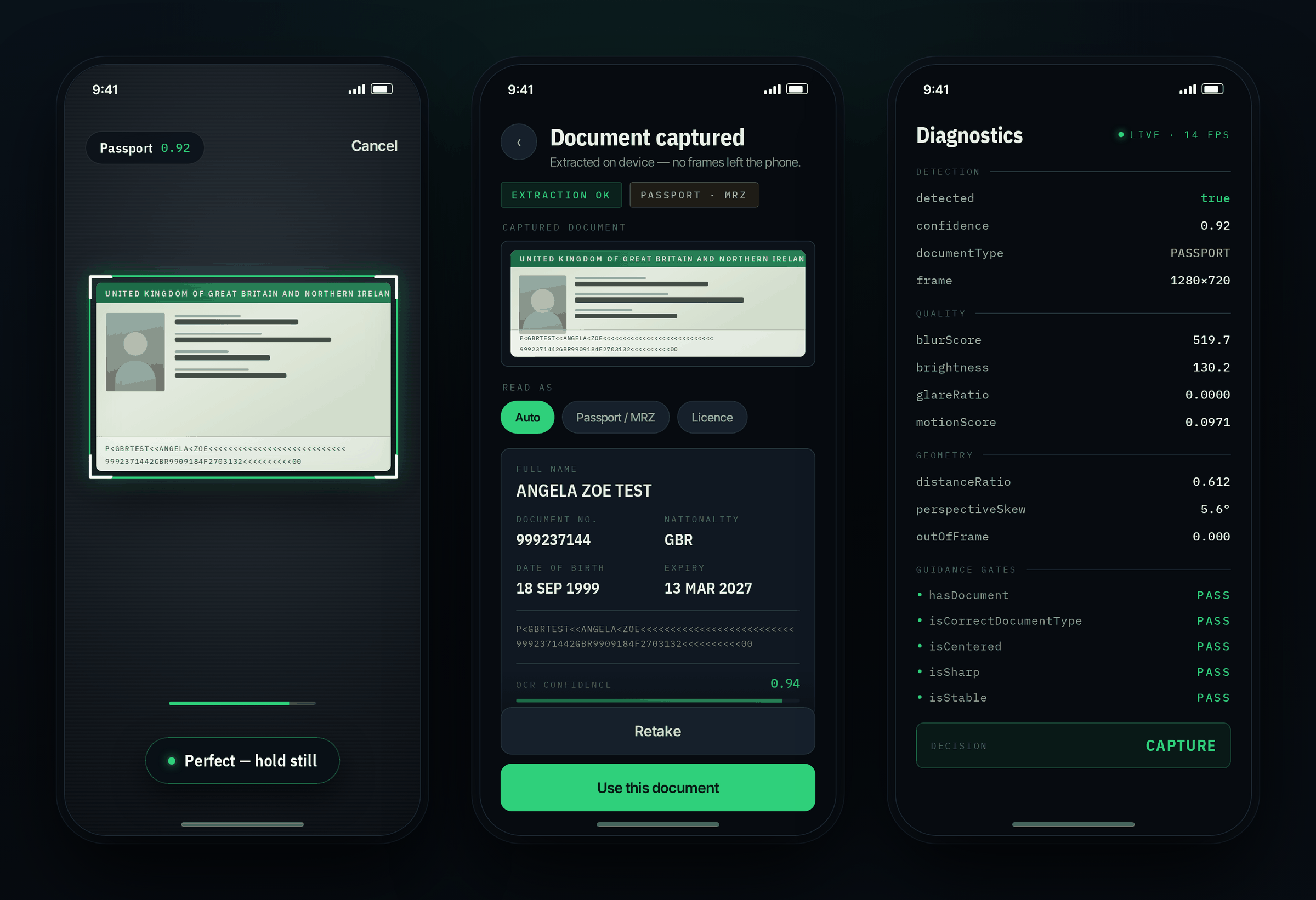
| Guided capture | Live quad tracking with document-type confidence. The shutter fires on its own once every gate passes — the user just holds still. |
| Extraction result | Perspective-corrected crop, parsed fields, raw MRZ, and a confidence score you can threshold on. |
| Diagnostics | Raw per-frame metrics and every individual guidance gate, so a rejected frame is always traceable to a specific check. |
Drop-in screen:
import { DocumentScannerScreen, DocumentType } from 'react-native-doc-scanner';

export function PassportScanner() {
  return (
    <DocumentScannerScreen
      documentType={DocumentType.PASSPORT}
      onCaptured={(result) => console.log(result.data)}
      onCancel={() => console.log('Scanner cancelled')}
    />
  );
}
Or bring your own UI and reuse the engine:
import {
  useDocumentScanner,
  ScannerOverlay,
  GuidanceBanner,
  DocumentType,
} from 'react-native-doc-scanner';

function CustomScanner() {
  const { guidance, quad, frameSize, captureStage } = useDocumentScanner({
    documentType: DocumentType.DRIVING_LICENCE,
    onCaptured: (result) => console.log(result.data),
  });

  return (
    <>
      <ScannerOverlay
        width={390}
        height={844}
        quad={quad}
        frameWidth={frameSize.width}
        frameHeight={frameSize.height}
        isValid={guidance.isValid}
        captureStage={captureStage}
      />
      <GuidanceBanner
        code={guidance.code}
        message={guidance.message}
        isValid={guidance.isValid}
      />
    </>
  );
}
Result shape:
interface DocumentResult {
  documentType: string;
  confidence: number;

  name?: string;
  documentNumber?: string;
  dateOfBirth?: string;
  expiryDate?: string;
  nationality?: string;
  address?: string;

  mrz?: string;

  fields?: Record<string, { value: string; confidence: number }>;
}npm i react-native-doc-scanner
# or: pnpm add react-native-doc-scannerPeer dependencies:
pnpm add \
  react-native-vision-camera \
  react-native-vision-camera-worklets \
  react-native-nitro-modules \
  react-native-reanimated \
  react-native-mmkv \
  react-native-gesture-handler \
@shopify/react-native-skia| Peer dependency | Minimum |
|---|---|
react-native-vision-camera |
5.0.0 |
react-native-vision-camera-worklets |
5.0.0 |
react-native-nitro-modules |
0.35.0 |
react-native-reanimated |
3.10.0 |
react-native-mmkv |
4.0.0 |
react-native-gesture-handler |
2.14.0 |
@shopify/react-native-skia |
1.5.0 |
zustand ships as a direct dependency — you don't install it yourself.
Then:
cd ios && pod installVisionCamera 5 / Nitro required. This SDK targets the Nitro architecture and does not support the legacy v3/v4 frame-processor-plugin API.
React Native — New Architecture (Fabric + TurboModules), JSI, Nitro Modules.
iOS — 15+, Xcode 15+, Swift, ONNX Runtime, OpenCV.
<key>NSCameraUsageDescription</key>
<string>We use the camera to scan identity documents.</string>
Android — API 24+, Kotlin, CameraX/VisionCamera, ONNX Runtime, OpenCV.
<uses-permission android:name="android.permission.CAMERA" />The SDK does not capture because a quadrilateral appeared. Capture requires every gate to pass, and to keep passing across a stable-frame window:
Document detected
   → correct framing        → correct size
   → valid perspective      → low motion
   → sharp                  → acceptable exposure
   → low glare              → stable tracking
   → temporal confidence accumulated
      → CAPTURE
Single-frame decisions produce false positives, so confidence is smoothed over time and fused before the shutter fires. Thresholds can be regenerated from labelled replay sessions:
npm run generate:thresholdsThe same detection and quality signals drive the on-screen guidance:
Move closer          Hold still            Reduce glare
Move farther away    Improve lighting      Turn the document
Center the document  Keep it in frame      Capturing…
                     React Native Application
                              │
                              ▼
                    DocumentScannerScreen
                              │
                              ▼
                     useDocumentScanner()
                              │
                              ▼
                    VisionCamera Frame
                              │
                              ▼
                     JSI / Nitro Module
                 ┌────────────┴────────────┐
                 ▼                         ▼
          Frame Scheduler             Camera Engine
                 │
                 ▼
          Document Engine
        ┌────────┼─────────┐
        ▼        ▼         ▼
     Detect   Track     Quality
        └────────┼─────────┘
                 ▼
          Decision Engine
                 ▼
             Auto Capture
                 ▼
        Perspective Correction
                 ▼
           OCR / MRZ / Barcode
                 ▼
        Structured Result Object
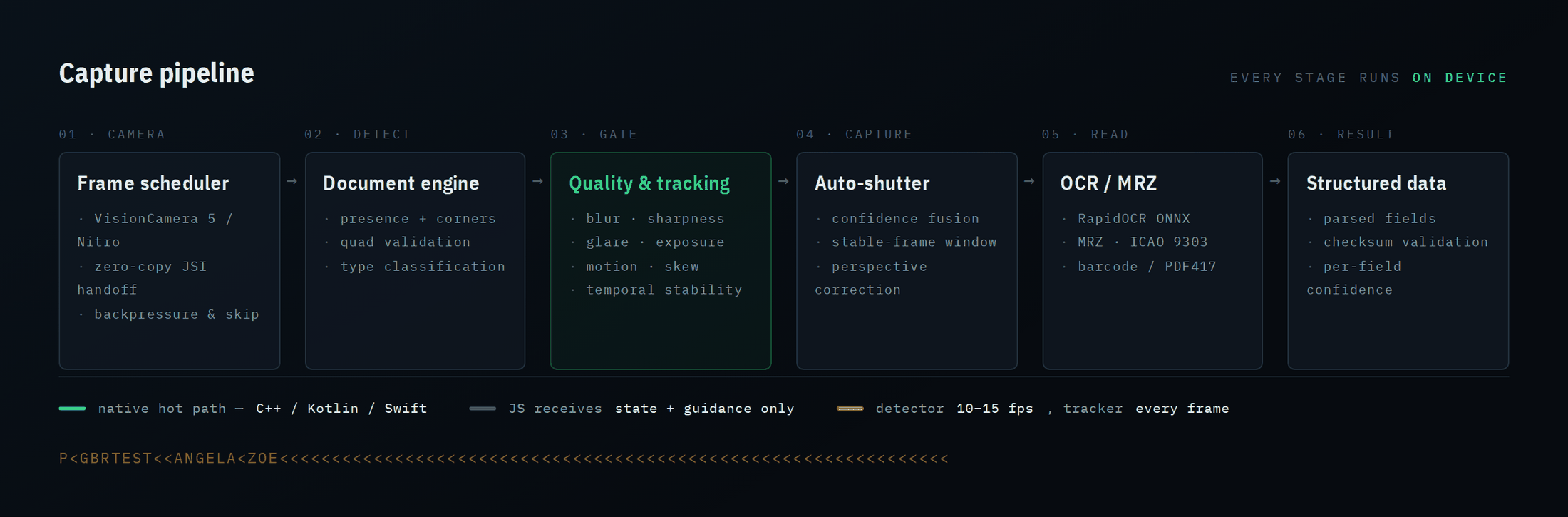
At 30–60 FPS, pushing every frame through the JS bridge costs memory copies, serialization, GC pressure, scheduling overhead, latency and dropped frames. So the loop stays native — Camera → Frame → ONNX/OpenCV → Tracking → Decision — and only small state objects and guidance codes are propagated to React Native.
Three techniques keep it cheap:
- ROI-first — detect once on the full frame, then run expensive work only on the document region.
- Temporal scheduling — tracking runs every frame; the detector runs adaptively at 10–15 FPS.
- Backpressure — frames arriving while inference is in flight are dropped rather than queued.
| Component | Technology |
|---|---|
| Camera | VisionCamera Core / Nitro |
| Native bridge | Nitro Modules / JSI |
| Document detection | ONNX Runtime |
| Image processing | OpenCV |
| OCR | RapidOCR / PaddleOCR (ONNX) |
| MRZ | OCR + ICAO 9303 parser |
| Barcode | Native / CV pipeline |
| UI | React Native + Skia |
| State | Zustand |
| Persistence | MMKV |
Passport · Driving licence · National ID · Residence permit · Visa · Vehicle registration · Insurance card · Proof of address · Custom types.
Document-specific models and parsers can be added without touching the core scanner.
Models are decoupled from application logic, so you can fine-tune, ship regional variants, or benchmark alternatives without changing a line of UI code.
import { ModelManager } from 'react-native-doc-scanner';

ModelManager.register({
  id: 'custom-document-detector-v1',
  label: 'Custom Document Detector',
  license: 'Apache-2.0',
  paths: {
    android: 'models/document_detector.onnx',
    ios: 'models/document_detector.onnx',
  },
});

await ModelManager.activate('custom-document-detector-v1');
Registry: document detector · document classifier · OCR detector · OCR recognizer · MRZ detector · your own.
Verify bundled model files and hashes:
npm run verify:modelsThe example app ships with the instrumentation used to develop the pipeline.
Diagnostics — unfiltered per-frame metrics (blurScore, brightness, glareRatio, motionScore, distanceRatio, perspectiveSkew) plus the pass/fail state of every guidance gate.
Record — capture a labelled .idvr session straight from the live camera, tagged with expected outcome (must_capture / must_not_capture) and lighting condition (dim / normal / bright / backlit).
Replay — re-run any recorded session through the current build's pipeline, deterministically. Threshold changes become measurable instead of anecdotal.
npm run replay                                              # run sessions through this build
node --experimental-strip-types bench/replay/run.ts push # push a session to a deviceBenchmark on real devices, from recorded sessions, across low-end Android, mid-range Android, high-end Android, an older iPhone, a modern iPhone and iPad. Desktop inference numbers are not a proxy for mobile.
Metric                  Result
--------------------------------
Detection latency       XX ms
Tracking latency        XX ms
Quality latency         XX ms
Capture latency         XX ms
Median acquisition      XX ms
P95 acquisition         XX ms
Peak RAM                XX MB
CPU / GPU utilization   XX %
False capture rate      XX %
Successful captures     XX %
pnpm install
pnpm test          # unit tests
pnpm typecheck     # tsc --noEmit
pnpm lint          # eslint src bench
pnpm specs         # regenerate Nitro bindings after editing src/specs/DocScanner.nitro.ts
Run the example app:
pnpm --dir example install
pnpm --dir example android # or: iosreact-native-kyc-sdk/
├── src/ components · hooks · models · ocr · opencv · screens
│ services · specs · store · types · utils · vision
├── android/ native scanner implementation
├── ios/ native scanner implementation
├── bench/replay/ deterministic session replay
├── tools/ threshold generation
├── scripts/ verify-models.sh
├── docs/ DEVELOPMENT · MODEL_TRAINING · TROUBLESHOOTING · redesign · images
├── example/
└── nitro.json
The native contract lives in src/specs/DocScanner.nitro.ts — that file is the source of truth; run pnpm specs after changing it.
Document geometry · corner ordering · quality scoring · guidance decisions · auto-capture decisions · OCR parsing · MRZ parsing · document classification · model management · scanner state · native integration.
This is a capture and computer-vision component, not a KYC compliance platform. Do not treat OCR output as proof that a document is genuine.
A production identity system still needs: TLS, server-side verification, document authenticity checks, face matching, presentation-attack detection, device integrity and root/jailbreak detection, replay protection, encrypted storage, secure model distribution, tamper detection, audit logging, risk analysis, and whatever your jurisdiction requires.
Shipped — real-time document detection · perspective correction · OpenCV quality analysis · OCR pipeline · MRZ extraction · auto capture · session recording and deterministic replay · diagnostics instrumentation
Next — multi-task document detector · document tracking · advanced temporal confidence · face detection and quality · passive then active liveness · face verification · document authenticity analysis · PDF417 pipeline · Web/WASM · unified C++ vision core · production benchmark suite
See docs/redesign/ for the engineering architecture and milestones.
Model licenses differ from this repository's license. Before shipping, check the terms on model weights, training datasets, OCR models, third-party native libraries, OpenCV components, ONNX Runtime, and any document-specific models. An open-source model does not automatically permit commercial redistribution.
See docs/MODEL_TRAINING.md.
pnpm install && pnpm test && pnpm typecheckNative changes: validate the example app on both Android and iOS. Model changes: include benchmark results and state the model's license.
react-native-doc-scanner is a developer SDK for document capture, computer vision and OCR. It does not by itself guarantee identity, document authenticity, regulatory compliance or fraud prevention.
Documents shown in this repository are specimen documents containing fictitious data.
MIT — see LICENSE. Built by Muhammad Ahmad.