Contains the coding challenge solutions
Problem Statement:
Prototype a Report generator
Functional Requirements:
Report App should generate hourly csv report transaction data.
Non-Functional Requirements:
Performance improvements. High Availability.
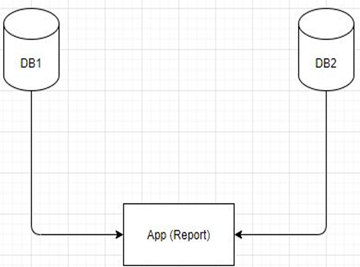
DB1 – has encrypted transaction Data. Read Only DB2 – has symmetric key for decryption. Read Only Components are across network
Pre-requisite
Java 8
Usage
How to run the application:
I have provided multiple provisions of running the application. Please follow the below steps.
Clone the repository using below command
git clone https://github.com/porwalu/coding-challenge
The 'report-generation' directory inside 'coding-challenge' forms the root of the repository, so please navigate to it first.
cd coding-challenge/report-generation
a) Using a shell script
On a Unix like Platform(or via unix emulator like cygwin/MobaXterm etc on windows), navigate to the 'bin' directory, which is directly under the root.
cd bin
Then execute the shell script :
/bin/bash launchApp.sh
The script will launch the microservices in background using the jars and then launch the Report Generation application.
b) Executing pre-compiled jars
Alternatively, the program can be run directly by executing the JAR from individual 'target' directory,.
There are three jar files which can be executed as below from this directory - coding-challenge/report-generation
java -jar key-service/target/key-service-1.0-SNAPSHOT.jar
java -jar transaction-service/target/transaction-service-1.0-SNAPSHOT.jar
java -jar report-executor/target/report-executor-1.0-SNAPSHOT.jar
The csv reports will be generated inside bin directory.
c) By building the jar again
After cloning the repository, from root(report-generation directory) go to individual projects directory in the same order (report-executor-commons, key-service,transaction-service,report-executor) and run the below command:
mvn clean install
This generates the newly created jar. Run them using the script or individuall as mentioned above.
Note: Since the microservices are run as a daemon, you might have to find the java process and kill it after you have finished testing.
Assumptions
Databases are read only from reporting app perspective.
Report should extract all transaction records.
Data is encrypted/decrypted using the same symmetric key as present in db2.
All transactions for a bank(bankId) are encrypted with same key.
High Level Design
Solution
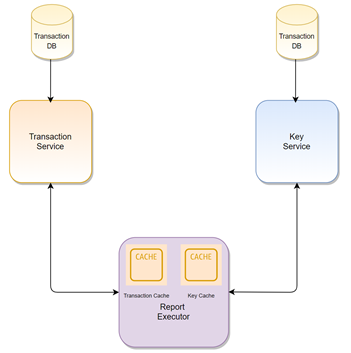
Data simulation for DB1 and DB2
DB2 – Created 10 records programmatically with BankId and symmetric key using simple sequence.
DB1 – Ensured that the transactions for BankIds are encrypted with same keys as in DB2
While inserting data into DB1, I am using encryption – data is encrypted using the symmetric key specific to a bank id before being stored in DB(in memory DS)
Microservices
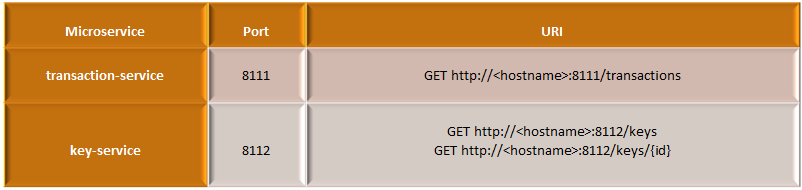
Created Two microservices exposing Http GET endpoints for data access from DB1 and DB2.
Report Application
This is a Standalone application which uses ExecutorFramework to get a newSingleThreadScheduledExecutor.
This application runs periodically (can be adjusted) to query data using the rest api for DB1, it then for the transaction data, fetches the key from DB2 and decrypts the data matching on BankId.
The data reconciliation and creation of csv happens for each run of the scheduler.
Caching
Ideally, we should save network calls by caching the key data as well as the Transaction data on the Report Application. The api call to get data from db should be appropriately made considering the data we already have so as to get the delta. This will improve performance.
High Level Design - Future Growth

TODO/Future
Project can be extended to use JpaRepository and actual db in Springboot.
Cache implementation can be improved further to evict data and create query range for new data and evicted data.
Creating a config file to control configurable properties
SSL implementation for Rest API access.