Before submitting
Area
apps/web
Steps to reproduce
- Open Settings → Providers and edit a provider instance (for example Codex).
- Set a custom accent color to white
#ffffff (any light color reproduces it).
- Look at the provider icon in the sidebar, the model picker, or Settings → Usage.
Expected behavior
The account badge keeps its initials readable for every accent color. A light accent should get dark text, a dark accent should get light text.
Actual behavior
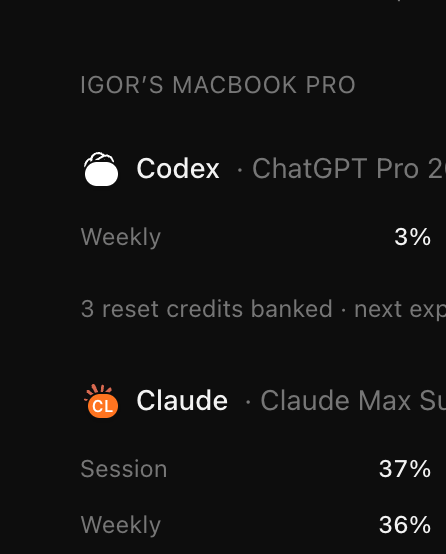
The badge always paints its initials in white (text-white in apps/web/src/components/chat/ProviderInstanceIcon.tsx), so with a white or light accent the initials disappear. In the screenshot below Codex has a white accent and shows no "CO", while Claude's orange accent still shows "CL".
The mobile badge has the same hardcoded white text in apps/mobile/src/components/ProviderIcon.tsx.
Impact
Cosmetic issue
Version or commit
0.0.40-nightly
Environment
macOS desktop app, dark theme
Screenshots, recordings, or supporting files
See the screenshot above.
Before submitting
Area
apps/web
Steps to reproduce
#ffffff(any light color reproduces it).Expected behavior
The account badge keeps its initials readable for every accent color. A light accent should get dark text, a dark accent should get light text.
Actual behavior
The badge always paints its initials in white (
text-whiteinapps/web/src/components/chat/ProviderInstanceIcon.tsx), so with a white or light accent the initials disappear. In the screenshot below Codex has a white accent and shows no "CO", while Claude's orange accent still shows "CL".The mobile badge has the same hardcoded white text in
apps/mobile/src/components/ProviderIcon.tsx.Impact
Cosmetic issue
Version or commit
0.0.40-nightly
Environment
macOS desktop app, dark theme
Screenshots, recordings, or supporting files
See the screenshot above.