The React checkbox tree that survives 100,000 nodes.


Headless, virtualized checkbox tree for React 18 and 19. Tri-state parents that stay correct at a hundred thousand nodes, ancestor-aware search, a real ARIA tree with full keyboard navigation, and not a single line of CSS you didn't write.
npm i react-virtual-checkbox-tree5.6 kB gzipped · one dependency · TypeScript-first · MIT
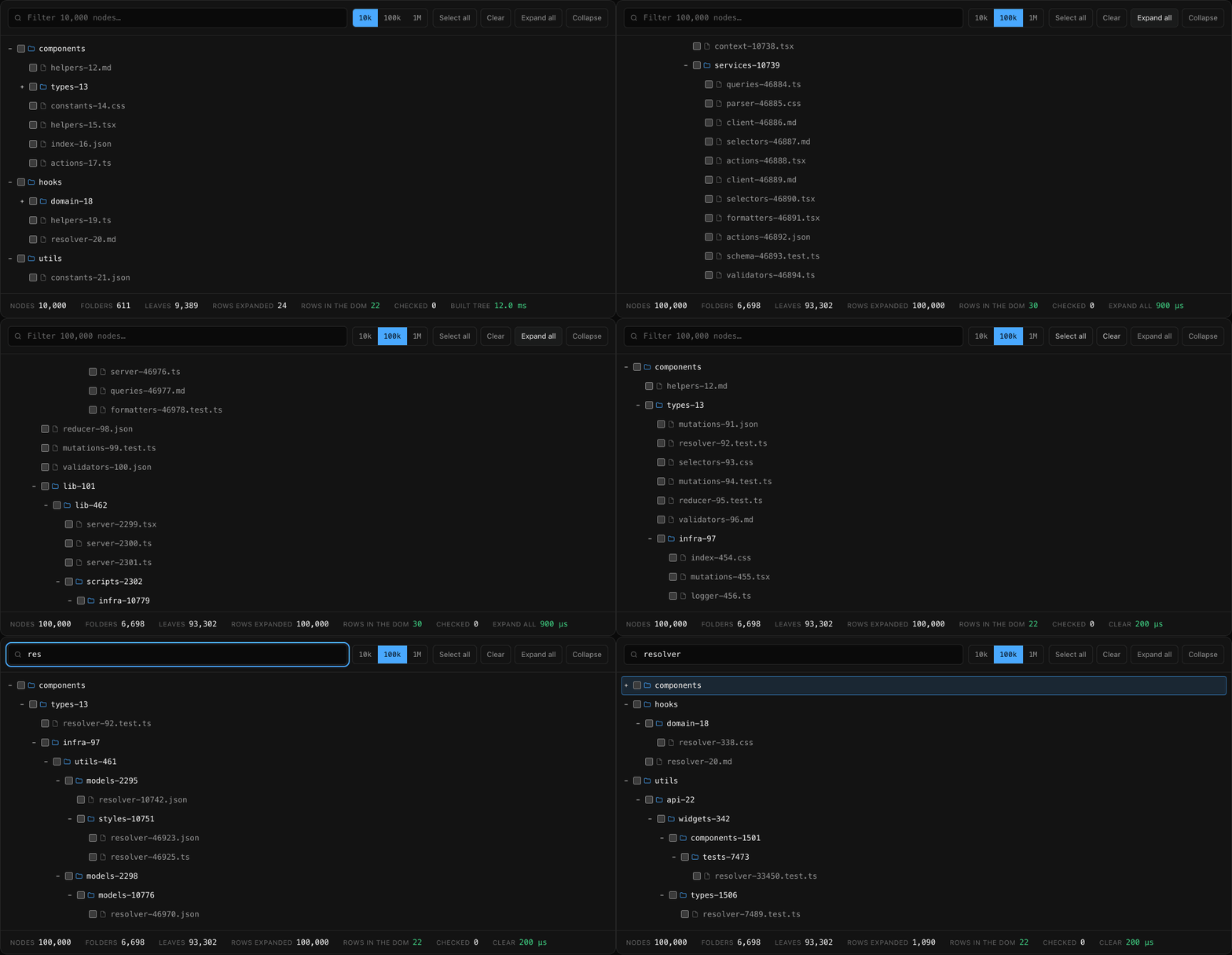
A real recording of the demo on the site — no edits, no staging: 100,000 nodes with every folder expanded, 22 rows in the DOM, and one click selecting all 93,302 leaves. Timings in the metric row are measured live in the browser; the isolated engine numbers are in Performance. Reproduce the recording with node scripts/record-demo.mjs.
| Question | Answer |
|---|---|
| What it is | A checkbox tree where folders derive checked / unchecked / indeterminate from their descendants, and only the rows you can see are ever in the DOM. |
| Why it's fast | Selection is stored as sparse assignments, not a boolean per node. Checking a folder of 50,000 leaves is one map write — measured at 1–3 µs whether the tree holds a thousand nodes or a million. |
| What it looks like | Whatever you want. There is no stylesheet to import. Three render props and a set of data-* attributes, and it inherits your design system. |
| What it won't do | Drag-and-drop, inline rename, lazily-loaded children, or checkable folders. Those are scope decisions, not oversights — see When not to use this. |
npm i react-virtual-checkbox-tree
# or
pnpm add react-virtual-checkbox-tree
# or
yarn add react-virtual-checkbox-tree
Peer dependencies: react@^18 || ^19 and react-dom@^18 || ^19. The only runtime dependency is
@tanstack/react-virtual.
A complete, paste-and-run file:
import { Tree, type TreeDefinition } from "react-virtual-checkbox-tree";

const data: TreeDefinition = {
  __root__: { id: "__root__", label: "root", children: ["docs", "src"] },
  docs:     { id: "docs", label: "docs", children: ["readme", "guide"] },
  readme:   { id: "readme", label: "README.md" },
  guide:    { id: "guide", label: "guide.md" },
  src:      { id: "src", label: "src", children: ["engine", "ui"] },
  engine:   { id: "engine", label: "engine.ts" },
  ui:       { id: "ui", label: "ui", children: ["tree", "row"] },
  tree:     { id: "tree", label: "tree.tsx" },
  row:      { id: "row", label: "row.tsx" },
};

export default function App() {
  return (
    <Tree
      aria-label="Project files"
      data={data}
      height={320}
      onCheck={(checkedLeafIds) => console.log(checkedLeafIds)}
    />
  );
}
The data is a flat map, not nested objects. Lookups are O(1), IDs stay stable across updates, and
you can build it straight from a SQL result or a flat API response without recursion. The __root__
entry is never rendered — its children are your top-level rows.
Add a search box, controlled selection, and your own checkbox:
import { useMemo, useState } from "react";
import { Tree, type TreeDefinition } from "react-virtual-checkbox-tree";
import { Checkbox } from "@/components/ui/checkbox"; // shadcn/ui, or anything

export function FilePicker({ files }: { files: TreeDefinition }) {
  const data = useMemo(() => files, [files]);
  const [checked, setChecked] = useState<string[]>([]);
  const [query, setQuery] = useState("");

  return (
    <div>
      <input
        onChange={(e) => setQuery(e.target.value)}
        placeholder="Filter files"
        value={query}
      />

      <Tree
        aria-label="Files"
        checkedItems={checked}
        data={data}
        height={400}
        onCheck={setChecked}
        renderCheckbox={({ a11yProps, checkedState, onChange }) => (
          <Checkbox
            {...a11yProps}
            checked={checkedState === "indeterminate" ? "indeterminate" : checkedState === "checked"}
            onCheckedChange={(value) => onChange(value === true)}
          />
        )}
        searchQuery={query}
      />

      <p>{checked.length} files selected</p>
    </div>
  );
}
Spread
a11yPropsonto any custom checkbox or expander. The row itself carriesrole="treeitem"andaria-checked, so the visual control must stay out of the tab order and out of the accessibility tree — otherwise every row gets announced twice.
I needed a checkbox tree. Not an exotic one — a folder hierarchy, tri-state parents, a search box, and enough rows that the browser would start to care.
I spent the better part of a week on it. The most-downloaded option re-rendered every node in the tree on every click, and its performance issue had been open since 2017. The polished ones came welded to a design system I wasn't using and couldn't remove. The headless ones handed me primitives and left the checkbox math — the genuinely hard part, the part where a parent is half-checked because two of its nine grandchildren are on — as an exercise for the reader. Most of them didn't virtualize, so past a few thousand rows the whole thing folded. I read a lot of four-year-old issue threads that ended in "PRs welcome."
So I stopped looking and wrote the thing I had been looking for. A selection engine that stores one assignment instead of a hundred thousand booleans and derives every parent's state on demand. A renderer that only ever mounts the rows you can actually see. And zero opinions about what a row looks like, because that part was never the hard part.
That's the whole library. If you're three days into the same search, this is for you.
- The checkbox math is the product. Parent state is derived, never stored — so checking a folder of 50,000 leaves is one map write, not a 50,000-item array. Indeterminate states stay correct through every cascade, and results are memoized until you touch that branch.
- Virtualized from the first commit, not bolted on. Rows render through
@tanstack/react-virtual. A 200,000-node tree mounts the same handful of DOM elements as a 20-node one. - Search that doesn't destroy your selection. Filter to 12 matching leaves, check the parent
folder, clear the filter: exactly those 12 are checked. Everything you couldn't see is untouched —
and the folders you had open come back. The query is diacritics-insensitive, so
resumefindsRésumé.pdf. - A real ARIA tree.
role="tree",aria-level/aria-setsize/aria-posinseton every row, tri-statearia-checked, arrow keys,Home/End, type-ahead, andaria-activedescendantso virtualization can never eat the keyboard focus. - No CSS. None. No stylesheet to import, no theme to override, no
!importantwar. Swap in your own checkbox, expander and row body through three render props, and style rows with thedata-state/data-level/data-expandedattributes the library already emits. - The engine works without React.
react-virtual-checkbox-tree/engineis the flattening, tri-state and search filtering as a plain class withsubscribe()— no renderer, no virtualizer, server-safe. Build your own UI on it, or drive it from a test.
I'd rather you found out here than after npm i.
- You need drag-and-drop or inline rename. This is a selection control, not a file manager. react-arborist is the better tool and I'd genuinely rather you used it.
- You need to load children on expand. The engine wants the whole map up front. You can rebuild
dataas pages arrive and your state survives, but there's noonLoadChildren. - You need checkable folders. Folders derive their state and can't hold their own, so "grant this whole department" as a value distinct from "all its current members" isn't expressible yet.
- Your data is a graph, not a tree. A node appearing under two parents keeps only the last parent it saw. Duplicate shared nodes under synthetic IDs first — the library warns you in development when it spots this.
- You have a hundred nodes and a deadline. If your tree is small and your component library already has a tree in it, use that. The engineering here starts paying for itself somewhere north of a few thousand nodes, or when you need the search-selection semantics.
- You can't tolerate a 0.x API. The prop surface will keep moving before 1.0. Pin the exact version.
type TreeItem = {
  id: number | string;          // stable; should match the map key
  label: string;                // shown by the default renderer, and what search matches
  children?: string[];          // omit or leave empty to make it a checkable leaf
  data?: Record<string, unknown>; // your metadata, passed through to renderers untouched
};

type TreeDefinition = Record<string, TreeItem>;
The map must contain a "__root__" entry whose children are your top-level rows.
A node with children: [] is a leaf, not an empty folder — it renders with a checkbox and no
expander. Child IDs with no entry of their own are dropped with a development warning rather than
crashing the tree, and a cycle in children throws immediately instead of hanging.
| Prop | Type | Default | Description |
|---|---|---|---|
data |
TreeDefinition |
— | Required. Flat node map including __root__. Passing a new object is safe. |
height |
number | string |
"100%" |
Height of the scroll container. Must resolve to a real height. |
checkedItems |
string[] | null |
— | Controlled checked leaf IDs. Folder IDs are ignored. |
onCheck |
(ids: string[]) => void |
— | Fires with every checked leaf ID when the selection changes. |
expandedItems |
string[] | null |
— | Controlled expanded folder IDs. |
onExpand |
(ids: string[]) => void |
— | Fires with every expanded folder ID. |
searchQuery |
string |
"" |
Filters to matches and their ancestors. |
searchScope |
"all" | "leaves" |
"all" |
Match every label, or only leaf labels. |
minSearchChars |
number |
3 |
Characters before the query takes effect. |
estimateSize |
number | (index) => number |
32 |
Row height, fixed or per row. |
overscan |
number |
8 |
Rows rendered above and below the viewport. |
indent |
number |
20 |
Pixels of indentation per level. |
renderItem |
(props) => ReactNode |
item.label |
Custom row body. |
renderCheckbox |
(props) => ReactNode |
native checkbox | Custom checkbox. Spread a11yProps. |
renderExpander |
(props) => ReactNode |
+ / − button |
Custom expander. Spread a11yProps. |
className / style |
— | — | Applied to the scroll container. |
aria-label / aria-labelledby |
string |
"Tree" |
Accessible name for the tree. |
The forwarded ref exposes expandAll(), collapseAll(), scrollToId(id), focusId(id) and
getEngine().
| Key | Action |
|---|---|
↑ / ↓ |
Move to the previous / next row |
→ |
Expand a closed folder, or step into an open one |
← |
Collapse an open folder, or move to the parent |
Home / End |
First / last row |
Space |
Toggle the focused row's checkbox |
Enter |
Expand a folder, or toggle a leaf |
* |
Expand every folder |
Ctrl/Cmd + A |
Select all, or clear if everything is already selected |
| Any character | Type-ahead to the next row whose label starts with what you typed |
Focus is tracked with aria-activedescendant on the tree container rather than a roving tabindex.
That's deliberate: virtualization unmounts rows as they scroll away, and a row holding real DOM focus
would take the focus with it.
The library emits these, and nothing else:
| Attribute | Values |
|---|---|
data-rvct-tree |
on the scroll container |
data-rvct-row |
on every row |
data-state |
"checked" | "unchecked" | "indeterminate" |
data-level |
depth, 0 for top-level rows |
data-expanded |
"true" | "false", folders only |
data-leaf |
present on leaves |
data-active |
present on the keyboard-active row |
[data-rvct-row]:hover            { background: #1a1a1a; }
[data-rvct-row][data-active]     { outline: 1px solid #3b82f6; }
[data-rvct-row][data-state="indeterminate"] .rvct-label { font-style: italic; }import { CheckedState, Engine } from "react-virtual-checkbox-tree/engine";
const engine = new Engine(data, { minSearchChars: 2 });
engine.subscribe(() => {
for (const row of engine.getVisibleItems()) {
// row: { id, level, isFolder, isExpanded, posInSet, setSize }
render(row, engine.getViewState(row.id));
}
});
engine.setSearchQuery("engine");
engine.toggle("src", true);
engine.getAllChecked(); // every checked leaf ID
engine.getCheckedSubtrees(); // the sparse assignments — cheap to persist at any scaleThis entry point pulls in no React and no virtualizer, and is safe to import from a server component.
Median of five runs, Node 26 on Apple Silicon, against the published build. Reproduce with
npm run bench.
| Nodes | Build engine | Flatten rows | Cascade a check | Read selection | Search keystroke |
|---|---|---|---|---|---|
| 1,110 | 1.3 ms | 0.3 ms | 3 µs | 53 µs | 142 µs |
| 11,110 | 9.6 ms | 2.2 ms | 1 µs | 320 µs | 957 µs |
| 111,110 | 115 ms | 25 ms | 1 µs | 3.7 ms | 11.5 ms |
| 1,111,110 | 1,955 ms | 684 ms | 1 µs | 75.8 ms | 169 ms |
The column that matters is cascade — it doesn't grow with the tree, because checking a subtree writes a single assignment instead of a boolean per node.
The columns that do grow are the honest ones. Building the engine is linear in node count, and
asking for the full list of checked leaf IDs has to materialize that list. Past a few hundred thousand
nodes, drive the Engine directly and read getCheckedSubtrees() instead of getAllChecked().
Verified with publint and
@arethetypeswrong/cli: ESM and CommonJS, node10 / node16 /
bundler type resolution, all green. The main entry ships a "use client" banner, so it works in a
Next.js App Router server file without extra wrapping.
- Quick start
- Checkbox semantics
- Search behavior
- Accessibility
- API reference
- Migrating from react-checkbox-tree
- Comparisons
- Playground
Issues and PRs are very welcome — especially bug reports with a reproduction, and anything that closes a gap in When not to use this. See CONTRIBUTING.md.
git clone https://github.com/jadghadry/react-virtual-checkbox-tree.git
cd react-virtual-checkbox-tree
npm install
npm test          # the library test suite
npm run dev       # the docs site, with the library in watch mode
npm run bench # reproduce the performance tableMIT © Jade Ghadry