
A tool-using bird for your cluster.
An AI-native Kubernetes TUI. Work from the keyboard, let an embedded agent investigate alongside you, or connect your editor's assistant over MCP. All three work with the same cockpit; you approve every cluster write.
Documentation | Latest release | PyPI
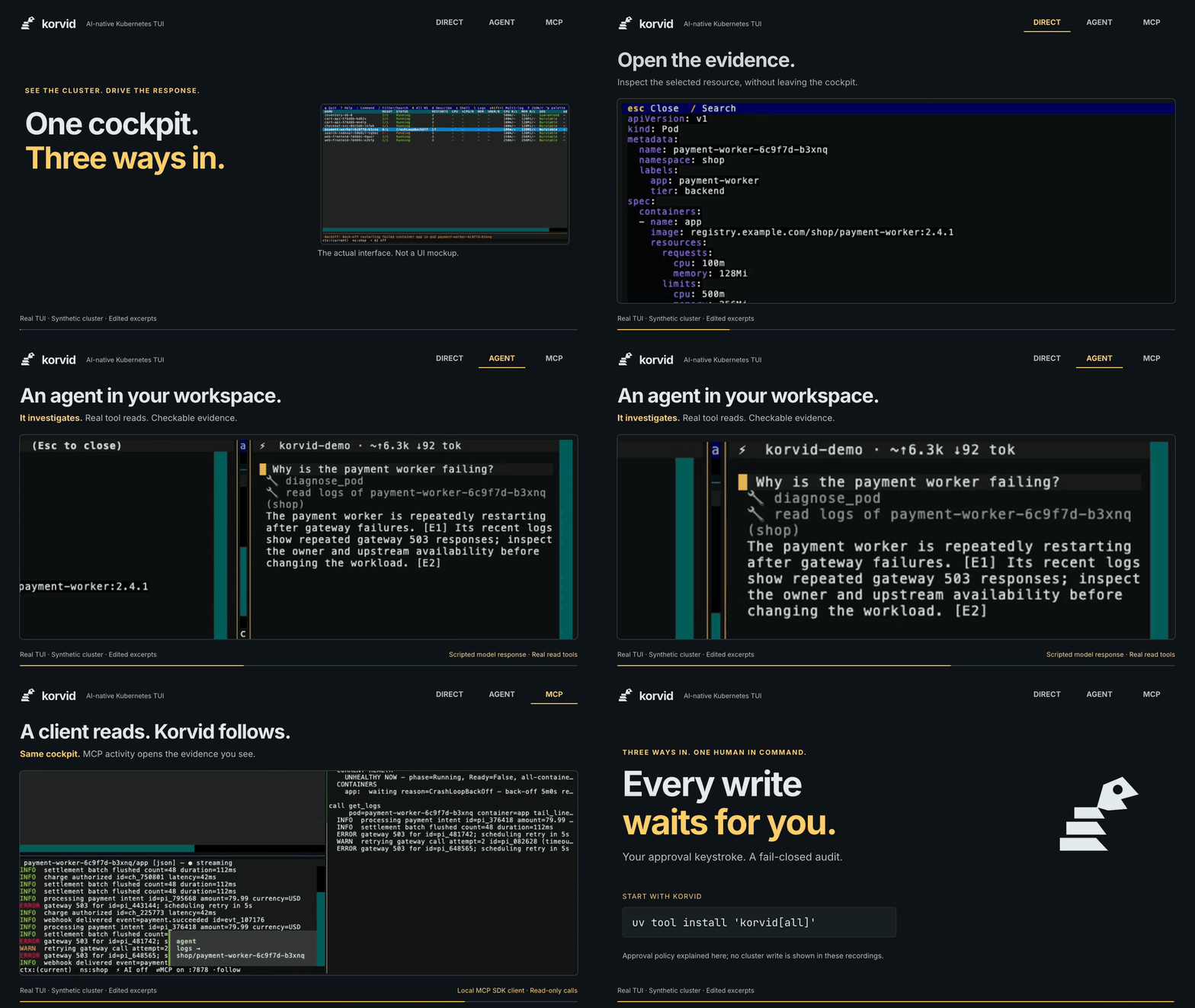
Watch the 28-second overview in HD (MP4)
Real TUI, synthetic cluster, edited excerpts. Agent: scripted model response with real read tools. MCP: local SDK client over Streamable HTTP, read-only calls. The ending explains approval policy; no cluster write is shown.
- Useful without AI. Browse resources, follow logs, inspect relationships, and operate workloads from a keyboard-first TUI.
- An agent that shares your screen. It sees the current view and selection, gathers evidence through structured tools, and opens the same panes you use. Normal keyboard input stays available.
- Bring your own assistant. Local MCP stdio connects an external host to the running TUI, rather than creating a second Kubernetes client.
- Approval is not delegated. Writes require a user keystroke and a
fail-closed audit append. If the audit record cannot be written, the mutation
is blocked.
--readonlydisables writes; protected contexts add confirmation.
Requires Python 3.11+ and a working kubeconfig. uv can fetch a suitable
Python automatically and installs korvid in an isolated tool environment:
uv tool install 'korvid[all]'
# or: pipx install 'korvid[all]'
korvid
These commands install the latest published package. For a reproducible pinned
install and migration details, use the
release notes.
For unreleased main development, install the reviewed source instead:
uv tool install 'korvid[all] @ git+https://github.com/hellices/korvid'python -m pip install 'korvid[all]' also works inside an activated virtual
environment, including one created inside a container. Do not install into
system Python or bypass PEP 668 with
--break-system-packages: an externally-managed-environment error means
you should use uv tool, pipx, or a venv.
| Key | Action |
|---|---|
: |
Command bar: pods, deploy all, helm, ns <name>, ctx <name> |
/ |
Filter the table |
Enter / Esc |
Drill down / back up |
d / l / s |
Describe / logs / shell |
g |
Resource dependencies and dependents |
Ctrl-A |
Embedded agent panel |
? |
Every effective keybinding, including your remaps |
Shell/debug and port-forward operations require kubectl; Helm writes require
helm. Browsing Helm releases does not require the Helm CLI.
Run :ai to search the model catalog and configure a connection.
Named profiles keep independent models, endpoints, and authentication settings;
once profiles exist, :ai opens the manager and Enter activates one.
Use :model <reference> to change the active profile's model.
The bundled catalog covers over 2,000 models through LiteLLM. Use a local Ollama endpoint, a cloud API, an OpenAI-compatible server, or the supported GitHub Copilot sign-in flow. The low/high model tier adjusts tool and prompt budgets; automatic tier selection is the default. See agent setup and model search.
Start the TUI first:
korvid --mcpFor VS Code, add this to .vscode/mcp.json:
{
  "servers": {
    "korvid": {
      "type": "stdio",
      "command": "korvid",
      "args": ["mcp", "stdio"]
    }
  }
}
The adapter privately discovers and authenticates to the running TUI.
The host must run as the same user and find korvid on its PATH.
No token belongs in host configuration or prompts.
Read and UI-drive tools are available; optional write proposals still wait for your approval in the TUI. Reconnect the host after switching cluster context or restarting MCP. Multiple instances require explicit selection. See MCP setup for other hosts and the tool-specific data boundary. OAuth, remote MCP, and headless mode are not part of this local flow.
| Explore | What you get |
|---|---|
| Overview · Keybindings | The three interaction paths and keyboard guide |
| Cluster browsing | Resource tables, split panes, metrics, multi-pod logs, filters, and session timeline |
| Operations | Approval previews, node maintenance, tracked port-forwards, file transfer, and audit |
| Relationships · Helm and operators | Bounded dependency graphs, release hierarchies, and install/upgrade workflows |
| Agent · MCP | Screen-aware investigation and external assistant integration |
| Provider extensions | SpecialFlow declarations for nonstandard transports and korvid.credential authentication chains |
| Observability · Air-gapped operation | Bounded Prometheus/Loki queries, internal endpoints, and corporate CA trust |
| Performance · Threat model | Measured limits, masking guarantees, and residual risks |
Cluster writes remain approval-gated and audited at every tier. Sensitive reads are masked at their documented boundaries; arbitrary log text is not guaranteed secret-free. External MCP hosts own their downstream model policy. Report vulnerabilities privately through SECURITY.md. For implementation details, see the architecture.
One client. Korvid follows. A local MCP SDK client makes four read-only
calls: list_resources, diagnose_pod, get_logs, and helm_list_releases.
The TUI follows the unhealthy pod list, describe pane, logs, and Helm release.
This recording uses the internal Streamable HTTP transport; configure new
external hosts with stdio as shown above.
Show or hide the 14-second MCP follow animation
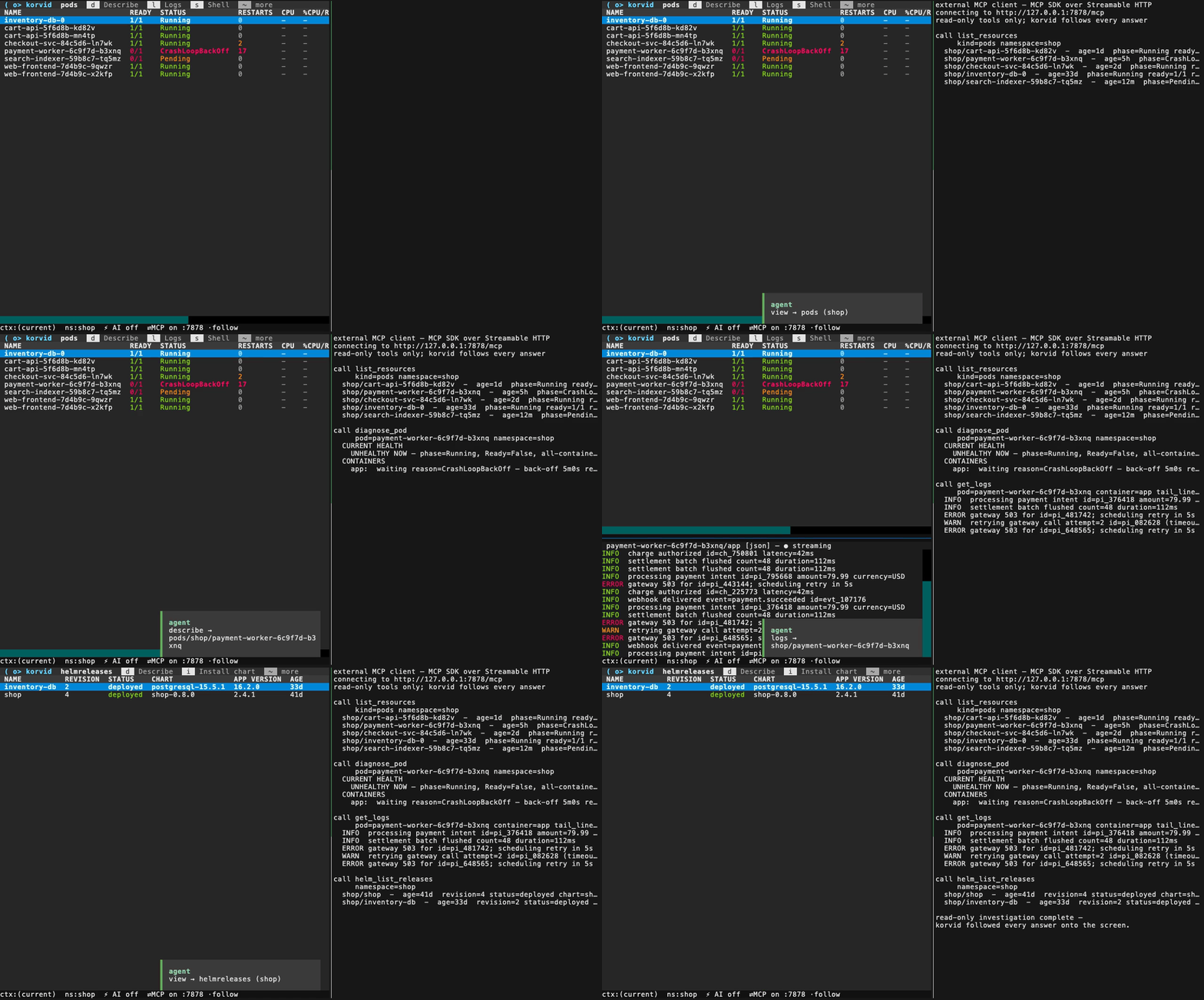
Recorded against the synthetic in-memory cluster, with no external client session metadata.
The TUI, embedded agent, and local MCP integration are available in published
releases. This README describes main; check the
latest release for
shipped changes, compatibility, and migration notes.
Install only the features you need:
uv tool install 'korvid'                       # base TUI
uv tool install 'korvid[agent]'                # embedded agent
uv tool install 'korvid[mcp]'                  # MCP server and stdio adapter
uv tool install 'korvid[agent,observability]'   # agent plus Prometheus/Loki
uv tool install 'korvid[mcp,observability]'     # MCP plus Prometheus/Loki
uv tool install 'korvid[all]'                  # full feature set
uv tool install 'korvid[all,entra]'            # also add Entra ID authentication
Choose one variant. To reinstall or expand an existing installation, specify the complete extra set instead of layering extras into a tool environment:
uv tool install --force 'korvid[all]'
# or
pipx install --force 'korvid[all]'
Tagged versions should be installed from PyPI; the source install in Quick
start is for unreleased code. Without [agent], the agent panel and its
keybindings are absent. Explicitly requesting a missing feature fails with
an install hint, rather than silently enabling a partial configuration.
Homebrew users can run brew install hellices/korvid/korvid. The tap uses
Homebrew's Python and follows its own reviewed update schedule. It excludes
[mcp]; use PyPI for the MCP server and stdio adapter.
Remove the tool with its owning installer:
uv tool uninstall korvid
# or
pipx uninstall korvid
Uninstall removes the package, not your configuration, audit history,
exports, or OS keyring credential (korvid / github-oauth).
State locations are documented and cleanup is explicit and opt-in in the release runbook.
Tagged releases publish the same wheel and source distribution to PyPI and GitHub, with checksums, SBOM, offline bundles, and provenance attestations. The versioned release notes contain pinned installation and verification commands. Maintainers follow the release runbook for exact-source validation, upgrade testing, and protected publication.
git clone https://github.com/hellices/korvid && cd korvid
uv sync --frozen --dev --all-extras
uv run korvid
make check