
JavaWeb Command-line Framework, help you easily build a command line JavaWeb System.
It can be easily combined with any Java framework , and no other dependency.Even you don't need create a HTML page.
- Some functions are provided to professional and do not want to invest in developing front-end.
- Quick development for a simple management system
- provided some tools through a web page
- Quick,simple,fun,geek and so on
<!-- https://mvnrepository.com/artifact/top.thinkin/w2j-cli-core -->
<dependency>
    <groupId>top.thinkin</groupId>
    <artifactId>w2j-cli-core</artifactId>
    <version>0.1.3</version>
</dependency>// https://mvnrepository.com/artifact/top.thinkin/w2j-cli-core
compile group: 'top.thinkin', name: 'w2j-cli-core', version: '0.1.3'
Base input and output,Text-table, Confirm,Auto-Complete
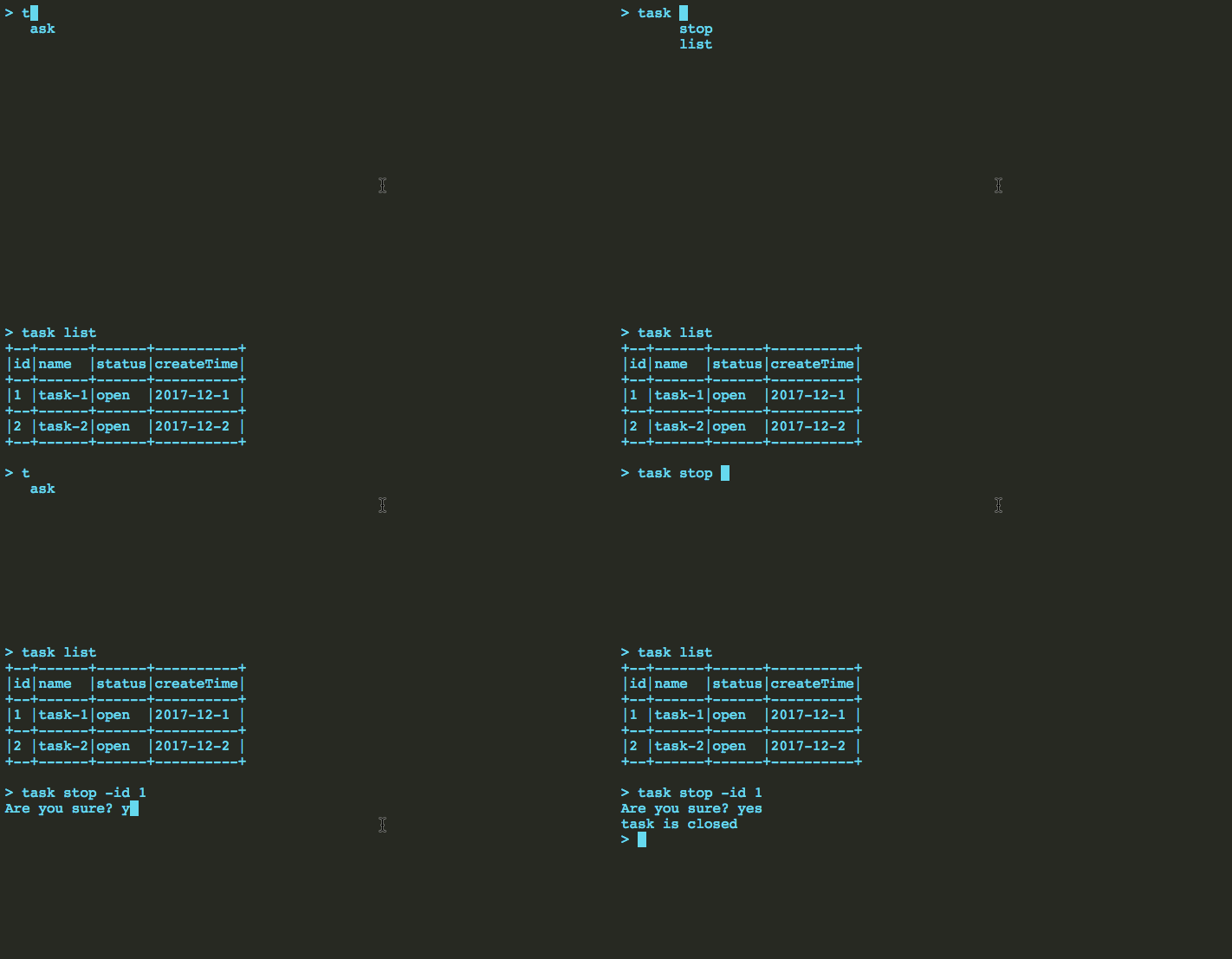
create a class and write annotations for root command,commands and parameters
@HJRoot(name="task",help = "task related operation")
public class TaskTest {
    @HJCommand(name = "list",help = "get the list of task")
    public String list(
            @HJValue(name="start",help = "start time. example:2017-12-1")
                    String start,
            @HJValue(name="end",help = "end time. example:2018-12-1")
                    String end
    ) throws WjException {
        TextTable table =  TextTable.create();
        table.config("id");
        table.config("name");
        table.config("status");
        table.config("createTime");

        table.add(Arrays.asList("1","task-1","open","2017-12-1"));
        table.add(Arrays.asList("2","task-2","open","2017-12-2" ));

        return View.text(table.buildTable());
    }

    @HJCommand(name = "stop",ask = true,help = "stop the task")
    public String close(
            @HJValue(name="id",help = "the task id",req = true)
                    String id,
            @HJContext()
                    Context context

    ){
        return View.text("task is closed");
    }
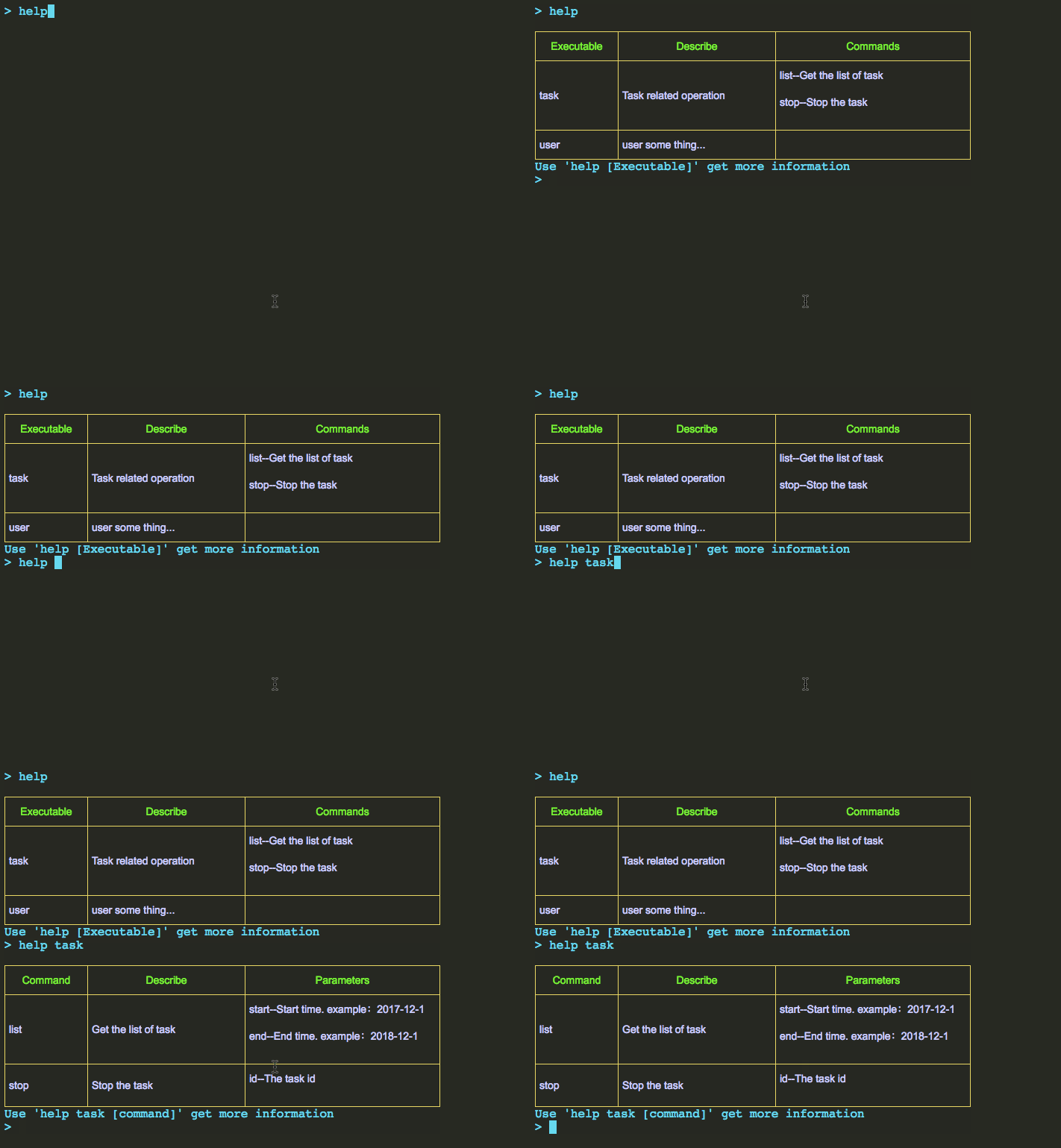
}Based on you annotations, W2J-CLI could automatically generate the help documents
W2J-CLI have provided a built-in login module.
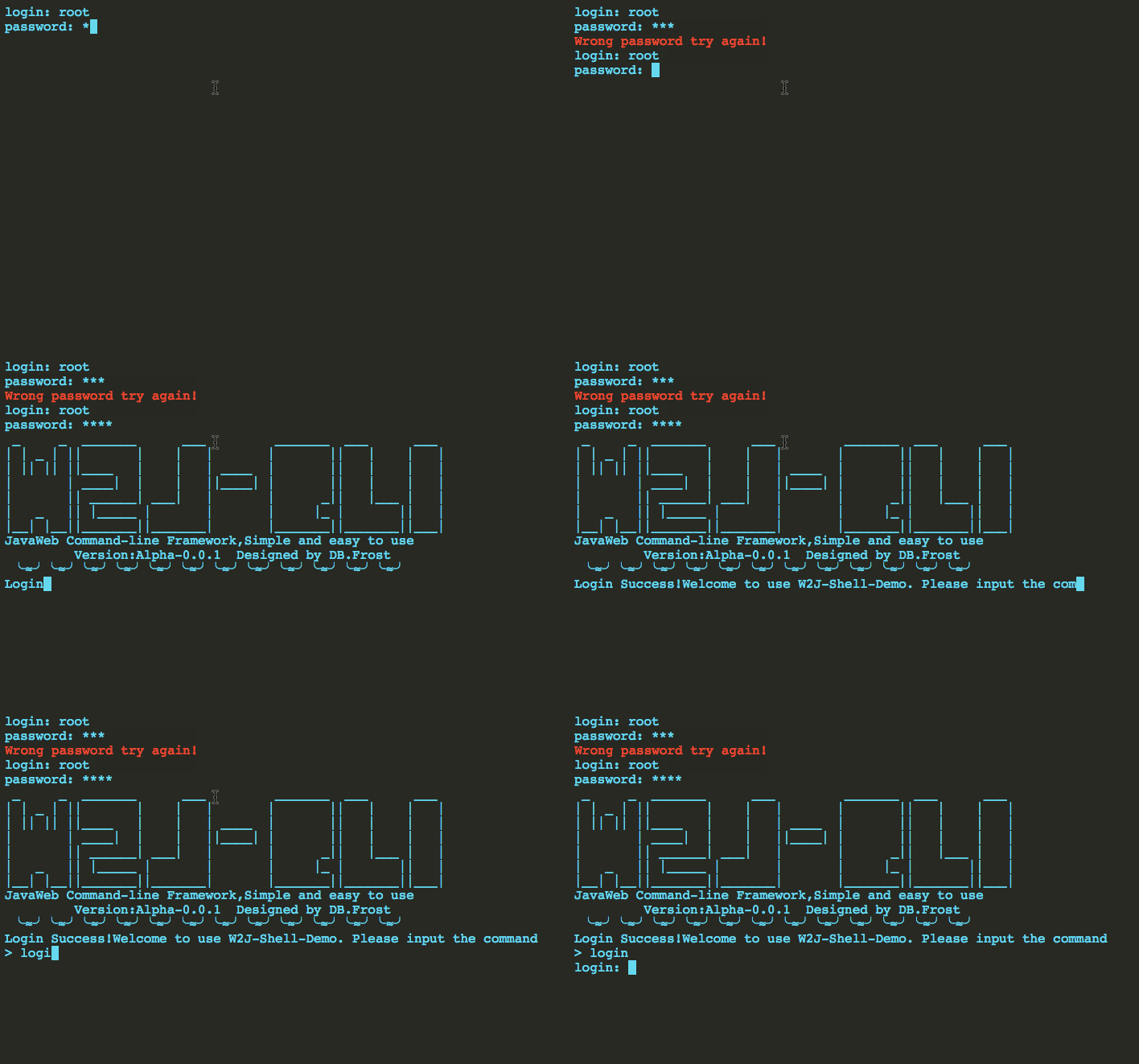
This codes simulates a simple logon process
public class YesLogin implements WJLogin<Context> {

    public final static String AUTH = "LX2F8rdCA2wKel9yR42";

    public  String login(String root, String pass, Context context) {
        if("root".equals(root)&&"pass".equals(pass)){
            return View.OK(AUTH);
        }else{
            return View.error("error");
        }
    }

    public  boolean filter(String auth, Context context) {

        if(AUTH.equals(auth)){
            return true;
        }else{
            return false;
        }
    }
}Users can create scripts to achieve stronger functionality. Of course, there are some commonly used built-in scripts.Likes loop command script, you can use it to achieve some animation effects.
/**
     * Circular sending command.
     * The result will be displayed on the screen and overlay the last display.
     * @param cli
     * @param stopPrefix If the prefix is this, the loop will stop
     * @param interval Time interval of a request
     * @return
     */
String script = ScriptKits.LOOP_CLI("task get -id "+id,"ok",500);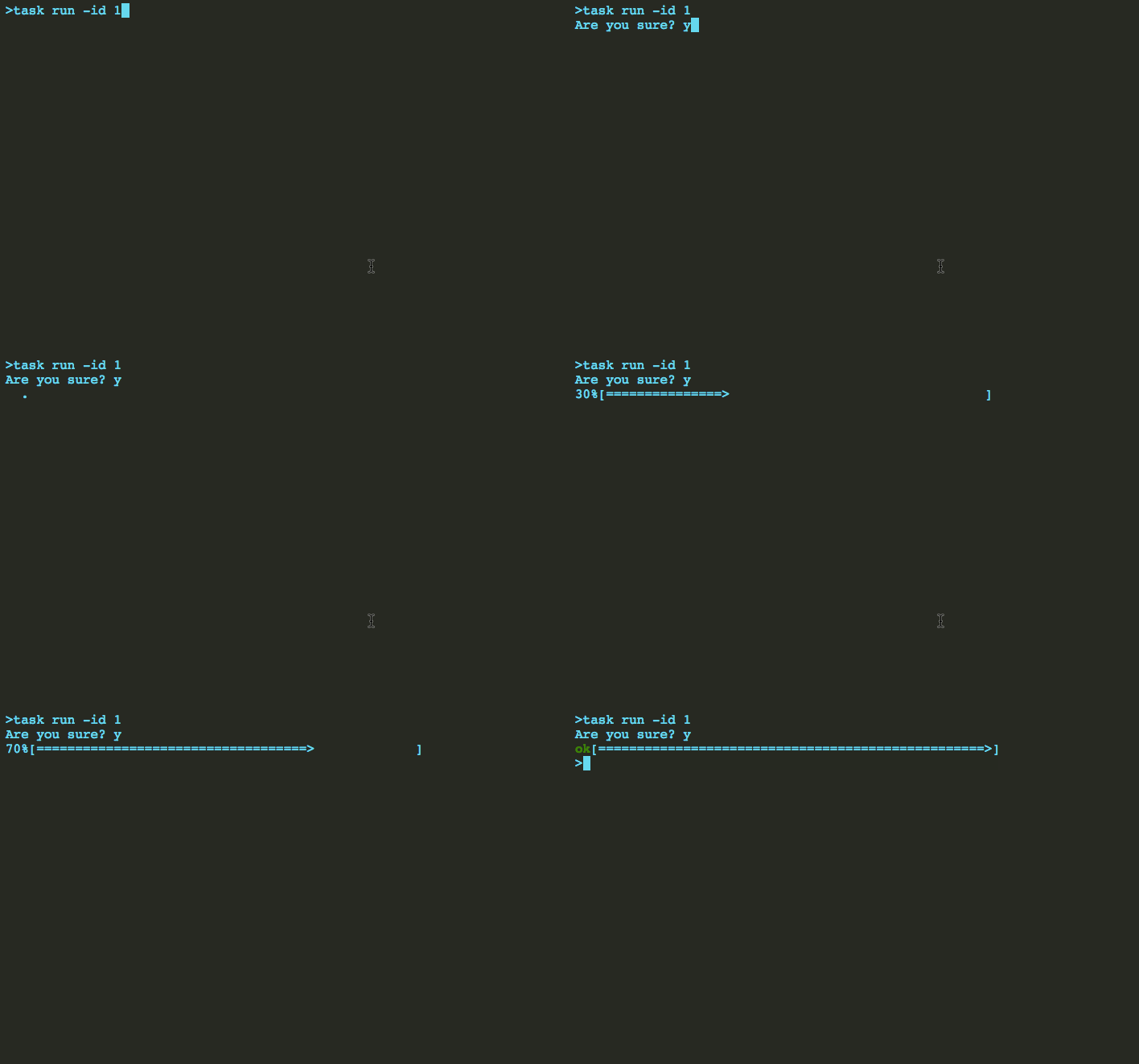
W2J-CLI can combined with any Java framework,likes spring,sptingMVC,struts2 and so on.
There has a example for combined with base servlet,you can get other ways in wiki
build web.xml
<servlet>
    <servlet-name>DispatcherServlet</servlet-name>
    <servlet-class>top.test.web.TestAction</servlet-class>
    <load-on-startup>1</load-on-startup>
  </servlet>

 <servlet>
    <servlet-name>HtmlServlet</servlet-name>
    <servlet-class>top.test.web.HtmlAction</servlet-class>
    <load-on-startup>1</load-on-startup>
  </servlet>

  <servlet-mapping>
    <servlet-name>DispatcherServlet</servlet-name>
    <url-pattern>/api/*</url-pattern>
  </servlet-mapping>

  <servlet-mapping>
    <servlet-name>HtmlServlet</servlet-name>
    <url-pattern>/html</url-pattern>
  </servlet-mapping>
build html Servlet
public class HtmlAction extends HttpServlet {
    HTMLConfig config;
    public void init() throws ServletException {
        try {
            // the postUrl is necessary ,if you use built-in login module needLogin must be true
            // there has some other configuration items,you can get them in wiki
            config =  HTMLConfig.cteate().setPostUrl("http://127.0.0.1:8082/api").needLogin(true).build();
        } catch (Exception e) {
            e.printStackTrace();
        }
    }
    protected void doGet(HttpServletRequest req, HttpServletResponse resp) throws ServletException, IOException {
        req.setCharacterEncoding("UTF-8");
        resp.setContentType("text/html;charset=UTF-8");
        PrintWriter writer = resp.getWriter();
        writer.write(config.html());
        writer.close();
    }
}
build the handler Servlet
public class TestAction  extends HttpServlet {
    CommandManage commandManage;
    public void init(){
        try {
            commandManage =  CommandManage.config()
                    .setLogin(new YesLogin()).add(new HelloTest()).add(new TaskTest());
        } catch (Exception e) {
            e.printStackTrace();
        }
    }


    protected void doPost(HttpServletRequest req, HttpServletResponse resp) throws IOException {
        req.setCharacterEncoding("UTF-8");
        Context context = new Context();//the context of your design

        String cli =  req.getParameter("cli");//get the command line
        String auth =  req.getParameter("auth");//get the login authcode
        String x = null;
        try {
            x = commandManage.handleCommand(cli,context,auth);
        } catch (Exception e) {
            e.printStackTrace();
        }
        resp.setContentType("text/html;charset=UTF-8");
        PrintWriter writer = resp.getWriter();
        writer.write(x);
        writer.close();
    }
}JDK 1.6+
- Dong Bin - Initial work - BOLG
This project is licensed under the MIT License - see the LICENSE file for details
- Hat tip to anyone who's code was used
- Inspiration
- etc