Repository navigation
bug: flet build windows gets stuck on packaging python app; and extension template generation issues #5507

Description

Duplicate Check
- I have searched the opened issues and there are no duplicates
Describe the bug
I have been following the documentation on creating user extensions for flet step-by-step from here. As of right now, I have managed to work my way through the following steps successfully[assuming that the flet extension is just called flet-wvr] :
- created a virtual environment within the project folder.
- activated the virtual environment using .venv\Scripts\activate.bat
- installed flet[all] {version: 0.28.3 according to
pip show} usingpip install flet[all]on it. - ran the command suggested by the docs with the name for my extension in place -
flet create --template extension --project-name flet-wvr. - cd-ed into the newly created examples directory, and further more into the flet_wvr_example directory within it.
and, this is where the problems begin. Firstly, I have noticed an issue with the way the pyproject.toml is generated, which causes an unbalanced quotes error, it'd be nice if this was fixed so that the template generated paths with \\ instead of just \. This would prevent the confusion a new developer might face when they encounter this issue. I had ended up doing this manually though and that resulted in the elimination of the unbalanced quotes error on my end. So, with that out of the way, lets move on to the other issue I've been facing -
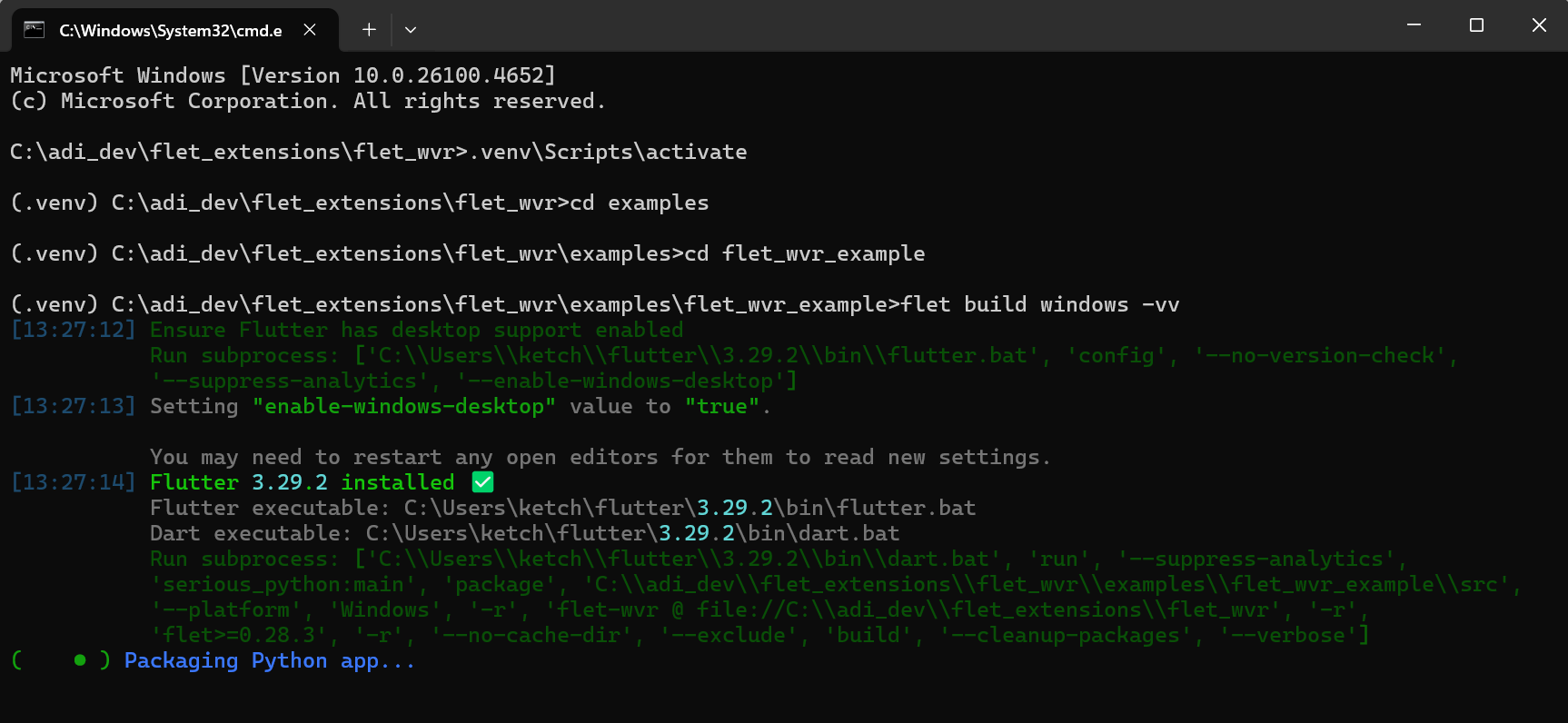
trying to run flet build windows -v or flet build windows or flet build windows -vv are all met with -
- an attempt at the installation of flutter, which is always successful and finishes with the status
Flutter 3.29.2 installed ✅. - an attempt at running a subprocess that uses the dart.bat from the installed flutter alongside serious_python, to package the app. this is the step that fails to ever finish. it gets stuck on Packaging Python app... forever. In verbose mode it doesn't show any logs about where it is getting stuck either, the last log shown during verbose mode building process is the attempt to run a subprocess with the dart.bat and serious_python args, after that it just gets stuck forever. I have tested and waited for this to finish for 2+ hours at some point and I am very positive this is not an internet speed issue or anything of that kind. A screenshot of how it looks with the
-vv[most detailed output I could possibly provide] will be attached to this issue.
To fix this issue and debug it, I have tried the following:
- deleted the build dirs created inside the examples/flet_wvr_example folder and the one created outside, alongside the egg info file from src -> this does not change anything, building it again causes the same issue to occur. Nothing is changed in the slightest.
- deleted flutter itself from my local environment, I do not use flutter separately for development -- so the original flutter installation was also due to flet, and wasn't manual, but I deleted it to let flet install a newer version of Flutter, this has also failed to lead to any improvements in the situation. This just makes flet wait for longer to first install flutter before it starts building the package, and then it gets stuck in the exact same way.
- tried deleting the entire venv and project directory and starting from scratch -- also does not work, this problem seems to be persistent across venvs.
- tried downgrading[using flet == 0.26.0 instead], this leads to different verbose output messages, but the build process still gets stuck on the "Packaging Python app..." stage. The last verbose output includes flet trying to install collected packages.
- tried using uv instead of pip to make venvs and run these commands -- leads to the same exact issue, no change observed.
- tried installing a newer version of python, the latest one infact, though the old version I had was 3.12, now I have 3.13.5 -- this did not change anything either.
- tried updating my visual studio development with c++ tools, this has also not lead to any difference in the build command output.
- i've tried running build with the
--cleanup-appand--clear-cacheoptions with also no difference observed in the behavior. - I've tried using the command prompt in admin mode, whilst following the same exact steps outlined previously -- this also leads to no change of behavior.
- tried using WSL[Windows Subsystem for Linux] to no avail, which should've been obvious right away, considering the fact that
flet build windowsis only supported on Windows and no other platform including linux, so this was just a shot in the dark. this method funnily enough worked in the past when trying to build for android, but it is sad that I cannot use it to bypass the issues I have been facing, this time around. - tried using AI to figure out if there were any solutions it could think of, GPT just straight up gave me a summary of it's google searches about the topic, that were very much unrelated, keep in mind that I am running a very minimal flet template, from the docs, and that there should not be any dependency or code related issues, cuz this is all pre-generated and has worked for multiple other users. Gemini on the other hand, did help me debug this quite a bit, and the steps I took to debug it more deeply have been outlined in the next few points.
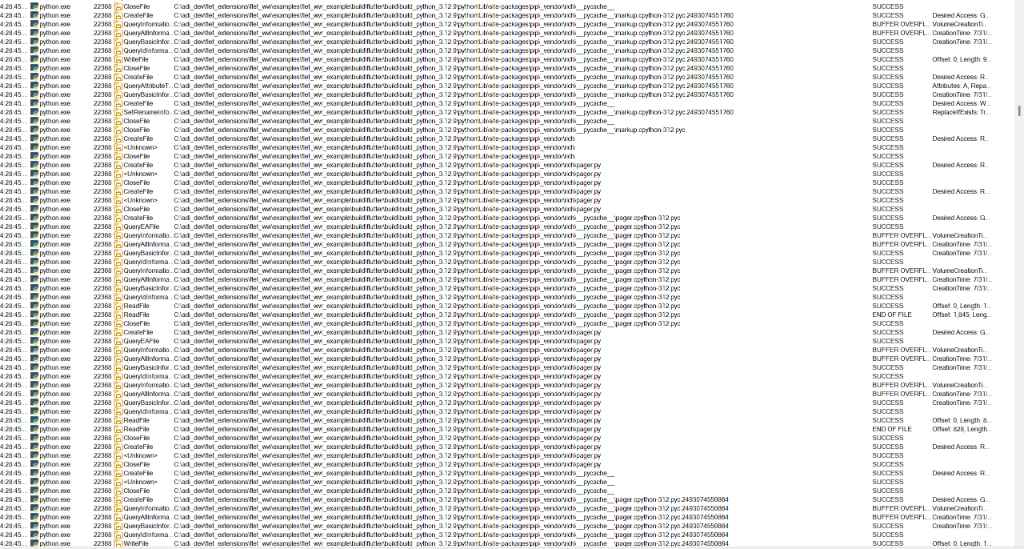
- I tried using ProcMon[Process Monitor -- A tool made to be used to see all the low level events taking place as a result of different apps on the device], I used two major filters:
12.1. Process Name is python.exe
12.2. Process Name is flet.exe
I decided to limit the filters to just these two, after testing out the results with more. These filters were sufficient enough to fetch the events taking place at a lower level due to the flet build command.
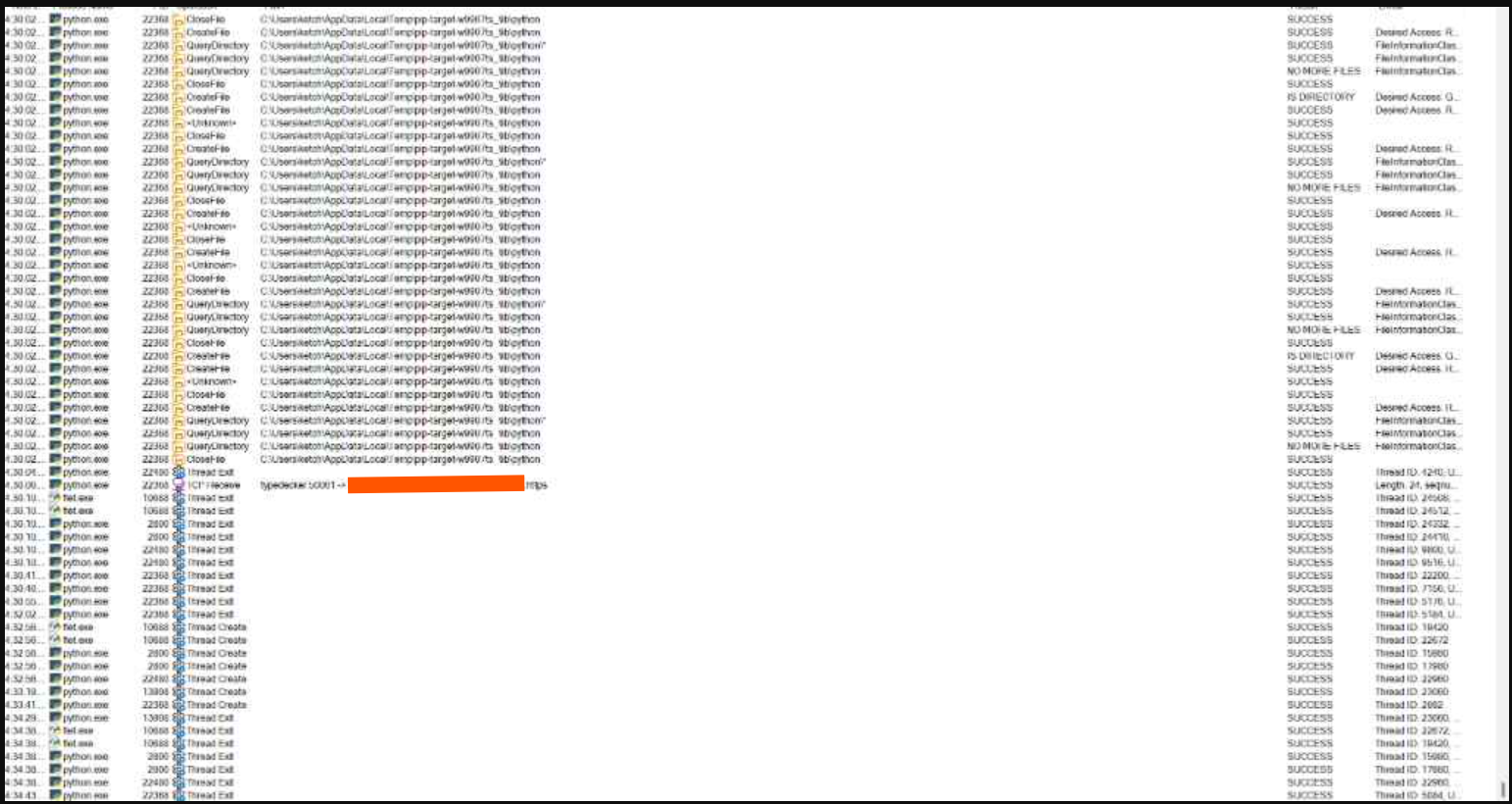
A brief/short description of my analysis of the ProcMon logs along with Gemini's help would be that -- A bunch of QueryInformation events were being issued by python.exe for addresses/paths that corresponded to pip-related files. A bunch of these events were SUCCESSes, and alot of others in between were BUFFER OVERFLOWs. This would keep going for a while, until at the very end, python.exe just started issuing CloseFile events for most of the previously accessed paths and then it'd get stuck in a loop trying to make a TCP connection -- create a thread -- and then exit the thread, repeatedly with nothing else happening while the build was still stuck on the "Packaging Python app..." step. I will attach some of my screenshots of the events described here, alongside this issue. From the analysis of all these events, what I ended up inferring; using some help from Gemini -- was that the issue being faced here, was related to long paths on windows, hence why the BUFFER_OVERFLOW results were coming in for a bunch of the events. I even tried switching my development to a folder inside the C: dir, instead of it being in subdirs, but even then the same issues were faced. I tried enabling LongPath support for windows by modifying the Registry using regedit on windows and set the value of LongPathsEnabled to 1 and restarted my computer, with not alot of change in the build process.
Description of the build directories :
-
External[Outside the
examplesdirectory]: It contained an empty folder by the name ofbdist.win-amd64and alibfolder withflet_wvrandflutterbeing subdirs within thelibfolder that contained the python and flutter files forflet_wvrrespectively. -
Internal[Inside the
examples/flet_wvr_exampledirectory]: It contained three folders -- namely.hash,flutterandsite-packages; withsite-packagesbeing completely empty[gemini described this to be the major issue, it said that the build process was successful at setting up the extension but got stuck at packaging the flet app alongside the python environment, just wanted to leave this in, incase it'd be of any help],.hashcontained a file named template-1 andfluttercontained a bunch of flutter related stuff in it. -
This was not really a fix for this issue, but rather a workaround, but it did indicate that the guess about the problem being caused due to path lengths might be right -- I tried using github-actions to build the template, it finished with success and created an artifact -- which was a .zip of the state the repo would've been in, if flet build was to be run locally, as instructed in the docs -- but when trying to unzip it on my platform, windows gave me the following error:
Error 0x80010135: Path too long.. So my development has basically been put to a halt entirely due to this issue; and I cannot even use workarounds to be able to develop it still.
I have already tried asking for help on the flet discord server, to no avail, alot of the people on there tried to help, but alot of them haven't faced this issue. This issue seems to be unique to certain windows 11 devices. I cannot really afford to try and reinstall windows, and it shouldn't have to be like that, I should be able to use a framework and fix the issues related to it, without having to reinstall my very operating system.. I have spent countless hours trying to find a fix for this, and I really hope that this issue will be looked at and answered with immediate attention. I do not ask for much, I know this is a free service you guys are providing to the community and I appreciate that but I would still like for it to be less error-prone for it to be usable enough on my front. Thanks, I hope this gets resolved fast! I'll try to see if I can fix the template pyproject.toml generation issue with the backslashes in a PR.
Code sample
Code
N/A [just built the template, no explicit code has been written]To reproduce
This seems to be a device/installation specific issue, and not all devices can reproduce this for some reason, but here are the steps I took to have come across this issue -
- create a virtual environment within the project folder.
- activate the virtual environment using .venv\Scripts\activate.bat
- instal flet[all] {version: 0.28.3 according to
pip show} usingpip install flet[all]on it. - run the command suggested by the docs with the name for my extension in place -
flet create --template extension --project-name flet-wvr. - cd into the newly created examples directory, and further more into the flet_wvr_example directory within it.
- run
flet build windows -vv. - wait for the flutter installation to finish and observe the behavior of the
Packaging Python app..., if your device has the [whatever thing is causing this issue] -- it should get stuck at running the subprocess and not finish.
Expected behavior
I expected the app to finish building within 10 mins max, that is the feedback I've gotten from other developers working with flet. But instead it just gets stuck on the "Packaging Python app..." step.
Screenshots / Videos
Captures
Operating System
Windows
Operating system details
Windows 11
Flet version
0.28.3
Regression
I'm not sure / I don't know
Suggestions
- To fix the template pyproject.toml generation issue, just make it generate with paths having \ in general, since they are gonna be escaped to \ anyways.
- I am very certain that the
flet build windows -vvissue has something to do with the path limit on windows, despite me having enabled long paths using the registry variable, it still gave me the buffer overflow issue at the smallest path i could possibly get to[while for most users it works fine even with longer paths, or it doesn't work altogether]. It also gave me the same Path too long issue whilst unzipping my pre-built github actions based zip file. So -- a fix would need to prolly try and make the command independent of the length of paths; And, maybe working on trying to rework the template structure, such that it doesn't look for files that deep into the project structure.
Logs
Logs
[13:27:12] Ensure Flutter has desktop support enabled
           Run subprocess: ['C:\\Users\\ketch\\flutter\\3.29.2\\bin\\flutter.bat', 'config', '--no-version-check',
           '--suppress-analytics', '--enable-windows-desktop']
[13:27:13] Setting "enable-windows-desktop" value to "true".

           You may need to restart any open editors for them to read new settings.
[13:27:14] Flutter 3.29.2 installed ✅
           Flutter executable: C:\Users\ketch\flutter\3.29.2\bin\flutter.bat
           Dart executable: C:\Users\ketch\flutter\3.29.2\bin\dart.bat
           Run subprocess: ['C:\\Users\\ketch\\flutter\\3.29.2\\bin\\dart.bat', 'run', '--suppress-analytics',
           'serious_python:main', 'package', 'C:\\adi_dev\\flet_extensions\\flet_wvr\\examples\\flet_wvr_example\\src',
           '--platform', 'Windows', '-r', 'flet-wvr @ file://C:\\adi_dev\\flet_extensions\\flet_wvr', '-r',
           'flet>=0.28.3', '-r', '--no-cache-dir', '--exclude', 'build', '--cleanup-packages', '--verbose']
(●     ) Packaging Python app...
Additional details
For the most part, I have already gone over this and stressed this enough, but this happens only on some devices and not on others. It might just be a lack of knowledge on my end, but I'd like to know about how to fix this either way, and if it helps others out it'd be even better, which is why I have decided to post this as an issue.
Metadata
Metadata
Assignees
Labels
Type
Projects
- Status
Activity
Jarzamendia commentedon Jul 31, 2025
I'm encountering the same problem on Windows 11 Enterprise 23H2.
typedecker commentedon Aug 2, 2025
@Jarzamendia Just to confirm a suspicion I might have about this bug, may I ask you if you also have anaconda installed on your windows 11? or do you just have base python? I have a sneaky suspicion that having an anaconda installation might be the cause, but I wanna make sure its not just me who has one and is facing this issue.
typedecker commentedon Aug 2, 2025
I finally found some logs being generated within the build/flutter folder, in a file named 0.28.3, the logs are as follows:
it always generates logs till here and gets stuck on this step, can this help in any way to solve the issue? @FeodorFitsner @ndonkoHenri
typedecker commentedon Aug 2, 2025
I tried running the command it is trying to run, manually, and it worked really quickly and the site-packages folder was filled up with all the files needed, but it doesn't work when it executes it and it gets stuck on the installing stage. is there a way to fix this? i have tried setting
PYTHONUTF8to 1 within the console incase it was because of that. I also tried runningflet build windows -vvright after running the command from the logs, but it completely erases everything and works from scratch, so it did not work out.typedecker commentedon Aug 2, 2025
I have already tried disabling windows defender[the only antivirus I have], and it didn't change anything, I have also checked process explorer[a tool from microsoft sys internals], and it doesn't show any blockades for the site-packages folder path either.
Razielthc commentedon Aug 6, 2025
Yo tenia el mismo problema , te recomiendo lo siguiente :
Intenta crear tu proyecto usando poetry para mi fue la solución al crear usar flet build windows y que se congelara
sigue los pasos para crear un nuevo proyecto que esta en la documentación https://flet.dev/docs/getting-started/#poetry esto te ayuda a generar la estructura de directorios correcta y el entorno virtual
Jarzamendia commentedon Aug 6, 2025
No, only Python 3.12.6 and pip 24.2.
I'll try the poetry method!
Jarzamendia commentedon Aug 6, 2025
After running some tests, I was able to successfully build the Windows app. I had to remove a few dependencies, which led me to identify the issue as being related to the wheel build process during the installation of certain Python packages.
In this case, the problem occurred with the Pillow package during installation.
However, the process doesn't seem to provide logs or output messages, which makes troubleshooting a bit challenging.
typedecker commentedon Aug 7, 2025
@Razielthc It did not work. I tried it and its still stuck on packaging python app, I am thinking of just trying wsl with linux builds at this point...
Also, @Jarzamendia im glad ur issue got solved! I doubt mine is the same issue though cuz I do not even have any extra dependencies, this is just base flet
typedecker commentedon Aug 7, 2025
Thanks so much for your help guys! Sadly the devs have decided to completely ignore this bug report for some reason :/ It feels like most of the build related bugs get ignored. Maybe they themselves don't know how to fix this, or just do not care enough.. This is sadly also whats bringing this framework down as a whole for me.. whats the point of being able to write nice UI design up if you cannot even actually build it into an app for distribution.. its just stupid.
FeodorFitsner commentedon Aug 10, 2025
@typedecker Your report includes a lot of helpful details — thank you for that. However, it actually contains two separate issues:
flet buildstuckTo keep things organized and easier to track, please open each problem as its own issue.
For the first problem (
flet buildstuck), we still don’t have enough information to investigate:Once you provide these details in a separate issue, we’ll be able to help more effectively.
If you’re not hearing back from the Flet team right away, it’s simply because we’re a small group and are heads-down polishing and preparing the Flet 1.0 release. Right now, support for
flet buildissues has slightly lower priority because:We truly appreciate the time you’ve spent digging into your issue — that kind of effort helps make Flet better for everyone. As an open-source project, Flet is built and maintained by contributors, often in their free time. While we do our best to help, there’s no guaranteed support, so we rely heavily on community contributions, shared solutions, and patience from everyone involved.
FeodorFitsner commentedon Aug 10, 2025
...just a thought - try running
flet buildfor your project in a clean environment, such as fresh Windows Azure VM with just VS 2022 installed or GitHub Actions job.typedecker commentedon Aug 10, 2025
@FeodorFitsner I have tried github actions already, but they get stuck on some flutter header error for some reason :/ I cannot afford to install windows from scratch cuz of personal reasons. Do you have any guesses on why this is happening though? since you know how things work on the backend
typedecker commentedon Aug 10, 2025
Also I just read the other message you've sent! Thanks for replying! I am sorry if it came off really rudely.. I've just been working on this issue for a while and I really wanna help this framework grow in every way possible, I have even come up with an ID system for controls and a XML to flet component parser script as well! I might also work on some drag and drop based program for flet later, once I have fleshed out the XML parser and my other apps! This issue has just been keeping me from using extensions, but I am willing to wait for 1.0's release, if it brings a better build system, I'd be very very happy to wait for however long it might take! Sorry for the impatience I demonstrated earlier.
Also to answer your questions and concerns on the build and the issue in general -- I shall make a separate issue for the extension generation process 👍, we can have this as the issue related to just flet build in general instead. I just have seen alot of people facing the flet build windows getting stuck on packaging python apps.. issue, and I really wanted to try my best to find the root cause of this.
The build logs stop here, and do not continue past this. Trying to install these pip packages manually using the pip instance the cli script was using, works, but for some reason the script itself cannot do it :/ this might be a serious python issue.
Also, I had a look at v1.0 docs, great job with them honestly! I would love to contribute in any way possible with docs too, I love documenting things in as informative of a way as possible <33 Thanks! @FeodorFitsner
19 remaining items
mikuink commentedon Nov 21, 2025
Hey, I'm running into the exact same issue as you. My code runs without any problems, and I'm using a freshly created .venv virtual environment—in fact, Flet is the only package I've installed. My system is a clean Windows 11 Pro installation from last week, and the only third-party software I have are PyCharm, Python, Git, and Visual Studio 2022. I’m certain my environment is completely clean, yet I’m still getting stuck at “Packaging Python app…”.
MB-Izzo commentedon Dec 1, 2025
Hi, I'm encountering the same issue.
ChenXinglinRobot commentedon Feb 2, 2026
I’m experiencing the same issue.
The build hangs at:
( ● ) Packaging Python app...
Environment:
Before hanging, I see this error:
Command '['git', 'clone', 'https://github.com/flet-dev/flet-build-template.git']'
returned non-zero exit status 128
flutter doctor also shows:
[!] Proxy Configuration
! NO_PROXY is not set
The process does not exit or throw any error, it just hangs for 30+ minutes.
(GongGong) D:\update_gonggong\GongGong>flet build apk -vv
[21:29:12] Run subprocess: ['D:\flutter\3.38.7\bin\flutter.BAT', '--version', '--no-version-check', '--suppress-analytics']
[21:29:14] Flutter executable: D:\flutter\3.38.7\bin\flutter.BAT
Dart executable: D:\flutter\3.38.7\bin\dart.BAT
Configuring Flutter's path to JDK
Run subprocess: ['D:\flutter\3.38.7\bin\flutter.BAT', 'config', '--no-version-check', '--suppress-analytics', '--jdk-dir=D:\java\17.0.13+11']
[21:29:16] Setting "jdk-dir" value to "D:\java\17.0.13+11".
git clone failed with error: Cloning into 'flet-build-template'...
error: RPC failed; curl 56 OpenSSL SSL_read: SSL_ERROR_SYSCALL, errno 0
error: 4064 bytes of body are still expected
fetch-pack: unexpected disconnect while reading sideband packet
fatal: early EOF
fatal: fetch-pack: invalid index-pack output
[21:31:49] Run subprocess: ['D:\flutter\3.38.7\bin\flutter.BAT', 'doctor', '--no-version-check', '--suppress-analytics']
[21:32:00] Doctor summary (to see all details, run flutter doctor -v):
[√] Flutter (Channel stable, 3.38.7, on Microsoft Windows [版本 10.0.26100.7623], locale zh-CN)
[√] Windows Version (11 家庭中文版 64-bit, 24H2, 2009)
[√] Android toolchain - develop for Android devices (Android SDK version 34.0.0)
[√] Chrome - develop for the web
[!] Visual Studio - develop Windows apps (Visual Studio 生成工具 2019 16.11.46)
X The current Visual Studio installation is incomplete.
Please use Visual Studio Installer to complete the installation or reinstall Visual Studio.
[!] Proxy Configuration
! NO_PROXY is not set
[√] Connected device (3 available)
[√] Network resources
┌──────────────────────────────────────────────────────────────────────────────────────────────────────────────────────────────────────────────────────────────────────────────────────────┐
│ Command '['git', 'clone', 'https://github.com/flet-dev/flet-build-template.git']' returned non-zero exit status 128. │
└──────────────────────────────────────────────────────────────────────────────────────────────────────────────────────────────────────────────────────────────────────────────────────────┘
(GongGong) D:\update_gonggong\GongGong>flet build apk -vv
[21:36:33] Run subprocess: ['D:\flutter\3.38.7\bin\flutter.BAT', '--version', '--no-version-check', '--suppress-analytics']
[21:36:35] Flutter executable: D:\flutter\3.38.7\bin\flutter.BAT
Dart executable: D:\flutter\3.38.7\bin\dart.BAT
Configuring Flutter's path to JDK
Run subprocess: ['D:\flutter\3.38.7\bin\flutter.BAT', 'config', '--no-version-check', '--suppress-analytics', '--jdk-dir=D:\java\17.0.13+11']
[21:36:37] Setting "jdk-dir" value to "D:\java\17.0.13+11".
[21:37:07] Created app shell ✅
Run subprocess: ['D:\flutter\3.38.7\bin\dart.BAT', 'run', '--suppress-analytics', 'serious_python:main', 'package', 'D:\update_gonggong\GongGong\src', '--platform',
'Android', '-r', 'flet-video>=0.80.5', '-r', 'flet>=0.80.5', '--exclude', 'build', '--cleanup-packages', '--verbose']
( ● ) Packaging Python app...
Traceback (most recent call last):
File "C:\Users\Chen Xinglin\AppData\Roaming\uv\python\cpython-3.10.19-windows-x86_64-none\lib\runpy.py", line 196, in _run_module_as_main
return _run_code(code, main_globals, None,
File "C:\Users\Chen Xinglin\AppData\Roaming\uv\python\cpython-3.10.19-windows-x86_64-none\lib\runpy.py", line 86, in run_code
exec(code, run_globals)
File "D:\GongGong.venv\Scripts\flet.exe_main.py", line 10, in
File "D:\GongGong.venv\lib\site-packages\flet\cli.py", line 8, in main
flet_cli.cli.main()
File "D:\GongGong.venv\lib\site-packages\flet_cli\cli.py", line 115, in main
args.handler(args)
File "D:\GongGong.venv\lib\site-packages\flet_cli\commands\build.py", line 50, in handle
self.package_python_app()
File "D:\GongGong.venv\lib\site-packages\flet_cli\commands\build_base.py", line 1723, in package_python_app
package_result = self.run(
File "D:\GongGong.venv\lib\site-packages\flet_cli\commands\build_base.py", line 1940, in run
return processes.run(
File "D:\GongGong.venv\lib\site-packages\flet_cli\utils\processes.py", line 49, in run
stdout_line = process.stdout.readline()
File "C:\Users\Chen Xinglin\AppData\Roaming\uv\python\cpython-3.10.19-windows-x86_64-none\lib\codecs.py", line 319, in decode
def decode(self, input, final=False):
KeyboardInterrupt
Nwokike commentedon May 1, 2026
What I am seeing is that flet build windows -vv gets past Flutter setup and then hangs forever at Packaging Python app... on my Windows 11 machine. The same repository builds in GitHub Codespaces, but my local Windows machine gets stuck during the Python packaging step. I have already tried the common workarounds mentioned in the thread, including rebuilding from scratch, changing Python versions, enabling long paths, using Poetry, using uv, and running with admin privileges, but none of them changed the behavior.
fix(app-template): write extension example paths with TOML-safe forwa…
Read a command's stdout and stderr while it runs (#263)
ndonkoHenri commentedon Nov 5, 2026
Fixed in Flet 1.1.0 (how to upgrade):
flet buildnow uses serious_python 6.1.3, which includes flet-dev/serious-python#263.On Windows,
flet buildno longer gets stuck at "Packaging Python app..." when pip or another packaging step writes warnings or errors. If a step fails, its output is now shown.The other problem, unbalanced quotes in the extension template's generated
pyproject.tomlpaths, was fixed in Flet 1.0.0 by #6775.If a build still hangs on 1.1.0, please reopen with the output of
flet build windows -vv.