
English | 한국어



Dari (다리) means "bridge" in Korean. Dari is an Android library for inspecting WebView bridge communication in real time, inspired by Chucker.
Just as Chucker intercepts and displays HTTP traffic, Dari captures and visualizes WebView JavaScript bridge messages between your web content and native Android code.
📖 Documentation — Setup guide, configuration reference, and API docs.
📱 On device: bridge calls → notification → message detail

🖥️ On your computer: the Desktop App over adb
dari-2.1-demo-linkedin.mp4
Debugging a hybrid app usually means sprinkling Log.d across @JavascriptInterface methods and scrolling Logcat to match requests with responses. Dari gives you:
- Every Web ↔ App bridge call in one list, with request/response paired by
requestId - Pretty-printed JSON payloads, status (
IN_PROGRESS/SUCCESS/ERROR), and timing - A live notification and shake-to-open, so the inspector is one tap away while testing
- A no-op artifact for release builds, so nothing ships to production
// build.gradle.kts
debugImplementation("io.github.easyhooon:dari:<latest-version>")
releaseImplementation("io.github.easyhooon:dari-noop:<latest-version>")
// In your bridge layer
val interceptor = Dari.createInterceptor()
// Where every request enters the bridge
interceptor?.onWebToAppRequest(handlerName, requestId, data)
// In the one function that sends responses to the web
interceptor?.onWebToAppResponse(handlerName, requestId, responseData, isSuccess)Run the app, trigger a bridge call, and tap the Dari notification. See Setup for App-to-Web messages, tags, and Protocol Buffers.
See the bridge messages of a connected debug build on your computer, on a bigger screen. It needs only adb: no proxy, certificate or port setup.
- Live messages from a USB-connected device or emulator, with the request and response side by side
- Foldable JSON with Expand all / Collapse all and one-click Copy, plus text and JSON export
- Response Time view per handler: calls, errors and avg/min/max, slowest first, with averages of 500 ms or more highlighted
- Optional masking of tokens, passwords and cookies, applied on the device before data leaves it
- macOS (signed and notarized, Apple Silicon and Intel), Windows, and Linux (preview), with in-app updates
Requires dari 2.0.0 or later in your app's debug build. Apps still on 1.x can't connect until they upgrade.
📥 Download or install from the terminal:
curl -fsSL https://raw.githubusercontent.com/easyhooon/dari/main/scripts/install-desktop.sh | bashSee the Desktop App guide for requirements and troubleshooting.
| Launcher Shortcut | Notification | Message List |
 |
 |
 |
| Overview | Request | Response |
 |
 |
 |
| Tag Filter | Settings | Dark Mode |
 |
 |
 |
- Intercepts Web-to-App and App-to-Web bridge messages
- Tag support for identifying message sources in multi-WebView/Activity environments
- Message status tracking —
IN_PROGRESS,SUCCESS,ERRORwith color-coded indicators - Status filtering — filter messages by status via chips
- Response time stats — call count, average, min, and max duration per handler, with slow handlers highlighted
- Chucker-style persistent notification showing recent bridge activity
- Message list UI with search, filter by handler name, and tag-based filtering
- Detail view with Overview / Request / Response tabs
- JSON pretty-printing for request and response payloads
- Optional Protocol Buffers inspection through an app-provided decoder
- Export messages as text or JSON
- Shake-to-open — shake device to launch Dari UI (with haptic feedback)
- Dark mode — System / Light / Dark theme toggle
- Settings bottom sheet — shake toggle, theme selector, clear data, and version info
- Dynamic launcher shortcut for quick access
- Zero overhead in release builds via no-op module
- Auto-initialization via
androidx.startup
| Manual (default) | Gradle plugin (new in 2.6.0, optional) | |
|---|---|---|
| Dependencies | dari + dari-noop |
The same dari + dari-noop |
| Extra setup | None | mavenCentral() in pluginManagement of settings.gradle.kts, and plugins { id("io.github.easyhooon.dari") } plus a dari { } mapping in the app module's build.gradle.kts |
| Bridge code | Interceptor calls where requests enter and responses leave | No Dari calls |
| Performance | Baseline | Same as manual, except bridges that pass large JSON strings (Performance) |
- The dependency alone doesn't turn on the plugin way. Adding or upgrading
darichanges nothing until you also apply the plugin and writedari { }. Without them, only your own interceptor calls are recorded. - Upgrading with manual calls: bump the version. No code changes.
- Pick one way per bridge. If a mapped method already calls
DariInterceptor, the plugin skips that method and prints a build warning. It only checks the mapped method's own body, so a manual call elsewhere on the same path, such as in a handler, is recorded a second time.
The steps below set up the manual way. For the plugin, also follow Optional: Gradle Plugin.
Add the dari (debug) and dari-noop (release) dependencies to your app's build.gradle.kts:
dependencies {
    debugImplementation("io.github.easyhooon:dari:<latest-version>")
    releaseImplementation("io.github.easyhooon:dari-noop:<latest-version>")
}
That's it for initialization. Dari auto-initializes via androidx.startup when your app starts.
Dari requires manual injection of the interceptor into your WebView bridge layer. Call it where messages enter and leave the bridge, not in each handler: most bridges have one entry point for incoming requests and one function that sends replies, so a few calls cover every handler.
import com.easyhooon.dari.Dari
import com.easyhooon.dari.interceptor.DariInterceptor

// Basic usage (no tag)
val interceptor: DariInterceptor? = Dari.createInterceptor()

// With tag — identifies the source in multi-WebView/Activity environments
val paymentInterceptor: DariInterceptor? = Dari.createInterceptor(tag = "PaymentWebView")
val mainInterceptor: DariInterceptor? = Dari.createInterceptor(tag = "MainWebView")
When a tag is provided, all messages captured by that interceptor are automatically tagged. Tags appear as chips in the message list and can be used to filter messages by source.
Log the request in the @JavascriptInterface method every request enters, and the response in the one function that sends replies back. Handlers then need no Dari code:
inner class Bridge {
    @JavascriptInterface
    fun onBridgeRequest(handlerName: String, requestId: String, data: String?) {
        // Every request enters here
        interceptor?.onWebToAppRequest(handlerName, requestId, data)
        when (handlerName) {
            "getAppInfo" -> sendResponseToWeb(handlerName, requestId, true, appInfoJson())
            // ...other handlers reply through sendResponseToWeb too
        }
    }
}

// Every reply leaves through here
private fun sendResponseToWeb(handlerName: String, requestId: String, isSuccess: Boolean, data: String) {
    interceptor?.onWebToAppResponse(handlerName, requestId, data, isSuccess)
    val script = "onBridgeResponse(${JSONObject.quote(requestId)}, $isSuccess, ${JSONObject.quote(data)})"
    webView.post { webView.evaluateJavascript(script, null) }
}
Replies sent later, e.g. from a permission callback, are still paired by requestId as long as they go through the same function.
Same idea in the other direction: log in the function that sends messages to JavaScript and in the method that receives the web's reply:
// In the function that sends messages to JavaScript
interceptor?.onAppToWebRequest(handlerName, requestId, data)

// In the @JavascriptInterface method that receives the web's reply
interceptor?.onAppToWebResponse(requestId, isSuccess, responseData)For messages that don't require a response (e.g., analytics events, screen tracking), you can pass null as the requestId:
// Fire-and-forget: no response expected
interceptor?.onWebToAppRequest(handlerName, null, data)
// No need to call onWebToAppResponse
When requestId is null, the message is treated as standalone and won't be matched with a response.
The existing String/JSON methods remain unchanged. To inspect protobuf payloads, create an interceptor with a decoder supplied by your app:
There is no protobuf feature flag or DariConfig toggle. Using this interceptor overload and the protobuf capture methods opts the bridge into protobuf inspection. See the full guide or Korean guide.
import com.easyhooon.dari.interceptor.protobufDecoder

val protobufInterceptor = Dari.createInterceptor(
    tag = "OrderBridge",
    protobufDecoder = protobufDecoder {
        webToApp("createOrder") {
            request { JsonFormat.printer().print(CreateOrderRequest.parseFrom(it)) }
            response { JsonFormat.printer().print(CreateOrderResponse.parseFrom(it)) }
        }
    },
)

protobufInterceptor?.onWebToAppProtobufRequest(
    handlerName = "createOrder",
    requestId = requestId,
    requestData = protobufBytes,
)
Dari does not depend on a protobuf runtime. The consuming app owns generated message types and decoding. Decoding runs synchronously on the interceptor caller's thread, so decoder work should stay bounded. Base64 is only needed when the app's bridge is string-only; an ArrayBuffer bridge can pass the bytes directly.
The REQUEST and RESPONSE tabs provide Decoded and Raw views. The raw view retains only the first 4 KB of each protobuf payload and displays that preview as Hex and Base64; the original byte size and truncation state remain available. Base64 in this view is a display encoding generated by Dari, not evidence that the bridge transported the payload as Base64.
| Protobuf Decoded | Protobuf Raw Bytes |
 |
 |
The interceptor calls above stay the default and keep working. If you'd rather keep Dari out of your bridge code, the optional io.github.easyhooon.dari Gradle plugin inserts the same calls into debug builds from a one-time mapping.
plugins { } and dari { } go in the app module's build.gradle.kts, the module that adds dari / dari-noop. They don't go in the root build.gradle.kts or in settings.gradle.kts.
// settings.gradle.kts: the plugin resolves from Maven Central
pluginManagement {
    repositories {
        google()
        mavenCentral()
        gradlePluginPortal()
    }
}
// app/build.gradle.kts
plugins {
id("io.github.easyhooon.dari") version "<version>"
}
dari {
webToAppRequest("com.example.MainActivity.Bridge", "onBridgeRequest") {
handlerName = arg(0); requestId = arg(1); data = arg(2)
}
webToAppResponse("com.example.MainActivity", "sendResponseToWeb") {
handlerName = arg(0); requestId = arg(1); success = arg(2); data = arg(3)
}
}Only for protobuf payloads: register the decoder once in Application.onCreate() with Dari.setProtobufDecoder(...). See the mapping reference.
You can customize Dari by calling init with a config before auto-initialization occurs, or in your Application.onCreate():
class MyApp : Application() {
    override fun onCreate() {
        super.onCreate()
        Dari.init(
            context = this,
            config = DariConfig(
                maxEntries = 1000,              // Default: 500
                showNotification = true,        // Default: true
                maxContentLength = 500_000,     // Default: 500,000 (truncate large payloads)
                shakeToOpen = true,             // Default: false
                retentionPeriod = 1.days,       // Default: null (disabled)
                fireAndForget = false,          // Default: false
            )
        )
    }
}| Parameter | Type | Default | Description |
|---|---|---|---|
maxEntries |
Int |
500 |
Maximum number of stored messages |
showNotification |
Boolean |
true |
Show persistent notification |
maxContentLength |
Int |
500,000 |
Truncate request/response payloads exceeding this length |
shakeToOpen |
Boolean |
false |
Enable shake gesture to open Dari UI |
retentionPeriod |
Duration? |
null |
TTL-based message cleanup (e.g., 1.hours, 3.days). null disables it |
fireAndForget |
Boolean |
false |
Treat bridge calls as one-way by default without waiting for responses |
dari/
├── dari-core/     ← KMP contracts for Android, JVM, and iOS
├── dari/          ← Debug library (interceptor, UI, notifications)
├── dari-noop/     ← Release no-op (same API surface, zero overhead)
└── sample/        ← Sample app with WebView bridge demo
dari-core can be added to commonMain in a Kotlin Multiplatform project:
commonMain.dependencies {
    implementation("io.github.easyhooon:dari-core:<version>")
}
This shares message models and interceptor contracts across Android, JVM, and iOS targets. The inspector runtime, UI, persistence, notifications, and WebView integration in dari remain Android-only.
The sample/ module contains a working WebView demo with realistic bridge scenarios: fetching app/device info, showing toast messages, haptic feedback, sharing via native share sheet, clipboard access, opening app settings, and requesting camera permission. Run the sample app, tap the buttons, and observe:
- A notification appears showing recent bridge messages
- Tap the notification to open the message list
- Tap any message to see its details (overview, request payload, response payload)
The sample captures its bridge with the Gradle plugin (dari { } in sample/build.gradle.kts). The Interceptor Integration code above shows the same capture done by hand.
Dari is intended for debug and internal builds. Bridge payloads may contain
tokens, personal data, or other sensitive values, so avoid sharing exported
messages without reviewing them first. Use dari-noop in release builds to
keep the same API surface without storing or displaying bridge messages.
The desktop app sends crash reports to Sentry by default: the exception type, stack trace, and OS, architecture and Java versions. Exception messages, bridge messages, host names and IP addresses are never sent. Turn it off in Settings → Privacy → Send crash reports.
| Method | Description |
|---|---|
init(context, config) |
Initialize with custom configuration |
createInterceptor(tag?) |
Create a DariInterceptor with an optional tag (returns null in noop) |
createInterceptor(tag?, protobufDecoder) |
Create a protobuf-capable interceptor while retaining all string/JSON methods |
setProtobufDecoder(decoder) |
Protobuf decoder for interceptors the Gradle plugin creates. Call once at app start |
setShakeToOpenEnabled(enabled) |
Enable/disable shake-to-open at runtime (persisted) |
setDarkMode(value) |
Override dark mode: true / false / null (system default). Persisted |
setShowTagChip(show) |
Show/hide bridge tag chips in the message list. Persisted |
setEnvironment(vararg labels) |
Label the capture (region, web build, flavor, …). Shown in both inspectors and exports; replaces earlier labels. Not persisted |
showNotification() |
Show the notification (e.g., after permission grant) |
clear() |
Clear all stored messages and dismiss notification |
| Method | Description |
|---|---|
onWebToAppRequest() |
Log a Web-to-App request. An overload accepts a separate optional displayName. |
onWebToAppResponse() |
Log the response to a Web-to-App request. Skipped if requestId is null. |
onAppToWebRequest() |
Log an App-to-Web message. An overload accepts a separate optional displayName. |
onAppToWebResponse() |
Log the response to an App-to-Web message. Skipped if requestId is null. |
onPageUrlChanged(url) |
Report the WebView's current page, e.g. from doUpdateVisitedHistory. Later requests record it (user info, query and fragment dropped) for the origin filter. |
ProtobufDariInterceptor extends this interface with matching on*ProtobufRequest() and on*ProtobufResponse() methods that accept ByteArray payloads.
/**
 * Interface for intercepting WebView bridge communication.
 * Injected into WebViewBridge to capture all bridge messages.
 */
interface DariInterceptor {
    /** Tag identifying the source of messages captured by this interceptor */
    val tag: String?
        get() = null

    /** Called when a Web -> App request is received */
    fun onWebToAppRequest(
        handlerName: String,
        requestId: String?,
        requestData: String?,
        fireAndForget: Boolean? = null,
    )

    fun onWebToAppRequest(
        handlerName: String,
        displayName: String?,
        requestId: String?,
        requestData: String?,
        fireAndForget: Boolean? = null,
    )

    /** Called when a response is sent for a Web -> App request */
    fun onWebToAppResponse(
        handlerName: String,
        requestId: String?,
        responseData: String?,
        isSuccess: Boolean,
    )

    /** Called when an App -> Web request is sent */
    fun onAppToWebRequest(
        handlerName: String,
        requestId: String?,
        data: String?,
        fireAndForget: Boolean? = null,
    )

    fun onAppToWebRequest(
        handlerName: String,
        displayName: String?,
        requestId: String?,
        data: String?,
        fireAndForget: Boolean? = null,
    )

    /** Called when a web response is received for an App -> Web request */
    fun onAppToWebResponse(
        requestId: String?,
        isSuccess: Boolean,
        responseData: String?,
    )
}GitHub stars for easyhooon/dari over time. This live chart shows repository stars, not library downloads.
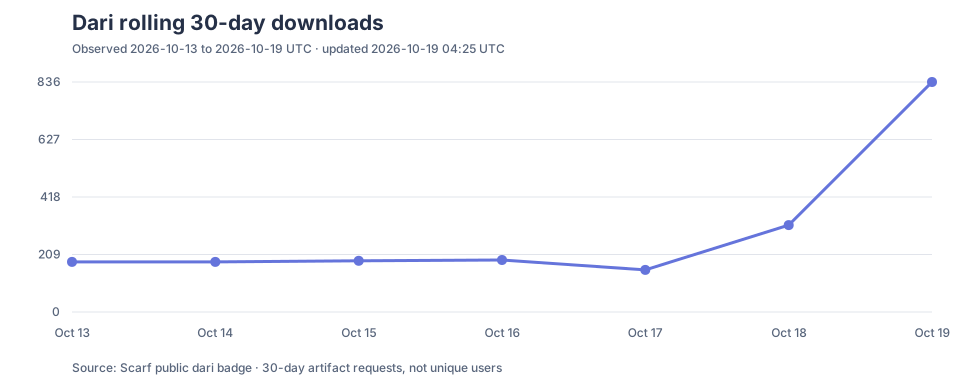
Rolling 30-day Maven Central requests for io.github.easyhooon:dari, observed daily via Scarf. See how it is measured.
If Dari saves you debugging time, you can star the repository, buy me a coffee on Ko-fi or sponsor on GitHub.
Copyright 2026 easyhooon

Licensed under the Apache License, Version 2.0 (the "License");
you may not use this file except in compliance with the License.
You may obtain a copy of the License at

    http://www.apache.org/licenses/LICENSE-2.0

Unless required by applicable law or agreed to in writing, software
distributed under the License is distributed on an "AS IS" BASIS,
WITHOUT WARRANTIES OR CONDITIONS OF ANY KIND, either express or implied.
See the License for the specific language governing permissions and
limitations under the License.