


Use ROBOTIS's officially maintained
dynamixel_hardware_interfaceinstead. It fills the same role, is released for humble, jazzy, kilted, lyrical, and rolling, and has capabilities this package never had.Read the migration guide. It maps every parameter and interface, and is honest about the four things you lose — runtime control-mode switching,
use_dummy, Protocol 1.0 servos, and lifecycle-based reconnection — with a workaround for each.No further releases will be made; the last one was 0.6.1. This repository will be archived (read-only) once the end-of-life status lands in
ros/rosdistro. Published binaries stay published and keep working. If you cannot migrate, pin this package.
The ros2_control hardware interface for any kind of ROBOTIS Dynamixel robot.
The package builds one pluginlib plugin, dynamixel_hardware/DynamixelHardware: a SystemInterface implementation that drives any number of ROBOTIS Dynamixel servos sharing a single serial bus. It is hopefully compatible with any configuration of Dynamixel servos, thanks to ros2_control's flexible architecture.
- All eight Dynamixel operating modes --
position,extended_position,multi_turn,current_based_position,velocity,current,torqueandpwm-- selected per joint with thecontrol_modeparameter. - Per-joint mode switching at runtime: the mode a joint runs in follows the command interfaces the active controller claims, so a position-controlled arm and a velocity-controlled wheel can share one bus and one control cycle.
- A
pwmcommand interface next toposition,velocityandeffort, for direct duty-ratio control. - Joint-side units: per-joint
gear_ratio,offsetandtorque_constantconvert between the servo and the joint, so controllers command joint radians and Nm rather than motor revolutions and milliamps. - Hardware-free operation:
use_dummyswaps the serial driver for a built-in dummy that emulates every operating mode through the same plugin logic, so a robot description can be brought up with no servos attached. - Bounded error handling:
write()sends nothing until the first successfulread()after activation, and each direction of the bus tolerates a configurable burst of consecutive failures before it reports an error to the controller manager. - Protocol 1.0 and 2.0 servos, through automatic control-table name fallbacks (
Goal_VelocitytoMoving_Speed,Present_VelocitytoPresent_Speed,Present_CurrenttoPresent_Load). - One codebase for every supported distro: the version differences live in
compat.hppand a single CMake standard check, not in diverging branches.
| ROS 2 distro | Branch | Support |
|---|---|---|
| rolling | rolling |
Development branch; all pull requests target it |
| lyrical | lyrical |
Supported, by label-driven backport |
| jazzy | jazzy |
Supported, by label-driven backport |
| humble | humble |
Supported until its upstream EOL in May 2027 (via the compat.hpp shim) |
Each distro branch is built and tested by its own workflow, and a nightly matrix rebuilds all four plus the examples repository downstream. The older branches (foxy, galactic, iron) are frozen and unsupported.
Kilted is not part of this line: it has no branch here and receives no backports. Kilted users stay on the released ros-kilted-dynamixel-hardware 0.6.0 binary, which predates everything documented below.
Binary packages are published for jazzy, kilted, lyrical and rolling, and carry the older 0.5.x/0.6.x line:
$ sudo apt install ros-$ROS_DISTRO-dynamixel-hardwareThere is no humble binary -- dynamixel_hardware has never been released into humble -- so humble users build from source, as does anyone who wants what this README documents:
$ export ROS_DISTRO=rolling  # humble, jazzy, lyrical or rolling
$ source /opt/ros/$ROS_DISTRO/setup.bash
$ mkdir -p ~/ws/src && cd ~/ws/src
$ git clone https://github.com/dynamixel-community/dynamixel_hardware.git
$ git clone https://github.com/dynamixel-community/dynamixel_hardware_examples.git
$ cd ~/ws
$ rosdep install --from-paths src --ignore-src -r -y
$ colcon build --symlink-install --cmake-args -DCMAKE_EXPORT_COMPILE_COMMANDS=ON
$ . install/setup.bash
Clone the default rolling branch whichever distro you build against. It is the only branch that carries what this README describes, and the same codebase builds on humble, jazzy, lyrical and rolling -- that is what the compat.hpp shim is for. The distro branches receive this content by backport once 1.0.0 is released; until then -b humble and -b jazzy would give you the 0.6.x line instead, and -b lyrical would fail, because that branch is cut as part of the 1.0.0 release.
The examples repository is optional; it is what the walkthrough further down uses.
A minimal <ros2_control> section:
<ros2_control name="DynamixelHardware" type="system">
  <hardware>
    <plugin>dynamixel_hardware/DynamixelHardware</plugin>
    <param name="port_name">/dev/ttyUSB0</param>
    <param name="baud_rate">1000000</param>
    <!-- <param name="use_dummy">true</param> -->
  </hardware>
  <joint name="joint1">
    <param name="id">1</param>
    <command_interface name="position"/>
    <state_interface name="position"/>
    <state_interface name="velocity"/>
    <state_interface name="effort"/>
  </joint>
</ros2_control>
Every parameter below is a <param> element inside that tag. These tables are the reference; the OpenManipulator-X walkthrough further down shows the same parameters in context.
Parameters of the <hardware> tag:
| Parameter | Default | Description |
|---|---|---|
port_name |
required | Serial port, e.g. /dev/ttyUSB0. The old name usb_port is still accepted but deprecated and logs a warning at startup. Only optional under use_dummy. |
baud_rate |
required | Serial baud rate, e.g. 1000000. Must be at least 1. Only optional under use_dummy. |
use_dummy |
false |
true runs the built-in dummy driver, which emulates every operating mode, instead of opening the serial port. |
torque_enable |
true |
false never turns servo torque on: activation and mode switches skip it and the joints stay limp. Meant for a leader arm in teleoperation, which is back-driven by hand while its states are published. Turning torque off is never skipped, so deactivation still de-energizes. |
read_error_tolerance |
5 |
Number of consecutive read failures at which read() reports an error. 0 never reports one, whatever the failure count. Negative values are rejected. |
write_error_tolerance |
5 |
Number of consecutive driver write failures at which write() reports an error, or 0 to never report one. This is a budget of its own, counted separately from read_error_tolerance. |
Per-joint parameters, inside each <joint> tag:
| Parameter | Default | Description |
|---|---|---|
id |
required | Dynamixel servo id, 0-252. Two joints may not share one id; that is rejected at initialization, naming both joints and the id they collide on. |
control_mode |
position |
Operating mode applied at configuration time: one of position, extended_position, multi_turn, current_based_position, velocity, current, torque, pwm. See Control modes. |
torque_constant |
unset | Motor torque constant in Nm/A; must be finite and positive (nan, inf and non-positive values are rejected at initialization). When set, the effort interfaces of that joint are in Nm instead of the servo's mA. |
gear_ratio |
1.0 |
Motor revolutions per joint revolution. See Gearing and offsets. |
offset |
0.0 |
Joint-side position offset in radians. See Gearing and offsets. |
Profile_Velocity, Profile_Acceleration, Position_P_Gain, Position_I_Gain, Position_D_Gain, Velocity_P_Gain, Velocity_I_Gain, Return_Delay_Time |
unset | Integers written verbatim to that servo's control table at configuration time. All but Return_Delay_Time are RAM registers that a mode change resets, so those are also rewritten after every mode change; Return_Delay_Time lives in EEPROM, survives a mode change, and is written once. |
control_mode selects the Dynamixel operating mode the joint is put into at configuration time. It defaults to position. An unknown value fails the lifecycle transition, and so does a mode the servo model cannot execute -- the failure names the servo id and the model, so an unsupported combination is reported before any controller starts instead of silently doing nothing:
control_mode |
Control-table item the model must have | Notes |
|---|---|---|
position |
-- | Every model supports it. |
extended_position |
-- | Multi-turn positioning. There is no single control-table item to check for, so support is decided by the servo itself; a model that refuses is named in the error. |
multi_turn |
-- | Multi-turn positioning on the older control tables; decided by the servo, as above. |
current_based_position |
Goal_Current |
Position control with a commandable current cap. |
velocity |
-- | Every model supports it. |
current |
Goal_Current |
|
torque |
Goal_Torque |
Only some Protocol 1.0 MX models have Goal_Torque; it is written per servo rather than by sync write. |
pwm |
Goal_PWM |
Goal_Current and Goal_PWM are also checked against the bus, not only the joint: the sync-write handlers for them are registered from the first configured servo's control table, so a mode needing one is rejected when the leading model lacks it, with the leading model named in the error.
The mode a joint actually runs in follows the command interfaces the active controller claims, so different joints can run in different modes in the same control cycle:
| Claimed command interfaces | Operating mode |
|---|---|
position |
the configured mode when it is one of the position-family modes, otherwise position |
velocity |
velocity |
effort |
current, or torque when the joint is configured as torque |
pwm |
pwm |
position + effort |
current_based_position (the effort command is the current limit, and it is only sent while the controller claims effort; otherwise the servo keeps its own Goal_Current, which defaults to its Current_Limit) |
position + velocity |
kept on the historical behavior: a changed velocity command switches the joint to velocity control, otherwise a changed position command switches it back to position control |
| an interface name this plugin does not know | logs a warning once and falls back to the same historical position/velocity behavior, so the controller still starts |
| any other combination of the four known interfaces | rejected, so the controller switch fails instead of the joint moving unexpectedly |
torque_constant is the motor torque constant in Nm/A and must be finite and positive. When it is set, the effort command and state interfaces of that joint are in Nm and are converted to and from the servo's milliamps for you. When it is omitted, the effort interfaces carry the raw current in mA.
In addition to position, velocity and effort, every joint exports a custom pwm command interface for direct duty-ratio control in [-1, 1]; values outside that range are clamped before they are converted to servo units. Declare it in the URDF (<command_interface name="pwm"/>) to use it. Under use_dummy the emulated servo mirrors the commanded duty ratio into its effort state, so a joint that combines pwm with torque_constant or a non-unity gear_ratio publishes that duty ratio scaled as if it were a current and the resulting value is meaningless; real hardware is unaffected. The duty ratio the plugin sends is never scaled either way.
Putting those together, a joint that tracks positions under a torque cap expressed in Nm:
<joint name="joint1">
  <param name="id">11</param>
  <param name="control_mode">current_based_position</param>
  <param name="torque_constant">1.79</param>
  <command_interface name="position"/>
  <command_interface name="effort"/>
  <state_interface name="position"/>
  <state_interface name="velocity"/>
  <state_interface name="effort"/>
</joint>
Switching a mode requires torque to be disabled on the Dynamixel, so the plugin disables torque, rewrites the operating mode and the extra control-table parameters, and then re-enables torque -- but only on the joints it is switching, and among those only the ones whose torque it had confirmed on when the switch began. Torque is tracked per joint, and a joint counts as energized only once the driver has acknowledged the torque-on; a torque-on the servo rejects leaves that joint recorded as de-energized. Joints the switch does not touch are left alone entirely. Commands are reset to the measured position at that moment, which means the first cycle after a switch sends the reset command rather than the controller's.
If a switch fails halfway -- a serial timeout, or a servo model that cannot execute the requested mode -- the affected joints are left de-energized and the plugin reports an error from every following write(). Re-activating the hardware component is what clears that fault; a later mode switch will not, because restoring torque is limited to the joints that were energized when that switch began. Both switch paths latch the fault, the legacy position + velocity heuristic in the table above included, so it keeps being reported instead of surfacing for a single cycle and then going quiet. controller_manager only logs a failed switch and starts the controller anyway, and that persistent error is what stops a limp arm from being reported as healthy. Under torque_enable=false the plugin never energizes anything, so de-energized is the intended state there and a switch that simply succeeds does clear the fault.
Deactivating the hardware component (or shutting down the controller_manager) disables torque, so the joints go limp -- previously on_deactivate was a no-op and the servos stayed energized. Keep this in mind before deactivating a robot that isn't resting in a safe pose.
gear_ratio is the number of motor revolutions per joint revolution. Going from the motor side to the joint side, positions and velocities are divided by it and efforts are multiplied by it; commands are converted the other way around. A negative value is legal and inverts the joint's direction, which is the easy fix for a servo mounted the wrong way round. Zero and non-finite values (nan, inf) are rejected at initialization, since neither has a meaningful conversion.
offset shifts the joint-side position and nothing else: the reported position is raw - offset, where raw is the position after the gear conversion, and a position command has the offset added back before it is scaled to the motor side. Velocity, effort and PWM are unaffected. Any finite value is accepted, including negatives and the default 0.0, which is a no-op.
The pwm command interface is never converted by gear_ratio or offset: a duty ratio is not a physical joint quantity.
Both directions of the bus absorb a burst of transient failures before reporting a fault, and each keeps its own counter.
- A failed read holds the last-known joint states and still returns success; only the
read_error_tolerance-th consecutive failure makesread()report an error. Any successful read resets the counter. - A failed driver write likewise returns success until the
write_error_tolerance-th consecutive failure, which makeswrite()report an error. Any successful write resets the counter.
Reporting an error takes the hardware component through on_error, which disables torque and disconnects, so the active controllers are deactivated mid-motion. That is deliberate -- a bus that has stopped answering should not look healthy (#88) -- but it is also a change from the previous behavior, where a failed read was only logged and a failed write was never reported at all. Setting a tolerance to 0 restores that older behavior for that direction: the failures are still counted and still logged as warnings, and the plugin simply never escalates. Use it if your bus is too marginal to survive escalation and you would rather ride the failures out; the two directions are independent, so you can disable one and keep the other.
write() sends nothing at all until the first successful read after activation, and that first successful read also re-synchronizes the commands to the measured state. A flaky bus therefore cannot make the plugin sync-write a zero or NaN goal to servos it has just energized. Activation itself now succeeds even when its initial read fails -- it only logs a warning -- because that write guard is what keeps the bus safe until a real state arrives.
A command that is not finite is refused by the serial driver before it is converted to servo units or sent: if any element of a batch is NaN, infinite, or too large to stay finite once narrowed to the single-precision float the conversion uses (magnitudes above roughly 3.4e38), the whole batch is dropped rather than partially written, and the error names the offending id and value. Such a command is always a bug in the caller. The refusal counts against write_error_tolerance like any other write failure.
If your control loop misses its update rate (see #90), two latency sources dominate:
- Every Dynamixel servo waits
Return_Delay_Time× 2 µs before answering; the factory default of 250 adds 500 µs per servo per cycle. Set<param name="Return_Delay_Time">0</param>on every joint and the plugin writes it to the control table for you. - USB serial adapters buffer replies for their latency-timer interval, 16 ms by default on FTDI. Reduce it to 1 ms with
echo 1 | sudo tee /sys/bus/usb-serial/devices/ttyUSB0/latency_timer.
Neither is something the plugin can work around by issuing fewer transactions: a cycle already costs one sync read covering the whole bus, plus one sync write per group of joints sharing a command type (position, velocity, effort or PWM) -- with torque mode the exception, since Goal_Torque has to be written per servo. Measure your own bus before assuming a given update rate is reachable: servo count, baud rate and adapter all move the result.
On jazzy and newer, the <ros2_control> tag itself accepts the framework-side rw_rate and is_async attributes: rw_rate runs this hardware component's read()/write() at a lower rate than the controller manager, and is_async moves them into a separate thread. Both are implemented entirely by ros2_control, so they work with this plugin without any plugin-side parameter. They do not exist on humble. See the ros2_control documentation for details.
usb_portwas renamed toport_name. The old name still works, but it is deprecated and logs a warning at startup; rename it in your URDF.effortandpwmcommand interfaces are new, along with thecontrol_mode,torque_constant,gear_ratio,offsetandReturn_Delay_Timejoint parameters and thetorque_enable,read_error_toleranceandwrite_error_tolerancehardware parameters. A 0.x URDF keeps working unchanged: every one of them is optional and defaults to the old behavior.read()andwrite()now report errors to the controller manager once their failure budget is exhausted, where 0.x logged a failed read and ignored a failed write entirely. See Error tolerance and the first read for how to opt back out.on_deactivatenow disables torque, where 0.x left the servos energized.
The dynamixel_hardware_examples repository carries the robot descriptions, launch files and controller configurations used below: open_manipulator_x_description (the reference implementation) and pantilt_bot_description (a two-joint minimum).
Update the port_name and baud_rate parameters, and the per-joint id parameters, in open_manipulator_x_description/urdf/open_manipulator_x.ros2_control.xacro so that they match your servos. The shipped file still uses the deprecated usb_port name, which keeps working; rename it to port_name to silence the startup warning. Every joint carries its own id inside its <joint> tag; see Configuration for the full parameter list.
- Terminal 1
Launch the ros2_control manager for the OpenManipulator-X.
$ ros2 launch open_manipulator_x_description open_manipulator_x.launch.py- Terminal 2
Start the joint_trajectory_controller and send a /joint_trajectory_controller/follow_joint_trajectory goal to move the OpenManipulator-X.
$ ros2 control switch_controllers --activate joint_state_broadcaster --activate joint_trajectory_controller --deactivate velocity_controller
$ ros2 action send_goal /joint_trajectory_controller/follow_joint_trajectory control_msgs/action/FollowJointTrajectory -f "{
  trajectory: {
    joint_names: [joint1, joint2, joint3, joint4, gripper],
    points: [
      { positions: [0.1, 0.1, 0.1, 0.1, 0], time_from_start: { sec: 2 } },
      { positions: [-0.1, -0.1, -0.1, -0.1, 0], time_from_start: { sec: 4 } },
      { positions: [0, 0, 0, 0, 0], time_from_start: { sec: 6 } }
    ]
  }
}"
If you would like to use velocity control instead, switch to the velocity_controller and publish a /velocity_controller/commands message to move the OpenManipulator-X.
$ ros2 control switch_controllers --activate joint_state_broadcaster --deactivate joint_trajectory_controller --activate velocity_controller
$ ros2 topic pub /velocity_controller/commands std_msgs/msg/Float64MultiArray "data: [0.1, 0.1, 0.1, 0.1, 0]"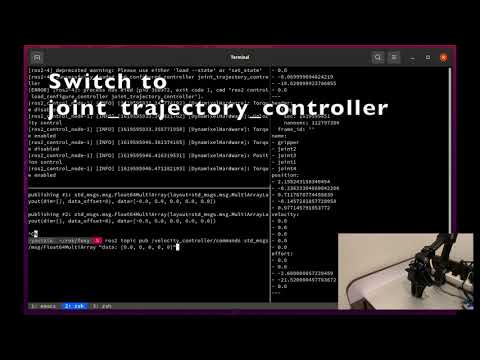
To run the same demo without any hardware attached, uncomment use_dummy in the <hardware> block of the same xacro, so that it reads:
<hardware>
  <plugin>dynamixel_hardware/DynamixelHardware</plugin>
  <param name="port_name">/dev/ttyUSB0</param>
  <param name="baud_rate">1000000</param>
  <param name="use_dummy">true</param>
</hardware>
Then follow the same instructions as for the real robot. No serial port is opened in this mode, so port_name can name a device that does not exist. baud_rate is still parsed and range-checked before the dummy takes over, so it has to be a valid value even here: 0 fails initialization under use_dummy exactly as it would on real hardware.
The dummy has no interpolation: a position command is reflected into the position state immediately, so the robot jumps straight to each trajectory point rather than travelling to it. Only plain position mode clamps the target, to ±π, matching a servo that cannot leave a single turn; extended_position, multi_turn and current_based_position are all unclamped. A velocity command is integrated over the control period instead, and a pwm command is mirrored into the effort state.
The package builds and tests in the official ROS containers, which is exactly what CI does -- no ROS installation on the host is needed. Start the container from the host, with your workspace mounted:
docker run -it --rm -v ~/ws:/ws -w /ws ros:rolling-ros-base bash # or lyrical, jazzy, humbleThen, inside it (the image already exports ROS_DISTRO):
apt-get update && rosdep update
rosdep install --from-paths src --ignore-src -r -y
source /opt/ros/$ROS_DISTRO/setup.bash
colcon build --symlink-install
colcon test --packages-select dynamixel_hardware && colcon test-result --verbose
colcon test runs the ament_lint_common linters and four gmock suites: the plugin itself (parameter parsing and validation, the lifecycle callbacks, all eight control modes, mode switching and the error-tolerance behavior), the dummy driver, the workbench driver, and a pluginlib load test. It also runs a launch_testing integration test, test/launch/test_dummy_bringup.launch.py, which brings up ros2_control_node with a two-joint dummy robot, spawns joint_state_broadcaster and joint_trajectory_controller, and asserts that the controller manager and both controllers are running, that /joint_states is published, and that a trajectory goal converges. It runs under run_test_isolated.py, so it gets its own ROS_DOMAIN_ID and is safe on a busy machine. Registering it needs controller_manager at configure time; where that is missing the test is simply not registered, and the build logs controller_manager not found - skipping the dummy bringup launch test.
- Open pull requests against the
rollingbranch. A bot comments on pull requests that target another branch. - After a pull request merges, maintainers apply the
backport-humble,backport-jazzyorbackport-lyricallabel and Mergify opens the matching backport pull request. A backport that conflicts is commented on for manual resolution rather than merged. - Keep the distro branches content-identical: distro-specific behavior belongs in
compat.hppor in a CMake version check, never in diverging branches.
Apache License 2.0. See LICENSE.