
App Clone is an Xposed/LSPosed module that raises the AOSP clone-profile limits on AOSP-derived firmware, so many independent clone users can be created and run at once. It also includes a small launcher app for creating clones, installing apps into them, and pinning labelled home-screen shortcuts.
Source and support: https://github.com/doccstat/appclone.
- Create multiple clone profiles; start or stop each profile when needed.
- Choose system default, start all, or stop all after reboot.
- Install an app that is already installed for the main user into a clone.
- Launch an app inside a specific clone, starting the profile if it is stopped.
- Pin a home-screen shortcut for one app in one clone.
- Label shortcuts with the clone id, app name, or clone name.
- Auto-pin a shortcut when an app is added to a clone.
- Delete one profile or all profiles; the main user is untouched.
- Export a diagnostics file when clone creation fails.
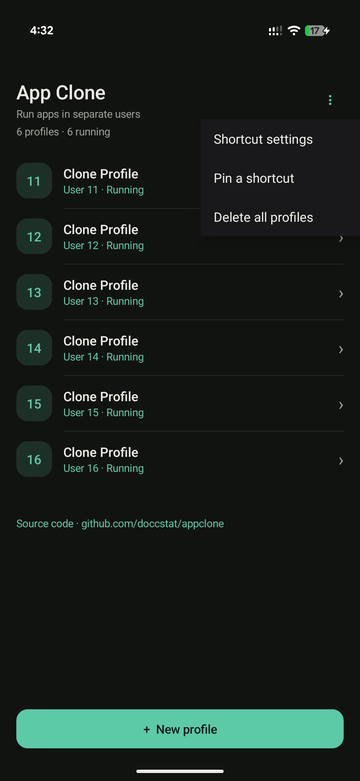
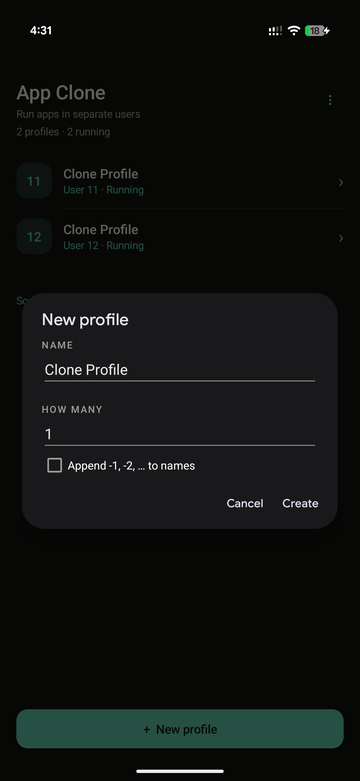
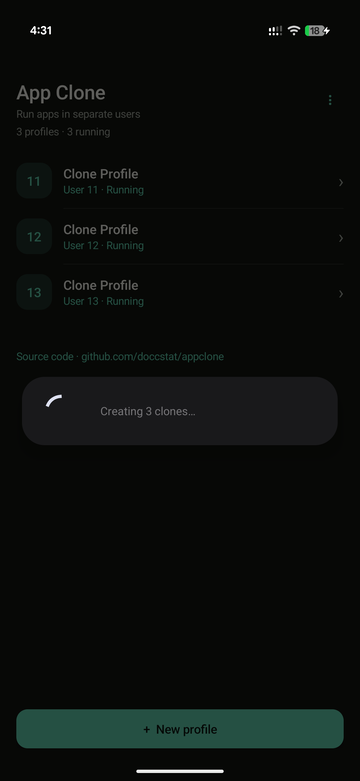
| Profiles | New profile | Creating clones |
|---|---|---|
 |
 |
 |
- Android 13+ (API 33+). Verified on Android 17 (API 37), Pixel 11 Pro Fold. Android 13–16 have the same AOSP clone user type and limit checks but are not yet device-tested.
- Root with LSPosed (or another legacy-Xposed-API framework) that can load a
module into
system_server. - Root access for the launcher app (
su), granted through KernelSU or another root manager on first use.
- Download the APK from Releases.
- Install it for user 0.
- Enable it in LSPosed and set its scope to
system(android). - Reboot.
- Open App Clone and grant root when prompted.
- The list shows every clone profile and whether it is running. Use Stop to stop its apps and notifications without deleting data, or Start to resume it. Controls support non-ephemeral clone profiles belonging to user 0.
- New profile creates one or more clones; the name is suggested for you.
If creation fails, the error dialog offers Export logs; attach the saved
appclone-diagnostics-*.txtfile to the issue. - Tap a profile to pick its apps. Tap an app row to install it into the clone, Open to run it there, Delete clone to remove the profile and its data. Open and home-screen shortcuts automatically start a stopped profile and wait for it to unlock before launching the app. Existing shortcuts work too; no re-pinning is needed. If startup fails, an error is shown instead.
- Delete all profiles (⋮ menu) removes every clone; your main user is untouched.
- Pin a shortcut (⋮ menu) lists each clone app once; pick the app, then the clone profile if the app is in more than one. The launcher asks you to confirm.
- Settings → After reboot (⋮ menu) offers:
- System default (initial setting): leave Android's profile startup behavior alone. This does not undo the module's profile-limit hooks.
- Start all profiles: start the clones after the main user unlocks.
- Stop all profiles: stop the clones after the main user unlocks, preserving stored data but pausing their apps and notifications. The choice applies on the next reboot, not immediately. It runs once as an Android job, waiting at least 10 seconds for system startup to settle. Android may delay it further, and profiles can run before it executes. Only the main user's clone profiles are controlled, with the same safeguards as manual Start/Stop. Settings shows the last result; reopen it to refresh.
- Settings also controls shortcut labels:
- Prefix clone app names uses
{id}: {name}by default, so a shortcut reads12: Chrome. The format accepts{id},{name}, and{clone}; the buttons below the field insert them. Any other text, including colons, is kept. - Auto-pin new clone apps requests a shortcut as each app is added to a clone. Labels apply to shortcuts created after the change; re-pin an existing shortcut to rename it.
- Prefix clone app names uses
Open App Clone and grant root before relying on reboot actions. Root must be available after reboot; force-stopping the app or Android background restrictions can prevent or defer the job. Failures are recorded in Settings and exported diagnostics, not retried in a loop. An interrupted job resumes unfinished profiles; a process kill before saving progress can repeat the last operation. Changing the setting cancels queued work, though an in-flight operation may finish. No always-running service or automatic idle-stop policy is added.
Reboot actions are not a permanent lock: manual Start/Stop and shortcuts still
work after the job finishes. Queued targets can override changes made before
it finishes. New profiles still start for initialization. Each clone keeps
its own /data/user/<clone-id>/ app data. Unlock the main user before starting
a clone.
- The label setting renames the module's own pinned shortcuts only. Pixel Launcher's app-drawer entries for clone users are labelled by the launcher process; renaming those would require a separate launcher hook.
- Shortcut labels are free text; line breaks are collapsed to spaces.
- Custom ROMs and OEM firmware that remove or change the AOSP clone-profile classes are not supported.
App Clone changes Android framework behavior through an Xposed/LSPosed module. It requires root and is intended for personal use on devices you own. It is not affiliated with Google, Android, LSPosed, or any device manufacturer. Use it at your own risk and keep a backup: creating, deleting, or modifying clone users can remove their app data, and an incompatible framework or firmware update can prevent the device from booting. The authors are not responsible for data loss, warranty issues, or problems caused by other modules or firmware.
App Clone is licensed under the GNU General Public License, version 3 only
(GPL-3.0-only). See the
license text. This
program is distributed in the hope that it will be useful, but WITHOUT ANY
WARRANTY; without even the implied warranty of MERCHANTABILITY or FITNESS FOR A
PARTICULAR PURPOSE.
Report issues with the bug report form.
It asks for the device/ROM build, module and framework versions, reproduction
steps, LSPosed/Vector logs, and the output of pm create-user/dumpsys user.
If creation fails, tap Export logs in the dialog and attach the saved
appclone-diagnostics-*.txt file. Without the exact error and framework logs,
an OEM-specific failure usually cannot be diagnosed.