An extended NotificationsAPI for Dart Web notifications.
Examples of notifications on different platforms.
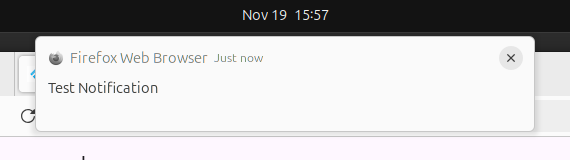
Example of a simple notification:
JsNotificationsPlatform.instance.showNotification("Test Notification", tag: "test");

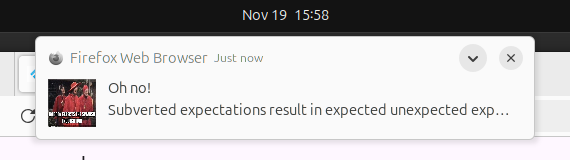
Example of a notification with actions:
JsNotificationsPlatform.instance.showNotification(
    "Oh no!",
    body: "Subverted expectations result in expected unexpected expectations. Anyway, check the icon...",
    tag: "inquisition",
    icon: "https://pbs.twimg.com/media/CtCG_f4WcAAJY-1.jpg",
    actions: [
        JSNotificationAction(action: "dismiss", title: "Whatever"),
        JSNotificationAction(action: "unexpected", title: "Didn't expect that"),
    ],
    requireInteraction: true,
);Note: when hovering over the notification to display actions, the image is not displayed.


The Dart Web package is limited in showing notifications, one can only show a title, body, and icon. This package extends the NotificationsAPI to allow for more customization.
Add the following to your pubspec.yaml file:
dependencies:
  js_notifications: ^0.0.5
That's it — no further setup is required. The service worker ships as a bundled asset of the
package (deployed automatically to assets/packages/js_notifications/assets/js_notifications-sw.js
with every build) and is registered automatically at startup.
Previously you had to copy js_notifications-sw.js into your app's web/ folder manually. This is
no longer needed:
- The plugin automatically unregisters any legacy registration of the copied worker on startup.
- You can safely delete
web/js_notifications-sw.jsfrom your project.
If you want to extend the service worker (e.g. handle sendAction payloads with your own logic),
copy assets/js_notifications-sw.js from this package into your app's web/ folder (any name),
modify it, and register it explicitly:
await JsNotificationsPlatform.instance.registerServiceWorker(url: "/my_notifications-sw.js");To keep the bundled worker but register it under a custom scope, omit url and pass only scope
(or use the scopeUrl setter):
await JsNotificationsPlatform.instance.registerServiceWorker(scope: "/js_notifications/");The previously registered worker is unregistered automatically. Note: a custom scope outside the
worker script's directory requires your server to send a Service-Worker-Allowed header — for the
bundled asset that is any scope broader than its asset directory.
import 'package:js_notifications/js_notifications.dart';final _jsNotificationsPlugin = JsNotificationsPlatform.instance;The service worker registers automatically when the plugin loads, and any notification posted before registration finishes is queued rather than dropped — so no explicit call is required.
Await initialize() when you want to know whether notifications are actually available (it
returns false when service workers are unsupported, e.g. an insecure context that is neither
https nor localhost, or when registration failed):
final ready = await _jsNotificationsPlugin.initialize();
if (!ready) {
  // service worker unavailable — notifications cannot be shown
}

// or check synchronously at any point
final ready = _jsNotificationsPlugin.isInitialized;_jsNotificationsPlugin.requestPermission().then((permission) {
print(permission);
});
_jsNotificationsPlugin.showNotification('Title', {
    body: 'Body',
    icon: 'icon.png',
    badge: 'badge.png',
    image: 'image.png',
    tag: 'tag',
    data: {
      'key': 'value'
    },
  }
);
_Note: the tag is used to identify the notification, if a notification with the same tag is shown, the previous notification is replaced.
For convenient notification access, provide a tag or one will be generated via the uuid package, specifically uuid.v4()._
Here, we use the actions parameter to add actions to the notification. These are filled with JSNotificationAction objects.
JsNotificationsPlatform.instance.showNotification(
    "Click me",
    body: "An interactive notification",
    tag: "interactive",
    actions: [
        JSNotificationAction(action: "dismiss", title: "Click me"),
        JSNotificationAction(action: "click-me", title: "No, click me!"),
    ],
    requireInteraction: true,
);
There are convenience methods to create actions, fromAction, fromTitle and simpleWithIcon.
- macOS: Limited to 2 actions (text only) with
Settingsautomatically added as a 3rd option. - Windows: Limited to 3 actions, fully customizable.
- Linux: Usually limited to 3 actions, customizability based on distro & desktop environment.
For this, we use the requireInteraction: true option
JsNotificationsPlatform.instance.showNotification(
    "Attention",
    body: "I just wanted your attention",
    tag: "attention",
    actions: [
        JSNotificationAction(action: "dismiss", title: "Go away"),
    ],
    requireInteraction: true,
);_jsNotificationsPlugin.actionStream.listen((event) {
print(event);
switch (event.action) {
case "unexpected": {
_sendBasicNotification("I know, neither did they.");
break;
}
//... other actions
}
});
_jsNotificationsPlugin.dismissStream.listen((event) {
print(event);
});_jsNotificationsPlugin.getAllNotifications().then((notifications) {
notifications.forEach((notification) {
print(notification);
});
});_jsNotificationsPlugin.getNotification('my-awesome-notification-tag-here').then((notification) {
print(notification);
});Any and all feedback, PRs are welcome.