
This is a fork of pixelmatix/SmartMatrix 4.0.3 (MIT licensed, © 2020 Pixelmatix). It exists because stock SmartMatrix 4.0.3 does not compile on Arduino-ESP32 core 2.x or later, which is the default ESP32 core in current Arduino IDE releases, and because 4.0 silently dropped two ESP32 pinouts that the 3.x line supported.
The diff is two changes, both listed below. Teensy support is untouched and identical to upstream. Upstream is not inactive-by-policy — it is simply unmaintained since 4.0.3 (2020-12-18). If the original maintainer prefers to take these upstream, please say so and this fork will be discontinued in favour of the original. See Upstream status below.
| # | File | Change | Needed for |
|---|---|---|---|
| 1 | src/esp32_i2s_parallel.c |
3 added #include directives |
building on core 2.x / 3.x |
| 2 | src/MatrixHardware_ESP32_V0.h |
restored AZSMZ_ESP32Matrix_v12 and AZSMZ_ESP32Matrix_v15 |
boards wired for those pinouts |
No functional, structural, or API changes to the display path.
4.0.3's ESP32 I2S-parallel driver uses symbols that still exist in the
ESP-IDF 4.4 headers shipped with Arduino-ESP32 2.x, but are no longer reached by
that file's #include chain. The result is a build failure:
esp32_i2s_parallel.c:129: error: 'GPIO_PIN_MUX_REG' undeclared
esp32_i2s_parallel.c:130: error: 'GPIO_MODE_DEF_OUTPUT' undeclared
esp32_i2s_parallel.c:278: error: 'I2S0O_DATA_OUT0_IDX' undeclared
esp32_i2s_parallel.c:285: error: 'I2S1O_DATA_OUT8_IDX' undeclared
esp32_i2s_parallel.c:384: error: 'ESP_INTR_FLAG_IRAM' undeclared
                              'ESP_INTR_FLAG_LEVEL1' undeclared
Adding these three includes resolves it:
#include "soc/gpio_sig_map.h"   // GPIO_PIN_MUX_REG, I2S*O_* signal indexes
#include "hal/gpio_hal.h"       // gpio_set_direction()
#include "esp_intr_alloc.h"     // ESP_INTR_FLAG_IRAM, ESP_INTR_FLAG_LEVEL1
A community workaround using #include "esp32-hal.h" also works, but drags the
entire Arduino HAL into this file. The three includes above are narrower and
leave the build otherwise untouched. They are harmless on core 1.0.x, where those
headers were already reached transitively.
Note: core 3.x (IDF 5.x) is not verified — see Verification.
The 3.x teensylc line defined two more ESP32 boards in its hardware header:
AZSMZ_ESP32Matrix_v12AZSMZ_ESP32Matrix_v15
4.0 dropped both. A sketch that sets GPIOPINOUT to either one therefore hits
the #else fallback in MatrixHardware_ESP32_V0.h and is silently wired to the
"ESP32 forum" pinout instead — 14 signals on the wrong GPIOs, with no error and
no warning. On a board that is actually wired for v12/v15 that produces
garbage, and the cause is not obvious from the symptom.
This fork restores both branches, carrying the pin assignments over unchanged from the 3.x header. To select one:
#define GPIOPINOUT AZSMZ_ESP32Matrix
#include <MatrixHardware_ESP32_V0.h>
AZSMZ_ESP32Matrix is an alias for AZSMZ_ESP32Matrix_v15, the only revision
AZSMZ currently sells; both names select the same pins. AZSMZ_ESP32Matrix_v12
is still there for the older boards.
This is not specific to the AZSMZ names — it applies to every pinout in this
header, and it is inherited from upstream. An undefined identifier evaluates to
0 inside #if, and ESP32_FORUM_PINOUT is defined as 0, so a typo does not
fall through to the end of the chain: it matches the forum branch exactly.
Verified on this fork:
GPIOPINOUT |
compiles | branch taken |
|---|---|---|
AZSMZ_ESP32Matrix |
yes | AZSMZ v15 |
AZSMZ_ESP32Matrix_v15 |
yes | AZSMZ v15 |
AZSMZ_ESP32Matrix_v12 |
yes | AZSMZ v12 |
AZSMZ_ESP32Matrix_v99 |
yes, no warning | ESP32 forum |
So the panel ends up driven on 14 wrong GPIOs. The only signal is the
#pragma message line in the compile log — check it after any pinout change:
MatrixHardware_ESP32_V0.h:302:21: note: #pragma message: MatrixHardware: AZSMZ ESP32Matrix v15
Note that the resulting binary size is identical for the AZSMZ and forum pinouts, so the sketch size tells you nothing about which one was selected.
This cannot be caught in the preprocessor. #if sees only the substituted value,
never the identifier you typed, so no amount of #else/#error logic
distinguishes a typo from a legitimate 0. Catching it would require
renumbering ESP32_FORUM_PINOUT away from 0, which would break anyone who
hardcoded that value. If you need a pinout this file does not have, use
MatrixHardware_Custom.h as upstream's examples describe.
Beyond the renames documented in upstream's MIGRATION.md, one ESP32 change is
a silent behavioural trap:
Set SM_HUB75_OPTIONS_ESP32_INVERT_CLK in kMatrixOptions. 3.x hardcoded
CLK inversion; 4.x made it an option that defaults to off. A sketch that does
not set it clocks the panel on the wrong edge.
const uint32_t kMatrixOptions = (SM_HUB75_OPTIONS_ESP32_INVERT_CLK);Other 3.x → 4.x differences worth checking: SMARTMATRIX_*_OPTIONS_NONE was
renamed to SM_*_OPTIONS_NONE, and 4.x fillCircle and friends accept
(rgb24)CRGB(...) where 3.x's rgb24 had no CRGB constructor.
Not part of this fork, but worth knowing. For panels taller than 16 rows the two halves of the image are driven by two channel groups that end up in the same 16-bit word, so they must be read from the same source frame. That is not obvious from the code, and a misalignment between the halves is very hard to judge by eye on a fast-moving pattern.
To measure it rather than guess, add this to loadMatrixBuffers48() in
src/MatrixEsp32Hub75Calc_Impl.h — immediately after the layer walk, before the
for(int j=0; j<COLOR_DEPTH_BITS; j++) bitplane loop:
        // tempRow0 feeds BIT_R1/G1/B1 (upper half, rows 0-15)
        // tempRow1 feeds BIT_R2/G2/B2 (lower half, rows 16-31)
        if(currentRow == 0){
            static unsigned int dbgCount = 0;
            if((++dbgCount % 50) == 0)
                printf("LAGCHK upper=%u lower=%u\r\n",
                       (unsigned int)tempRow0[0].red, (unsigned int)tempRow1[0].red);
        }
Have the sketch write a frame counter into pixel (0,0) (upper half) and
(0,16) (lower half). The two numbers must be equal on every line; a persistent
lower == upper + 1 means the halves really are one frame apart. Costs one
printf per 50 calc passes.
Method note: prefer this to eyeballing. Judging sub-pixel alignment from a 1-pixel pattern sweeping past at ~150 Hz is unreliable — while developing this fork, an apparent one-column offset on a moving barcode turned out to be a misreading, while the instrumented check reported equality on every sample.
- Misleading
#pragma message. InMatrixHardware_ESP32_V0.hthe#pragma message "ESP32 forum wiring"sits inside the v15 branch. If you select v15 you get a message about forum wiring, which is not what is active. Harmless, but confusing while debugging a pinout. - Header name collision. Both this fork and SmartMatrix 3.x ship a file
called
MatrixHardware_ESP32_V0.h. If both libraries are installed, the one Arduino picks first wins. 3.x's copy does not defineAZSMZ_*, soAZSMZ_ESP32Matrix_v15silently evaluates to 0 and you land on the forum pinout. Keep only one of the two installed, or include the header by full path.
| Check | Result |
|---|---|
| Compiles on Arduino-ESP32 core 2.0.17 | ✅ verified |
| Unmodified 4.0.3 on core 2.0.17 | ❌ fails with the errors above |
| Panel output on hardware | ✅ verified, see below |
| Teensy builds | identical to upstream, untouched |
| Core 3.x (IDF 5.x) | ❓ not tested |
Examples verified to build on core 2.0.17 with this fork: MultipleTextLayers,
MultiRowRefreshMapping, FastLed_Functions. Note that these are cross-platform
examples whose MatrixHardware*.h includes are all commented out, so an ESP32
build needs the pinout selected first — this is upstream behaviour, not a fork
change:
#define GPIOPINOUT AZSMZ_ESP32Matrix_v15
#include <MatrixHardware_ESP32_V0.h>
#include <SmartMatrix.h>
Without it the build stops with
SmartMatrix.h:74: error: No MatrixHardware*.h file included.
(Adafruit_Gfx additionally requires the Adafruit_GFX library, which is an
unrelated third-party dependency.)
Tested on a 64x32 HUB75 32-row MOD16-scan panel, AZSMZ_ESP32Matrix_v15
pinout, Arduino-ESP32 core 2.0.17, QIO flash at 80 MHz, 4 MB partition
default, ESP32_I2S_CLOCK_SPEED 20 MHz, refresh depth 36, 4 DMA buffer rows.
What was established:
- The fork's
src/esp32_i2s_parallel.cdiffers from a separately hardware-verified SmartMatrix 3.x → core 2.x port only by those three#includelines. The I2S/DMA path is otherwise identical. - The two channel groups are confirmed to read the same source frame, using the instrumentation described in Debugging channel alignment (13/13 samples equal). There is no channel-group skew in the data path.
- Static column tests, a scrolling barcode, a moving circle, a per-column
static barcode, and the
FastLed_Functionsexample (noise + circle + scrolling text at brightness 30) all display correctly.
No functional defect was found in 4.0.3's display path. Vertical striping was reported during development of this fork but did not reproduce; the most likely explanations are the dropped-pinout issue (change 2, since fixed) and insufficient USB supply — the test panel could not be driven from laptop USB without the board browning out. Treat striping on a 4.0.3-derived setup as a supply or pinout problem before suspecting the library.
Core 3.x is built on ESP-IDF 5.x, which reorganised the I2S driver
(esp_driver_i2s) and changed the GPIO HAL again. Because
src/esp32_i2s_parallel.c writes I2S registers directly via
soc/i2s_struct.h rather than going through the driver, it is not
guaranteed that a three-#include fix is sufficient for 3.x. Treat core 3.x
support as unverified until someone actually compiles and runs it.
Checked against github.com/pixelmatix/SmartMatrix:
| Reference | State | Note |
|---|---|---|
| Latest release | 4.0.3, 2020-12-18 | current Library Manager entry |
| Maintainer's last commit anywhere | 2021-12-18 | Louis Beaudoin; the only later master commit (2023-06-11) is Eric Eason merging his own PR #174 |
Last commit on master |
2023-06-10 | master and teensylc both still have this bug |
Repo pushed_at |
2024-01-10 | a push to some branch, not a master commit |
| Issue #165 "Update to arduino-esp32 v2.0.3" | open since 2022-05 | same problem |
| Issue #171 "Can't compile to ESP32" | open since 2023-04 | reports the identical 'GPIO_PIN_MUX_REG' undeclared error |
| PR #175 "Platform 2 support" | open, unmerged since 2023-10-25 | +5/-0 in one file, mergeable_state=clean, no comments, no reviews; updated_at still equals created_at |
| Open issues | 56 |
So the fix has been proposed upstream several times and has not been merged. PR #175 is the closest comparison available: a minimal, conflict-free, 5-line patch sat untouched for three years, which is about as strong a signal as one can get about the maintenance situation. This fork exists because the official Library Manager entry does not build on the ESP32 core that current Arduino IDE ships by default.
If the original maintainer would rather take this upstream, this fork should be discontinued in favour of the original. The changes are small and additive; there is no reason to keep two copies of the library in circulation.
(upstream README follows unchanged)
SmartMatrix Library is designed to refresh HUB75 LED matrix panels and APA102-compatible addressable LEDs with high quality graphics, using simple Arduino sketches.
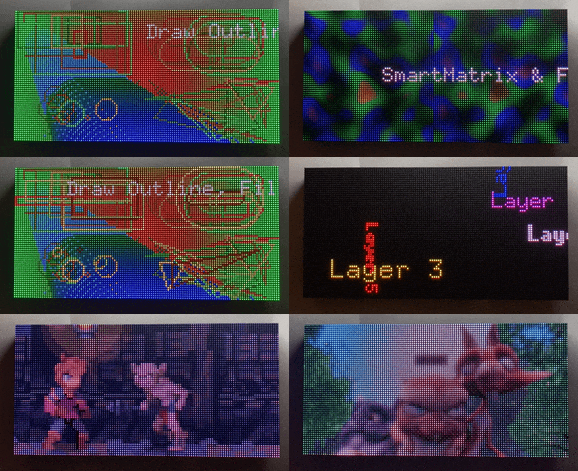
128x64 HUB75 Panel Driven with SmartLED Shield for Teensy 4
SmartMatrix Library 4 has support for Teensy 4.1, Teensy 4.0, Teensy 3.6, Teensy 3.5, Teensy 3.2/3.1, Teensy 3.0, as well as experimental support for ESP32.
The code to refresh HUB75 panels takes advantage of platform-specific peripherals like DMA, I2S, FlexIO, and once started runs in the background using interrupts. It takes a lot of work to port SmartMatrix Library to a new platform. We're working on an open source solution that will allow a lot more platforms to drive HUB75 panels, sign up for updates here if you're interested.
The documentation in this README contains the basic information you may need to run your first SmartMatrix Library sketch, but there is more detailed documentation in the SmartMatrix Wiki.
SmartMatrix Library runs best on the Teensy 4.0 and 4.1 using the SmartLED Shield for Teensy 4, available from Crowd Supply and other distributors. If you want to use the less powerful but more mature Teensy 3, you can use the SmartLED Shield for Teensy 3, available from Adafruit, SparkFun, Digi-Key, and other distributors around the globe. The shield doesn't require any soldering to get started, besides putting pins on your Teensy board.

SmartLED Shield for Teensy 3 - Photo Courtesy Adafruit
There's an adapter PCB design to upgrade SmartLED Shield for Teensy 3 to work with the Teensy 4.
You can wire up a bare Teensy 3.x to a HUB75 panel, but at a minimum it's recommended to use 5V level shifters to drive the panels with the voltage level they are expecting. There's a recommended circuit with latch chip to use with the Teensy 3 that will reduce the amount of pins used. The Teensy 4 requires an external latch.
The shields are Open Source Hardware, with design files posted in the /extras/hardware/ directories.
Teensy 4 support was contributed by Eric Eason
Teensy 4 APA102 support depends on FlexIO_t4 by KurtE, which is included as a submodule in src/lib/. The original FlexIO_t4 library is on GitHub
The ESP32 platform is supported with SmartMatrix Library 4.0, but not all features are up to par with the Teensy 3/4 ports. For details on the ESP32 port, see the Wiki
- Sketches written for SmartMatrix Library 3.x should work with SmartMatrix Library 4.0 with a few changes.
- See MIGRATION.md for details on how to update your SmartMatrix Library 3.x sketches for SmartMatrix Library 4.x
- A lot of files were subtly renamed, just changing the case. If you're trying to use git to check out a commit and get an error like
The following untracked working tree files would be overwritten by checkout, you may need to use git from the command line and add the-fparameter to force checkout (throwaway local modifications), as your git client might think it's overwriting the case-changed files and losing data.
- Support for Teensy 4 and ESP32
- Support for driving APA102 LEDs on Teensy platforms
- New "GFX" layers rewritten for better efficiency, and using Adafruit_GFX for drawing, fonts, including much larger fonts
- Support for panels with non-standard mapping, e.g. 16x32/4 (MOD4) panels
- See more features in the SmartMatrix Wiki
HUB75 RGB panels are typically used for LED billboards (e.g. Times Square), making them cost-effective and readily available. They’re much cheaper per-pixel than addressable LEDs, and available in a wide range of pixel pitch (as of now, 2 mm spacing up to 10 mm spacing per LED). They do require an external controller to continually send data to the panels to refresh them line by line, and that’s where the SmartLED Shield and SmartMatrix library come in. Adafruit, Sparkfun, and other distributors carry panels that are known to be compatible with SmartLED Shield and the SmartMatrix library, but most panels on AliExpress and other sources are compatible as well.
The pixel pitch and "RGB" are good search terms on Aliexpress, e.g. "P6 RGB" for a 6 mm pitch RGB HUB75 panel.

HUB75 Panels Ranging from P2 to P10 pitch
To download in Arduino Library form, see Releases on GitHub, or use Arduino Library Manager.
This documentation assumes you have a general knowledge of the Teensy 3 or Teensy 4, how to use the Arduino IDE, and the Teensyduino addon. If you need an overview of any of those tools, please use these references:
- PJRC - Teensyduino
- Arduino - Getting Started with Arduino
- For general Teensy support, not related to the SmartMatrix Shield or SmartMatrix Library, post a question at the PJRC Forum
Make sure you have a supported version of the Arduino IDE and Teensyduino add-on installed.
- Arduino IDE - version 1.6.5 or later recommended
- Teensyduino - use the latest version
Before continuing, use the blink example in the Arduino IDE to verify you can compile and run a sketch on your Teensy 3.1/3.2.
Download the latest version of the SmartMatrix Library, or install it from Arduino Library Manager:
SmartMatrix Releases - GitHub
Note: "SmartMatrix" Library used to be listed in Arduino Library Manager under "SmartMatrix3". You may need to look for the library in Arduino Library Manager or your libraries folder under either "SmartMatrix" or "SmartMatrix3" as we transition to the new name.
If you're not using Arduino Library Manager, you need to import the library into Arduino, see instructions from Arduino here:
Arduino - Libraries
Some of the examples depend on other libraries, which you can download separately, or install from Arduino Library Manager. See "External Libraries" below.
Start with the FeatureDemo Example project, included with the library. From the Arduino File menu, choose Examples, SmartMatrix3 (or SmartMatrix), then FeatureDemo.
Find the section at the top with the note // uncomment one line to select your MatrixHardware configuration, and uncomment the file appropriate for your hardware.
You should already have most of the correct Arduino settings to load the FeatureDemo sketch on your Teensy, from running the blink example earlier. For Teensy 3: under Tools, CPU Speed, make sure either 48 MHz or 96MHz (overclock) is selected. (Some libraries are not compatible with the 72MHz CPU). For Teensy 4, use the default CPU speed.
The examples are configured to run on a 32x32-pixel panel. If your resolution is different, adjust the kMatrixWidth and kMatrixHeight variables at the top of the sketch. You may also need to change kPanelType. Some common kPanelType settings:
- 32-pixel high panels, e.g. 32x32, 64x32:
SM_PANELTYPE_HUB75_32ROW_MOD16SCAN - 16-pixel high panels, e.g. 32x16:
SMARTMATRIX_HUB75_16ROW_MOD8SCAN - 64-pixel high panels, e.g. 64x64, 128x64:
SM_PANELTYPE_HUB75_64ROW_MOD32SCAN - For other less common panels, see more details in
MatrixCommonHub75.hand [the wiki][https://github.com/pixelmatix/SmartMatrix/wiki)
You can chain several panels together to create a wider or taller display than one panel would allow. Set kMatrixWidth and kMatrixHeight to the overall width and height of your display. If your display is more than one panel high, set kMatrixOptions to how you tiled your panels:
- Panel Order - By default, the first panel of each row starts on the same side, so you need a long ribbon cable to go from the last panel of the previous row to the first panel of the next row.
SM_HUB75_OPTIONS_C_SHAPE_STACKINGinverts the panel on each row to minimize the length of the cable going from the last panel of each row the first panel of the other row.- Note
SM_HUB75_OPTIONS_C_SHAPE_STACKINGisn't compatible with panels that require the Multi Row Refresh Mapping feature (if yourkPanelTypevalue includes the column size, it likely requires Multi Row Refresh Mapping, e.g.SM_PANELTYPE_HUB75_16ROW_32COL_MOD2SCAN)
- Note
- Panel Direction - By default the first panel is on the top row. To stack panels the other way, use
SM_HUB75_OPTIONS_BOTTOM_TO_TOP_STACKING. - To set multiple options, use the bitwise-OR operator e.g. for C-shape Bottom-to-top stacking:
const uint8_t kMatrixOptions = (SM_HUB75_OPTIONS_C_SHAPE_STACKING | SM_HUB75_OPTIONS_BOTTOM_TO_TOP_STACKING);
Click the Upload button, and the sketch should compile and upload to your Teensy, and start running right away.
You can use the FeatureDemo sketch (or other example sketches) as a way to get started with your own project. Inside loop(), find a demo section that is similar to what you want to do with your project, delete the other sections, and save it as as new sketch.
Some SmartMatrix examples require external libraries to compile. You may already have older versions of these libraries installed in Arduino that may be too old to work with SmartMatrix and the examples. It's usually best to use Arduino Library Manager and get the latest version of the library.
Installing Arduino libraries from GitHub has a couple pitfalls. This Adafruit tutorial explains the basics of installing libraries and how to avoid the pitfalls.
GifDecoder and AnimatedGIF
There are two libraries needed for the AnimatedGifs example. Both can be installed from Arduino Library Manager, or you can manually install from GitHub.
Adafruit_GFX
You can optionally use Adafruit_GFX with SmartMatrix Library. The new "GFX" layers in SmartMatrix Library are much more efficient, and allow for using large fonts for both static display or scrolling across the screen.
Install Adafruit_GFX using Arduino Library Manager or manually from GitHub
FastLED
If you're having trouble compiling sketches that use FastLED and are getting errors that refer to FastLED.h, try compiling the FastLED_Functions example first, which will help narrow down the issue. Also make sure you are using FastLED 3.1 or later.
This error means the FastLED library isn't installed (correctly):
fatal error: FastLED.h: No such file or directory
The FastLED version included with Teensyduino may lag behind the latest. It's better to install FastLED manually using the latest version available from GitHub, or using Arduino Library Manager. If you see any of these errors, you likely have an older version of FastLED installed:
no known conversion for argument 4 from 'CRGB' to 'const rgb24&'
error: 'inoise8' was not declared in this scope
This can be tricky to track down as Teensyduino installs libraries into your Arduino application directory, which might not be in your Arduino sketchbook. Look at the ResolveLibrary messages you get when compiling to make sure that the version of library you want is being used.
You can manually install the latest version of FastLED (3.x or higher) from the FastLED releases page: https://github.com/FastLED/FastLED/releases
Teensy Audio Library
The SpectrumAnalyzer sketches require the Teensy Audio Library, which is included in Teensyduino. If you have trouble compiling, first make sure you can compile the FastLED_Functions example, as FastLED 3.x is also a requirement for this sketch. If you're missing the Audio library, the best way to install is by running the Teensyduino installer. Make sure the "Audio" library is checked during the install.
If you need help, the best place to ask for help, or look for others who may have worked through the same issue, is the SmartMatrix Community. Please don't post troubleshooting requests here on GitHub.
If you've found a bug with the code, or want to suggest an improvement, feel free to submit a GitHub Issue or Pull Request.
A lot of work went into writing SmartMatrix Library, designing the shields, and releasing them as Open Source Hardware. There are real costs in maintaining the documentation and community forum. If they are useful to you and you'd like to say thank you, you can make a donation via PayPal. Thank you!