
Plays .prt particle effects in PixiJS v8 and PixiJS v7, in Three.js, and in
Phaser 4 (each via its own subpath — see below). Design effects
visually in the
particlr editor, export a .prt file, play it
back with this package. The editor previews through this exact runtime, and
playback is deterministic (same document + seed ⇒ same frames) — so what you
tune is what you ship.
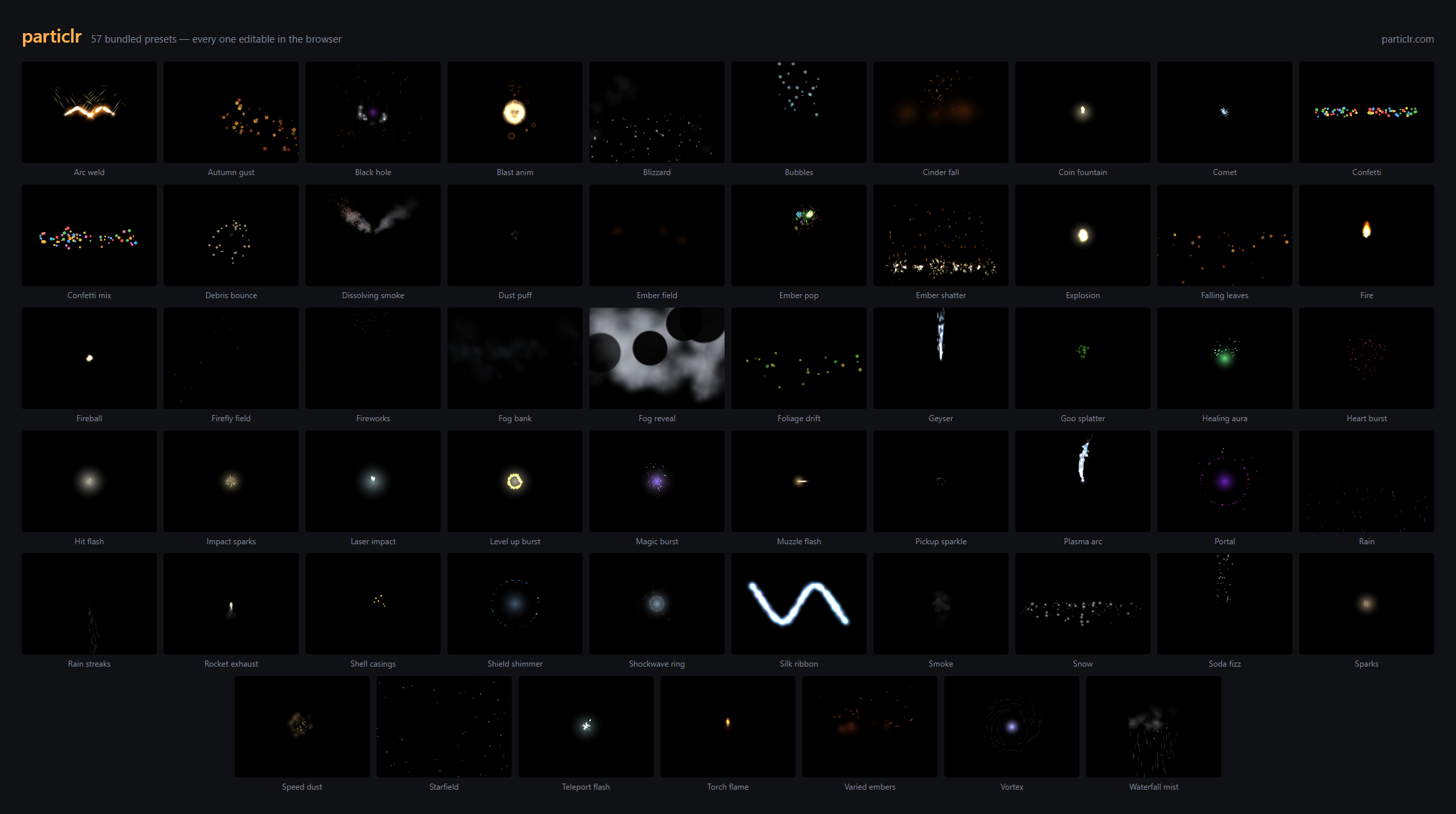
The editor ships 57 CC0 presets — every frame above was rendered by this package. Open any of them at particlr.com, tune it, export, and play it back here.
npm install @particlr/runtime pixi.jsimport { Application } from "pixi.js";
import { parseParticle, Effect } from "@particlr/runtime";
import { PixiParticleRenderer } from "@particlr/runtime/pixi";
const app = new Application();
await app.init({ width: 800, height: 600 });
document.body.appendChild(app.canvas);
const doc = parseParticle(await (await fetch("boom.prt")).text()).doc!;
const fx = new Effect(doc, { seed: 1337 });
const view = new PixiParticleRenderer(fx);
view.container.position.set(400, 300); // where the effect plays
app.stage.addChild(view.container);
app.ticker.add((t) => {
fx.step(t.deltaMS / 1000); // advance the simulation
view.sync(); // draw it
});That's the whole integration. Live example: particlr.com/sample.
Games still on PixiJS v7 (the v7 → v8 migration is a large lift) can consume the
same .prt effects without migrating. The v7 adapter lives on its own subpath —
one subpath per major: ./pixi is the v8 adapter, ./pixi7 is the v7
adapter. The pixi.js peer range is ">=7.2.0 <9", and the v7 adapter is
developed and golden-tested against pixi.js 7.4.3.
The only differences from the v8 snippet above are the v7 Application idiom
(the constructor is synchronous — no await app.init() — and the canvas is
app.view, typed as ICanvas, hence the cast) and the import path:
import { Application } from "pixi.js";
import { parseParticle, Effect } from "@particlr/runtime";
import { PixiParticleRenderer } from "@particlr/runtime/pixi7";

const app = new Application({ width: 800, height: 600 });
document.body.appendChild(app.view as HTMLCanvasElement);

const doc = parseParticle(await (await fetch("boom.prt")).text()).doc!;
const fx = new Effect(doc, { seed: 1337 });
const view = new PixiParticleRenderer(fx);
view.container.position.set(400, 300); // where the effect plays
app.stage.addChild(view.container);

app.ticker.add(() => {
  fx.step(app.ticker.deltaMS / 1000); // advance the simulation
  view.sync();                        // draw it
});
The public API is identical to ./pixi — migrating between majors is a one-line
import change. The v7 adapter is at full feature parity: flipbooks, trails
(including connect ribbons), sub-emitter rendering (driven by the shared core),
and dissolve (via a forked v7 particle pipeline). The one hard limit is the
renderer: v7 has no WebGPU, so the v7 adapter is WebGL only.
Performance note, measured honestly: v7's ParticleContainer renders full
Sprite objects where v8 renders lightweight Particle structs, so the v7
adapter costs more CPU per frame by construction — in our benchmarks (~500
live particles, high churn, real Chromium) the v7 adapter spends ~1.3 ms per
frame where v8 spends ~0.1 ms. Both are far under a 60 fps budget; at typical
2D-game particle counts this is not a limiting factor, but if you are pushing
tens of thousands of particles, v8 is the faster target.
A second rasterizer for the same 2D simulation, @particlr/runtime/three.
The host gets a THREE.Group (view.root) it places in its own scene; the
effect renders on that object's local XY plane, with an optional billboard
mode that faces the camera every frame.
npm install @particlr/runtime threeimport { WebGLRenderer, Scene, PerspectiveCamera, Vector3 } from "three";
import { parseParticle, Effect } from "@particlr/runtime";
import { ThreeParticleRenderer } from "@particlr/runtime/three";
const renderer = new WebGLRenderer({ antialias: true });
renderer.setSize(innerWidth, innerHeight);
document.body.appendChild(renderer.domElement);
const scene = new Scene();
const camera = new PerspectiveCamera(50, innerWidth / innerHeight, 1, 10000);
camera.position.set(0, 300, 900);
camera.lookAt(0, 0, 0);
const doc = parseParticle(await (await fetch("boom.prt")).text()).doc!;
const fx = new Effect(doc, { seed: 1337 });
const view = new ThreeParticleRenderer(fx, { billboard: true });
view.root.position.copy(new Vector3(0, 200, 0)); // where the effect plays
scene.add(view.root);
function frame(now: number): void {
fx.step(1 / 60); // advance the simulation
view.sync(); // draw it
renderer.render(scene, camera);
requestAnimationFrame(frame);
}
requestAnimationFrame(frame);That's the whole integration; see samples/three-game/src/main.ts for a
click-to-spawn host with resize handling and one-shot teardown.
| Option | Type | Default | Notes |
|---|---|---|---|
billboard |
boolean |
false |
false: quads stay in the group's local XY plane. true: the corner offset is applied in view space after transforming the instance center, so every particle faces the camera regardless of the group's orientation. Applies to sprite quads only — trail ribbons are not billboarded and always stay in the group's local plane, even with billboard: true. Live-settable (view.billboard = true). |
loadTexture |
(dataUrl: string) => Promise<Texture> |
browser decode via createImageBitmap |
Overrides async user-texture loading — useful in Node/test environments without a DOM Image/createImageBitmap. |
Every .prt blend mode maps to a fixed RawShaderMaterial blend-function
tuple. This table is the single source of truth — it is unit-tested
verbatim in test/three/materials.test.ts.
.prt blend |
blending | blendSrc | blendDst | blendEquation |
|---|---|---|---|---|
normal |
CustomBlending | OneFactor | OneMinusSrcAlphaFactor | AddEquation |
add |
CustomBlending | OneFactor | OneFactor | AddEquation |
multiply |
CustomBlending | DstColorFactor | OneMinusSrcAlphaFactor | AddEquation |
screen |
CustomBlending | OneFactor | OneMinusSrcColorFactor | AddEquation |
erase |
CustomBlending | ZeroFactor | OneMinusSrcAlphaFactor | AddEquation |
erase is destination-out, exactly as the editor thumbnails model it. Every
tuple assumes a premultiplied source: textures upload straight alpha, and
the fragment shader multiplies texel × tint in straight alpha then writes
premultiplied output (vec4(rgb·a, a)).
The sim is 2D screen-space, y-down, with rotation in degrees,
clockwise-positive (Pixi conventions). Three is y-up, CCW-positive. The
adapter maps sim space to the group's local space as position: (x, y) → (x, -y) and angle: aAngle = -velAngleDegrees · π/180 (radians, negated),
so an effect authored in the editor reads upright and un-mirrored on the
plane. A particle renders size px wide and size × frameAspect px tall
(frameAspect = frameHeight / frameWidth), matching the Pixi adapter's
sizing rule.
This is not a 3D particle sim. Positions stay (x, y); the .prt
document is unchanged; there are no 3D emission shapes, no 3D forces, and no
depth interaction between particles and the rest of your scene beyond
standard alpha-blended draw order (V2_DESIGN Part 1). If your effect needs a
camera-facing plane, use billboard: true; if it needs true 3D particles,
this adapter is not that — place a plane where you want the effect and treat
it as a 2D layer in a 3D world, the same way a sprite-based VFX plane works
in any 3D engine.
Every layer's Mesh carries mesh.userData.particlrLayer (the layer's
index in the document) so a host can find/inspect a specific layer's draw
call. A layer with a trail adds an extra Mesh for the ribbon, tagged with
both userData.particlrLayer (same index) and userData.particlrTrail = true.
- Float color precision. Attributes carry the float tint/alpha values
straight from
LayerRenderBuffers— no 8-bit quantization (Pixi'stintis a packed 8-bit-per-channel color). Raster goldens are per-adapter (Three-vs-Three across commits), so this divergence from Pixi's output is expected, not a bug. - Flipbook and dissolve-noise UV windowing, not texture swapping. Pixi
swaps per-particle frame textures; the Three adapter is one instanced
draw per layer, so the vertex shader computes a UV window into the whole
sheet/noise tile from a per-instance
aFrameattribute instead. Concrete consequence for a layer that combines a flipbook with dissolve: the Three adapter samples the dissolve noise at the per-frame WINDOWED uv (already offset/scaled to the flipbook cell), whereas Pixi's dissolve shader samples at the raw SHEET uv — so the erosion pattern shifts per flipbook frame in Three but not in Pixi. This does not fail any test (raster goldens are per-adapter, never cross-compared); it is a visual difference between adapters. - No color-space or tone-mapping participation. Materials are
RawShaderMaterial, so three injects no attribute declarations and applies no color-space transform or tone mapping — output matches Pixi's un-color-managed pipeline. - Textures are never disposed by the adapter. Built-in and user
textures are cached at module scope for the page's lifetime, same policy
as the Pixi adapter;
view.destroy()disposes geometries and materials only.
@particlr/runtime/phaser renders the same 2D simulation as a native Phaser
citizen: a Phaser.GameObjects.Container on the scene's display list, batched
through Phaser's own quad batcher. Phaser 4 only — phaser is an optional
peerDependency pinned to ">=4.2 <5", and the adapter is developed and
golden-tested against phaser 4.2.1. (Phaser 3's pipeline API shares nothing
with v4's RenderNode API; a v3 backend would be a second renderer, and v3 is
frozen at 3.90.0.)
npm install @particlr/runtime phaserregisterParticlr() adds two Phaser-native calls: this.load.particlr(key, url)
in preload, and this.add.particlr(key, x, y) in create. The .prt fetch
runs inside Phaser's own LoaderPlugin — runtime code never fetches.
import Phaser from "phaser";
import { registerParticlr } from "@particlr/runtime/phaser";

registerParticlr(); // once, before new Phaser.Game — idempotent, no import side effects

class Demo extends Phaser.Scene {
  preload(): void {
    this.load.particlr("boom", "assets/boom.prt");
  }
  create(): void {
    this.add.particlr("boom", 400, 300);
  }
}

new Phaser.Game({ type: Phaser.WEBGL, width: 800, height: 600, scene: Demo });
That's the whole integration; see samples/phaser-game/src/main.ts for a
click-to-spawn host. this.add.particlr takes an options object as its fourth
argument — { seed?: number, autoStep?: boolean }, seed defaulting to 1337 —
and returns the Container, whose particlr property holds { fx, view } if you
need the Effect and the renderer afterwards.
registerParticlr() writes only to Phaser's static registries
(FileTypesManager and GameObjectFactory.prototype), so calling it before any
Game exists is fine, and calling it twice is a no-op.
Teardown. Destroying the returned GameObject tears the renderer down with it
— container.destroy(), or a scene shutdown that destroys the display list,
releases the scene UPDATE listener and any dissolve render nodes. Nothing else
to remember on this route. Hosts using the class route below own that step
themselves: call view.destroy().
Skip the sugar when you want the cross-adapter R4 surface — .gameObject,
.warnings, .ready, .sync(), .destroy() — and deterministic, host-driven
stepping. autoStep: false leaves the scene UPDATE event unhooked, so nothing
advances until the host calls step() itself; every golden test runs this way.
import Phaser from "phaser";
import { parseParticle, Effect } from "@particlr/runtime";
import { PhaserParticleRenderer } from "@particlr/runtime/phaser";

class Demo extends Phaser.Scene {
  private fx!: Effect;
  private view!: PhaserParticleRenderer;

  async create(): Promise<void> {
    const doc = parseParticle(await (await fetch("assets/boom.prt")).text()).doc!;
    this.fx = new Effect(doc, { seed: 1337 });
    this.view = new PhaserParticleRenderer(this.fx, { scene: this, autoStep: false });
    this.view.gameObject.setPosition(400, 300); // where the effect plays
    this.add.existing(this.view.gameObject);    // the class route does not add itself
  }

  override update(_time: number, deltaMs: number): void {
    this.fx.step(deltaMs / 1000); // advance the simulation
    this.view.sync();             // draw it
  }
}| Option | Type | Default | Notes |
|---|---|---|---|
scene |
Phaser.Scene |
— | Required. The scene whose TextureManager, renderer, and UPDATE event the view uses. |
autoStep |
boolean |
true |
true: the view hooks Phaser.Scenes.Events.UPDATE, converts Phaser's delta ms to seconds, steps, and syncs — add it to a scene and it plays. false: nothing advances until the host calls step() and sync(). |
loadTexture |
(dataUrl: string) => Promise<Texture> |
browser decode via createImageBitmap |
Overrides async user-texture loading — useful in Node/test environments without a DOM Image/createImageBitmap. |
Either way, step(dt) clamps to maxDt internally, so a hidden tab's catch-up
delta cannot explode emitters (see "Stepping semantics" below).
Every .prt blend mode maps to a fixed Phaser blend slot. This table is the
single source of truth — it is unit-tested in test/phaser/blendModes.test.ts
and visually smoke-tested in the raster golden lane.
| particlr | Phaser mode | GL config | Note |
|---|---|---|---|
normal |
NORMAL (0) |
FUNC_ADD; ONE, ONE_MINUS_SRC_ALPHA |
premultiplied |
add |
custom slot via addBlendMode |
FUNC_ADD; ONE, ONE |
Phaser's built-in ADD (1) is ONE, DST_ALPHA — differs on non-opaque targets; we register our own |
multiply |
MULTIPLY (2) |
FUNC_ADD; DST_COLOR, ONE_MINUS_SRC_ALPHA |
matches |
screen |
SCREEN (3) |
FUNC_ADD; ONE, ONE_MINUS_SRC_COLOR |
matches |
erase |
ERASE (17) |
FUNC_REVERSE_SUBTRACT; ZERO, ONE_MINUS_SRC_ALPHA |
dst·(1−srcA) − 0 ≡ destination-out; equivalent to our AddEquation; ZERO, ONE_MINUS_SRC_ALPHA |
The custom add slot is registered once per renderer and reused; erase is
destination-out, exactly as the editor thumbnails model it.
Phaser is y-down with clockwise-positive rotation, the same as Pixi, so pool
x/y pass through with no axis flip and no angle negation (unlike the Three
adapter). A particle renders size × stretch px wide and
size × (frameHeight / frameWidth) px tall, matching the Pixi adapter's sizing
rule. Phaser's texture space is bottom-up, so the adapter emits bottom-up frame
UVs — flipbook frame 0 is the top-left tile on screen, the same as everywhere
else.
Decoded textures are registered in the scene's TextureManager under namespaced
keys: particlr:builtin:<id> for the five built-ins, particlr:user:<hash> for
embedded user sheets, particlr:dissolve-noise for the dissolve noise tile.
Nothing else in your game collides with them, and nothing under that prefix is
yours to manage — the cache is page-lifetime and the adapter never destroys a
texture (same policy as the Pixi and Three adapters). view.destroy() tears down
the GameObjects and releases the layer's dissolve render nodes only.
A user texture that is still decoding renders the built-in circle-soft
placeholder and swaps in when ready; view.ready resolves after every swap. An
unknown texture ref pushes an E10 warning onto view.warnings and falls back to
circle-soft.
Full parity with the Pixi and Three adapters — sprites, flipbooks, trails
(including connect ribbons), sub-emitter rendering, and dissolve (a
BatchHandlerQuad subclass carrying the shared erosion shader). Two limits worth
knowing:
- WebGL only. Phaser 4's Canvas renderer can express neither the blend table
nor the quad batch path, and Canvas is deprecated in v4. On a Canvas game the
view pushes a warning onto
view.warningsand renders nothing. Build the game withtype: Phaser.WEBGL(orPhaser.AUTOon a WebGL-capable browser). - GameObject alpha is a no-op on particles. Setting
alphaonview.gameObject(or on a layer GameObject) does not fade the effect: the batch submission writes each particle's own tint and alpha out of the simulation buffers and ignores the display-object alpha it inherits. To fade a whole effect, animate it in the document or throughEffect's parameters, not through the GameObject.
The five builtin textures (circle-soft, circle-hard, square, spark,
smoke) are generated as pure-math straight-alpha RGBA pixel buffers — no
canvas, no GPU, no pixi.js. They are the same bytes every adapter uploads.
If you are writing a renderer for another engine and only need those buffers,
import them from the ./textures subpath, which pulls in zero Pixi code:
import { generateBuiltinTexture, type TextureData } from "@particlr/runtime/textures";

const tex: TextureData = generateBuiltinTexture("circle-soft");
// tex.width, tex.height, tex.pixels (Uint8Array, RGBA, non-premultiplied)
This entry needs no pixi.js peer and runs in bare Node. The ./pixi and
./pixi7 adapters continue to re-export generateBuiltinTexture for existing
consumers, so nothing changes for Pixi users.
step(dt) is host-driven and defensive (tightened in 0.6.0):
dtis first scaled bytimeScale, then clamped to 1/20 s so a tab unhide or debugger pause cannot explode emitters. When the clamp engages, emitter displacement for that step is scaled byclampedDt/rawDt, so a moving emitter's world-space trail stays continuous instead of teleporting.- Zero, negative, and
NaNdt are silent no-ops — a NaN never enters the simulation.+Infinityis clamped like any large dt. - Playback is deterministic: same document + same seed + same dt sequence produces the same frames.
Effect also has a movable emitter for trails (setEmitterPosition),
playback control (timeScale, onDone), a host-driven attractor
(setAttractor), and per-instance parameters (setParam, setColorParam) —
one boom.prt, many weapons. The full API is documented in the shipped
TypeScript types, and the .prt format's reference is the bundled JSON
Schema: import schema from "@particlr/runtime/particle.schema.json".
MIT. See LICENSE.