
A free, open-source color tool for designers and developers. Pick colors from images, create palettes,
generate gradients, and convert color formats - all running entirely in your browser.




Created by Bilal Malik
Follow on Github bilalmlkdev
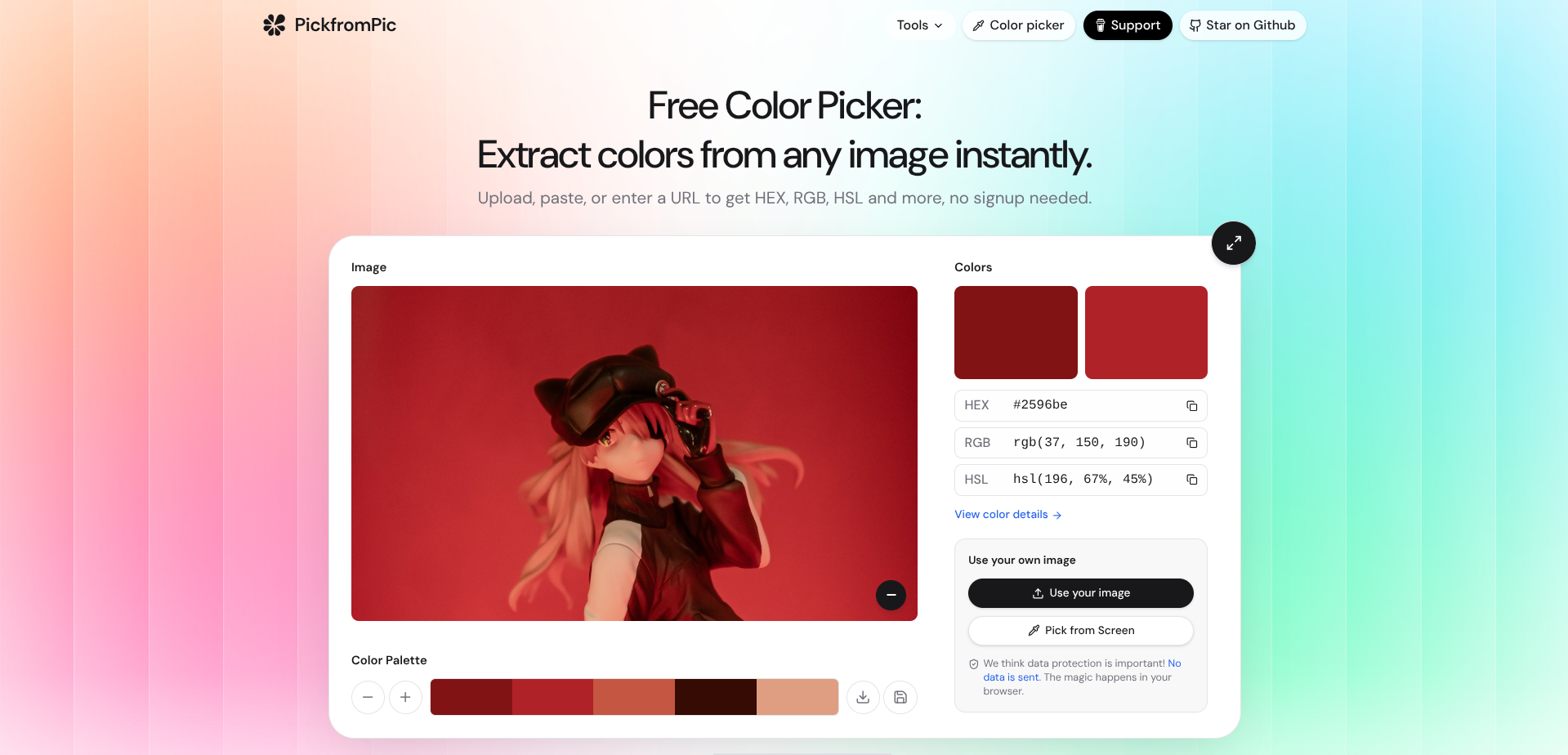
Most color tools ask you to install a browser extension, create an account, or upload your work to some server before you can pick a single pixel. pickfrompic doesn't. Open the site, drag in an image, and you're picking colors within a second. No sign-up, no upload to a remote server, nothing leaving your machine. Every color you pick, every palette you save, and every gradient you build stays right in your browser.
Built for two kinds of people: someone who just needs to grab a color from a screenshot quickly, and someone who wants to build entire design systems from reference images without opening Figma.
Drop in any PNG, JPG, GIF, or WEBP - or paste a URL, or use the built-in screenshot tool to grab an entire website. The app extracts dominant colors automatically and displays them as a palette. Click any swatch and the image lights up with dots showing every pixel that matches that color. The magnifier lens follows your cursor down to the individual pixel, and the EyeDropper API lets you pick colors from anywhere on your screen.
A full-featured picker with HEX input, plus format-specific sliders for HSB, HSL, and RGB when you need fine control. The right panel always shows all eight format cards - HEX, RGB, HSL, HSB, CMYK, LAB, LUV, and HWB - so you can grab whatever format your project needs without switching views.
Build color palettes from scratch or from picked colors. Add up to 20 colors, remove any you don't want, randomize the entire set with one click, or pick directly from your screen. Each color shows its format values in cards on the right side. Export as CSS variables, JSON, SVG, or PNG.
Build linear and radial CSS gradients. Add and remove color stops, adjust positions with sliders, set the angle visually, and toggle between linear and radial. The live preview updates as you tweak, and you get the CSS code ready to copy or download as SVG or PNG.
Everything you save lands in the Dashboard - a dedicated space for palettes, colors, and gradients you want to keep. Three tabs keep things organized, grid and list view options, search, multi-select with bulk delete, and every saved item can be exported or downloaded individually. Powered by localStorage - instant, private, and works offline.
Nothing should get between you and the color you're looking for. No forced account creation, no server round-trip for saving a palette, and no single "correct" way to use the tools. Tools are always one click away. Copy actions happen instantly with per-item feedback. The maximize button lets you focus on one tool without distraction. Every piece of the UI is there because it answers a question you'd otherwise have to ask yourself mid-work: what format do I need, and how do I get it fast?
Does pickfrompic require an account or internet connection? No. Everything is stored locally in your browser. You can use it offline after the first load.
Where do my saved colors go?
Nowhere but your own browser's localStorage. No backend, no database, nothing leaves your device.
Will my saved items carry over if I switch browsers? No, since storage is local. Export your items first using one of the supported formats.
Is pickfrompic free to use? Yes, entirely. Open-source under the MIT license. You're free to self-host or modify it.
Does pickfrompic work on mobile? Built and tuned for desktop. It will load on mobile, but you'll get the best experience on a desktop or laptop.
Does the EyeDropper work everywhere? The EyeDropper API requires Chrome, Edge, or Opera. Every other feature works in all modern browsers.
Technologies
- React 19 - UI framework
- TypeScript - Type safety
- Vite - Build tool and dev server
- TailwindCSS v4 - Styling
- React Colorful - Color picker component
- React Router v7 - Client-side routing
- Lucide React - Icons
- react-extract-colors - Image color extraction
pickfrompic/
├── public/                 Static assets (favicon, manifest, service worker)
├── src/
│   ├── components/
│   │   ├── atoms/          Button, Input, Swatch, Dropdown, TopLoader
│   │   ├── molecules/      Logo, ModalShell, PillTabs, RangeSlider
│   │   ├── organisms/      Header, ImageUploader, ColorPalette, ColorDetailsPanel
│   │   ├── modals/         ExportPaletteModal, SaveItemModal, ImageSourceModal
│   │   └── templates/      ToolCard, PageShell
│   ├── context/            DashboardContext
│   ├── hooks/              useDocumentTitle
│   ├── pages/              MainPicker, ColorConversion, CreatePalette, GradientMaker, Dashboard
│   └── utils/              ColorMath, exportUtils
├── index.html
├── vite.config.ts
└── package.json
The color logic lives in ColorMath.ts (conversion functions) and exportUtils.ts (format-specific export generation). Those two files are the place to start if you're reading the source.
| Format | Example | Description |
|---|---|---|
| HEX | #2596be |
Hexadecimal color code |
| RGB | 37, 150, 190 |
Red, Green, Blue (0-255) |
| HSL | 198, 67%, 45% |
Hue, Saturation, Lightness |
| HSB | 198, 80%, 74% |
Hue, Saturation, Brightness |
| CMYK | 81, 21, 0, 25 |
Cyan, Magenta, Yellow, Key |
| LAB | 59, -16, -27 |
CIELAB color space |
| LUV | 58, -12, -27 |
CIELUV color space |
| HWB | 198, 18%, 25% |
Hue, Whiteness, Blackness |
Chrome 76+, Firefox 62+, Safari 12.1+, Edge 79+. The EyeDropper API (pick from screen) requires Chrome, Edge, or Opera.
git clone https://github.com/bilalmlkdev/pickfrompic.git
cd pickfrompic
npm install
npm run dev
No environment variables, no backend - npm run dev is the whole setup.
- Color harmony suggestions (complementary, analogous, triadic)
- Accessibility contrast checker
- Custom image cropping before extraction
- Additional export formats
Contributions are welcome. Fork, branch, test against npm run dev, and open a pull request. Small fixes are just as welcome as larger features.
This project is licensed under the MIT License.
MIT License

Copyright (c) 2026 Bilal Malik

Permission is hereby granted, free of charge, to any person obtaining a copy
of this software and associated documentation files (the "Software"), to deal
in the Software without restriction, including without limitation the rights
to use, copy, modify, merge, publish, distribute, sublicense, and/or sell
copies of the Software.

The above copyright notice and this permission notice shall be included in all
copies or substantial portions of the Software.

THE SOFTWARE IS PROVIDED "AS IS", WITHOUT WARRANTY OF ANY KIND, EXPRESS OR
IMPLIED, INCLUDING BUT NOT LIMITED TO THE WARRANTIES OF MERCHANTABILITY,
FITNESS FOR A PARTICULAR PURPOSE AND NONINFRINGEMENT. IN NO EVENT SHALL THE
AUTHORS OR COPYRIGHT HOLDERS BE LIABLE FOR ANY CLAIM, DAMAGES OR OTHER
LIABILITY, WHETHER IN AN ACTION OF CONTRACT, TORT OR OTHERWISE, ARISING FROM,
OUT OF OR IN CONNECTION WITH THE SOFTWARE OR THE USE OR OTHER DEALINGS IN THE
SOFTWARE.