

Wherewolf is a local SQL workbench for CSV, Parquet, JSON, JSON Lines, and XLSX files. It opens a native PyQt6 desktop window and runs queries with DuckDB by default. There is no browser UI and no local web server.
Wherewolf requires Python 3.12 or newer.
uv tool install wherewolf
wherewolf
wherewolf-desktop is an equivalent entry point. Both commands open the native desktop window.
wherewolf --version prints the release version and the build commit, for example
wherewolf 0.6.0 (build 202db43). It answers without loading Qt, so it works over SSH and on a
machine with no display — useful for confirming which build an installed copy actually is.
uv tool install places no desktop entry, so a Linux desktop has nothing to read the
application icon from and shows a placeholder — on Wayland this is true no matter what the
application sets on its own windows, because the compositor resolves the icon through the
installed entry rather than through the window. Install one:
wherewolf install-desktop-entryThat writes wherewolf.desktop into $XDG_DATA_HOME/applications and the icon into the
hicolor theme at every standard size, which also puts Wherewolf in the application menu.
wherewolf remove-desktop-entry deletes both again. Neither command loads Qt's GUI, so both
work over SSH.
The default installation is DuckDB-only: it neither installs nor imports PySpark. To enable the local Spark engine, install the extra and a Java runtime compatible with PySpark (CI uses Java 21):
uv tool install 'wherewolf[spark]'Spark runs locally as local[1] with bounded driver memory. It is not a remote- or cluster-Spark
client. When you select Spark, completion immediately uses a curated set of common functions and
then discovers the local runtime's built-in SQL functions in the background. That discovery can
start the bounded local JVM before your first Spark query; DuckDB-only startup still does not
import PySpark or require Java.
The input-dialect selector accepts DuckDB, Spark, Azure SQL, Oracle, and PostgreSQL SQL and
transpiles it to the selected local DuckDB or Spark engine. Oracle and PostgreSQL are source
languages, not database connections. Dialect translation is provided by sqlglot, so not every
vendor-specific construct can run locally; for example, Oracle ROWNUM and DUAL queries are
reported before execution and must be rewritten for the selected engine.
git clone https://github.com/beallio/wherewolf.git
cd wherewolf
./run.sh uv sync
./run.sh uv run wherewolf
For the optional Spark engine from a source checkout, run ./run.sh uv sync --extra spark after
installing Java.
For SSH sessions, cron jobs, CI, and Makefiles, wherewolf query runs one DuckDB SQL statement
without loading Qt or PySpark and exports every result row to a local file:
wherewolf query SQL [--dataset ALIAS=PATH ...] --format {csv,parquet,xlsx} -o PATH [--force]
--dataset is repeatable and optional, so a constant query needs no source file:
wherewolf query 'SELECT 1 AS answer' -o /tmp/answer.csvBind each source file to the alias used by the SQL. The alias must be a SQL identifier; JSON, JSON Lines, CSV, Parquet, and XLSX inputs use the same format support as the desktop catalog.
wherewolf query 'SELECT region, sum(amount) AS total FROM sales GROUP BY region' \
  --dataset sales=/srv/imports/sales.csv \
  --format parquet \
  --output /srv/reports/sales-by-region.data
csv is the default format. CSV, Parquet, and XLSX are supported; like desktop full export,
XLSX is limited to 100,000 rows. The output argument is honored exactly — choosing CSV does not
rename sales-by-region.data to a .csv suffix. A destination that already exists is rejected
unless --force is given. A directory is never an output, and an output that resolves to an input
dataset is always rejected, including through a symlink, even with --force.
On success the command writes exactly Wrote <absolute-path> to standard output and exits 0.
Dataset, SQL, and export failures write one wherewolf query: ... line to standard error, leave
standard output empty, and exit 1. Argument syntax errors retain argparse's exit code 2.
This v1 command accepts SQL only as one command-line argument and writes results only to a file. SQL files, stdin, named parameters, saved queries, stdout result streaming, Spark execution, progress reporting, cancellation, and workspace/catalog persistence are intentionally not part of this mode.
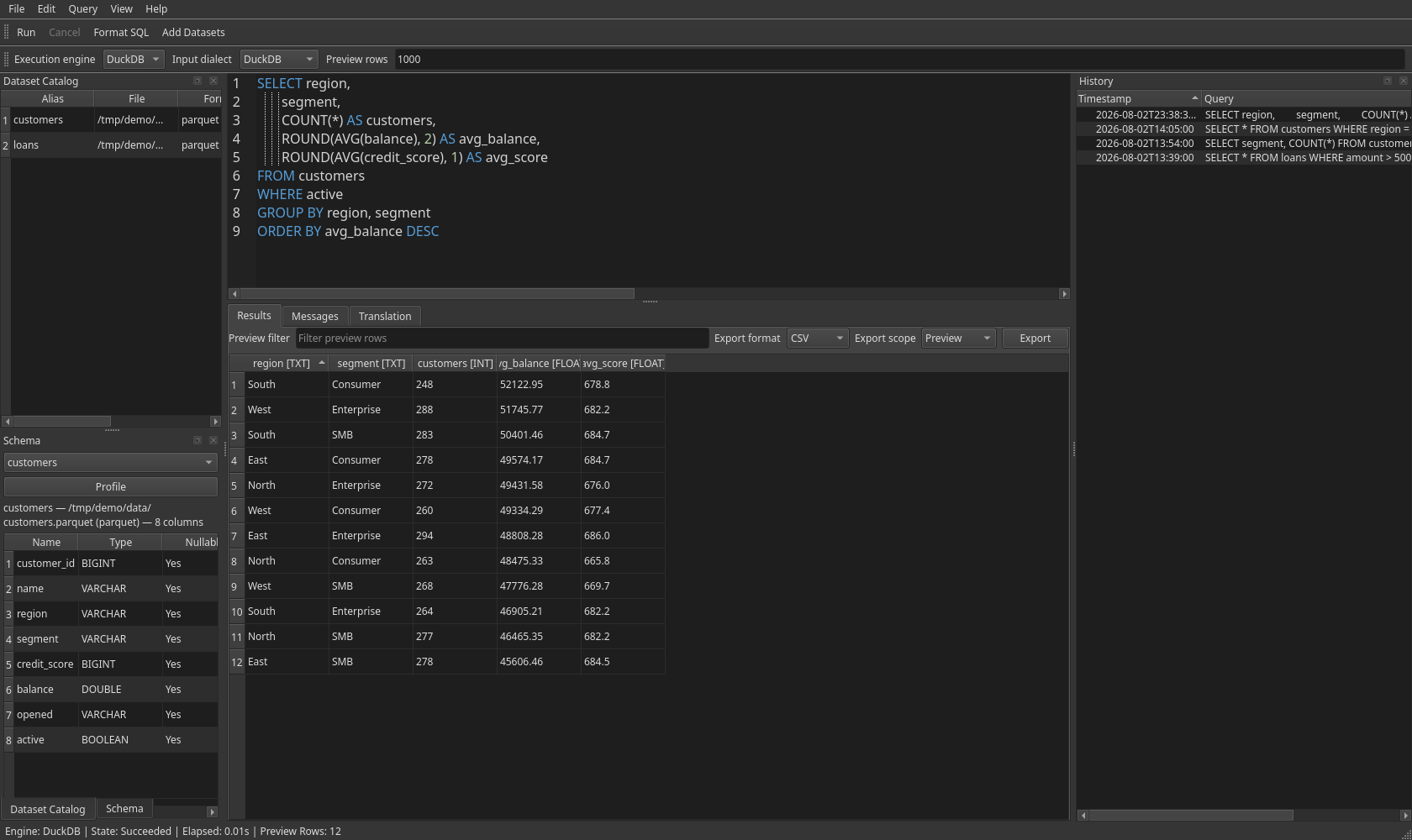
- Choose Add Datasets… or drag supported local files into the Dataset Catalog. The command opens the operating system's native multi-file dialog where Qt supports it.
- Each file receives a table alias. Rename it from the catalog context menu when needed, then use the alias in SQL. The Schema dock reports discovered columns and any schema error.
- Write SQL in the editor and press Ctrl+Return to run the selection or current statement.
Ctrl+Space opens completion, and Ctrl+Shift+F formats SQL. On macOS, use the platform's
equivalent shortcut conventions.
Completion is case-insensitive and can match a prefix, token initials, or the middle of a
catalog alias, visible SQL alias, column, or function: for example,
salesfindsmonthly_sales,dtfindsDATE_TRUNC, andtruncalso findsDATE_TRUNC. - Press Ctrl+. to request cancellation of the active query. The status bar and Messages tab
report state, timing, preview rows, truncation, and errors.
For an unmodified, single DuckDB statement from this editor, an engine error that includes an
exact
LINE/caret location is clickable in Messages: activating it returns to the originating tab and marks the failing token. After you edit the SQL, the old error remains readable but no longer navigates, so it cannot point at changed text. - History records successful queries in
~/.wherewolf/history.json. Selecting a history entry restores its SQL only — your dataset catalog is left untouched — and does not run it. The History dock shows timestamp and query in separate sortable columns. Use File → Clear History to remove saved entries, View → Reset Layout to restore the default layout, or the View menu to reopen a dock you have closed.
The Schema dock also profiles the selected dataset — null percentage, approximate distinct
count, min, max and mean — computed with DuckDB SUMMARIZE on a background thread. Profiling
runs automatically when a dataset is added and is skipped for sources above a configurable size.
Both settings live in View → Preferences…, alongside editor font size, theme, and completion.
Window geometry, docks, splitter proportions, editor font size and theme, preview row count, recent dataset directory, profiling and completion preferences are persisted between desktop sessions.
The grid displays a bounded preview — 1,000 rows by default, adjustable from 10 to 100,000 —
preserves values for typed sorting, and supports selection, spreadsheet-compatible TSV copy,
filtering, column reordering, hiding, auto-sizing, and reset. Column headers carry a data-type
badge such as age [INT] or when [DATE], with the exact type in the tooltip. Right-click a
header to copy or insert its name, adjust columns, or choose an ordering action.
When a DuckDB preview is truncated, choose Count all rows beside the truncation notice to count the captured query without replacing the preview. The count runs separately, so current filters, local sorting, selection, exports, and query history stay intact. If a captured source changed or disappeared after the preview, Wherewolf asks you to rerun the query instead of showing a count for different data. Spark and multi-statement previews do not offer this control.
Eligible truncated DuckDB previews also offer Previous and Next. Each page re-runs the
captured statement with the preview size that was in effect when the query ran, so changing the
preference later does not change the page boundaries. The grid, preview export, and selection export
follow the page on screen; Export Full Results still uses the original captured request. A source
that changes after page 1, a cancelled page fetch, or a page error leaves the current page on screen
and asks you to rerun rather than mixing data from different source versions. Pagination is limited
to one DuckDB statement. Without a final ORDER BY, Wherewolf warns that page membership is not
stable. A top-level order removes that syntactic warning, but duplicate sort keys and volatile
expressions such as ORDER BY random() still need a unique, deterministic order supplied by you.
Selecting multiple result cells shows their cell, distinct-value, and null counts above the grid.
For selections made entirely from numeric columns, it also shows the sum, mean, minimum, and
maximum. To read a long value or nested JSON without grid truncation, right-click the cell and
choose Inspect Cell, or press Ctrl+I while the grid is focused; the floating inspector can
copy the complete unescaped value.
The preview filter accepts either plain text, matched as a substring, or a SQL predicate over
the previewed rows such as age > 40 or region = 'East' AND amount > 100. An invalid
expression reports the engine's error and leaves the current rows in place. Filters apply to the
preview only and cannot reach rows excluded by the row limit.
Clicking a header only sorts the local preview. While a local sort is active, Wherewolf labels it Sorted preview only. It does not rerun or alter your query. To change the result order of the query itself, use Apply Ascending Order to Query or Apply Descending Order to Query from that header's context menu, then run the resulting SQL. These commands apply only to a result produced by the current editor tab; open a saved query in a tab before changing its SQL order.
Export Preview… writes the currently displayed, bounded preview. Export Full Results… re-executes the captured query rather than exporting only the preview. For DuckDB, full CSV and Parquet exports stream directly to disk without materializing the entire result in Python; full XLSX export is intentionally capped at 100,000 rows. Choose the scope and file format beside the results grid and press Export; the save dialog offers only the selected format and confirms before replacing an existing file. If a source file changed on disk after the query ran, the export reports it rather than reporting plain success. Spark has no desktop full-export adapter, so full Spark export is not available.
Wherewolf is licensed under GPL-3.0-only. Releases through 0.5.2 remain available under MIT;
their original text is retained in LICENSES/MIT-pre-0.6.txt, and those prior grants remain
valid.
Run the test suite from a source checkout:
./run.sh uv run pytestThe project uses uv, ruff, and ty; see AGENTS.md for the project execution and
cache-isolation contract.