
SharkTrust gives connected products a stable Domain Name System (DNS) name and automatically managed Transport Layer Security (TLS) certificates, so customers can open a device's web interface using ordinary HTTPS. With a publicly trusted certificate authority, users can connect by name without installing a private root certificate or accepting a self-signed certificate warning. The device can remain on a private network, with its web interface accessible only where that network permits.
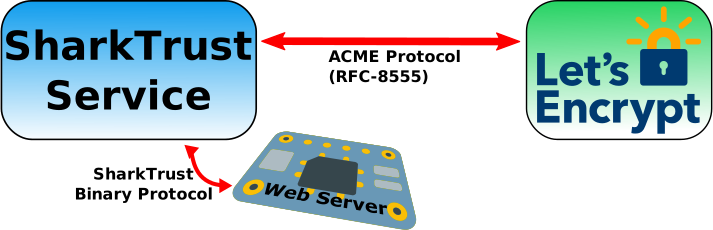
For a device manufacturer, this removes certificate enrollment and renewal from the customer's setup procedure. Integrate the SharkTrust client and a zone credential into your product, and the device can register its address, obtain its name, and download its certificate and private key. The portal handles the certificate authority's Automated Certificate Management Environment (ACME) protocol; the embedded client uses a small binary protocol over TLS.
Start here: Try the C examples, read the user manual, or install your own portal with Ansible.
Consider a product whose web server receives 192.168.1.50 from the customer's
router. SharkTrust can give it a name such as controller.devices.example.com
and publish that name with the private address. A browser on a network that can
reach the device opens https://controller.devices.example.com. DNS provides
the address, and the certificate authenticates the name.
When the address changes, the client reports the new address. When the certificate needs renewal, the portal obtains a replacement and the client fetches and installs it. Customers can find device links on the zone's web page instead of keeping track of changing IP addresses.
flowchart TD
    B["Customer browser"] -->|"Direct HTTPS"| D["Embedded device"]
    D -->|"Enroll and fetch credentials"| P["SharkTrust portal"]
    P -->|"ACME"| CA["Certificate authority"]
    P -->|"Publish addresses and validation records"| DNS["Authoritative DNS"]
    B -->|"Resolve device name"| DNS
The browser-to-device connection goes directly to the embedded web server. SharkTrust supplies DNS and certificates; network routing and device access control remain part of your product and deployment. This portal does not provide a reverse connection or remote-access tunnel.
- Less customer setup. Provision a zone credential in firmware so each device can register without asking the customer to manage certificates or DNS records.
- Names that follow devices. Devices report address changes while retaining their registration and assigned name, including when they use DHCP.
- A smaller client integration. Keep ACME account management, validation, and renewal in the portal. Use the OpenSSL example with an existing web server or the SharkSSL/Minnow example as a starting point for an embedded HTTPS server.
- Your own namespace. Use a product zone such as
devices.example.com, or let customers register and manage their own zones. One portal can manage multiple zones with separate owners and device registrations. - Control over deployment. Run your own portal on a public Linux server or on premises, using the supplied Ansible installer and systemd service.
- Certificate lifecycle management. The portal uses ACME Renewal Information (ARI) when offered by the CA, with a fallback based on actual certificate lifetime. Clients still need to fetch and install renewed credentials.
- Tools for daily administration. Manage zone users and roles, optionally use Microsoft Entra sign-in, review certificate retries, and preview inactive devices before removing them.
| Deployment | Useful when | What to plan |
|---|---|---|
| Public portal | Devices at multiple customer sites should share your product's enrollment service. | A public domain, reachable authoritative DNS, portal HTTPS, and outbound device access to the portal. Device web servers can stay private. |
| On-premises portal | A customer wants local control of the portal, device records, and DNS service. | Local DNS resolution and HTTPS trust, plus public delegation and CA access when using a public CA. See the on-premises guide. |
SharkTrust defaults to Let's Encrypt and can use another compatible ACME CA. Public trust depends on the selected CA being trusted by the browser. A private CA requires its trust root on the computers and devices that rely on it. Installing the portal on premises does not by itself make public certificate issuance work offline.
The portal generates and stores device private keys and delivers them over TLS. Choose SharkTrust when that centralized key model fits your product. Protect the portal, backups, enrollment credentials, and device storage accordingly. For a different integration model, see SharkTrustX, which lets its device clients perform ACME and keep their certificate private keys on the device. The two portals use different client protocols.
The examples include a public test credential for the
st.sharkssl.com device zone. They connect to
sharktrust.realtimelogic.com; no zone registration is required for this test.
From a POSIX shell with a C compiler, Make, and OpenSSL development libraries:
# Run from a checkout of this repository.
cd examples
make
./SharkTrust-Client-Obfuscated-Key
The client registers a device and saves its downloaded certificate and key.
Follow the client guide to use them with your web server,
poll for renewals, or replace the bundled getzkey.ch with your own zone's file.
The shared test credential is intentionally public; use your own zone for your
product's namespace and credential control.
The manual index provides reading paths for product developers, zone owners, and portal operators. Each chapter is also linked here:
| Guide | Contents |
|---|---|
| User manual | Delegate and register a zone, find devices, obtain client credentials, manage users, and recover access. |
| Installation with Ansible | Prepare DNS and a Linux server, configure the controller, install, set administrator credentials, and verify the service. |
| On-premises installations | LAN addressing, public DNS validation, local resolvers, and HTTPS bootstrap. |
| Portal configuration | Installer variables, runtime settings, CA selection, and administrator credentials. |
| Operations and upgrades | Service commands, renewal behavior, backups, updates, migration, and branding. |
| Troubleshooting | DNS delegation, certificate warnings, email errors, client enrollment, and service failures. |
| Architecture | DNS and certificate flows, runtime components, key ownership, and security boundaries. |
| Device protocol | TLS transport, commands, binary responses, credentials, and client lifecycle. |
| Stored data | SQLite records, certificate profiles, renewal schedules, and legacy data import. |
| C client integration | Build and adapt the OpenSSL and SharkSSL/Minnow examples. |
The portal application is in www, the clients are in examples, and deployment automation is in ansible. The portal runs on Mako Server and uses BIND9 for authoritative DNS.
This repository is distributed under the MIT License. Mako Server and the TLS libraries used by your device have their own licensing terms. See the SharkTrust product page or contact Real Time Logic for product integration and deployment assistance.