

🌐 Company Site - Here
🤗 Hugging Face - Here
🛟 Help Center - Here
🐳 Docker Hub - Here
The camera screens are the native FacePlugin ones, launched from React Native. Jump: Quick start · How it works · Get the engine · Run the demo · SDK License · Setup on your own app · About SDK
- Clone FaceLivenessDetection-ReactNative
- Engine binaries (auto-downloaded by the runner, or place them yourself) — Get the engine
-
python run_android.py(orpython run_ios.pyon macOS) with a physical phone plugged in - Home status shows Ready → Active liveness / Passive liveness unlock
That is the whole setup. The scripts do the rest: the yarn workspace install, the JS bundle, pod install on macOS, the build, and the install onto the phone. They need Node 18+ and JDK 17 (plus
Xcode 15+ on macOS) on PATH, and stop with a named hint if anything is missing.
FacePlugin Face Liveness Detection SDK for React Native is a fully on-device anti-spoofing demo for KYC and remote identity verification. It detects printed photos, video replay, 3D masks and deepfake-style attacks — no extra hardware, no cloud.
It runs liveness two ways, and this app ships both:
- Passive — the engine scores a single frame. Nothing is asked of the user.
- Active — the face is scored for spoofing first, and only a face that clears that gate is asked for a short sequence of actions (blink, smile, turn your head). A recorded video cannot answer a sequence it has never seen, so the two together are the stronger check against replay.
All processing stays on the phone. No biometric data leaves the device.
This app does not re-implement liveness in JavaScript. The native module launches the native
FacePlugin screens, so the camera preview, the anti-spoofing gate, the shuffled challenge sequence,
the progress ring and the result card are the same code that
FaceLivenessDetection-Android
and FaceLivenessDetection-iOS run.
The engine is the same binary too — facerecognitionsdk.
That is also why this package has no camera dependency: there is no JS preview, no frame shuttling over the bridge, and no overlay to draw.
| Layer | Where it lives | What it is |
|---|---|---|
| React Native UI | example/src/ |
Home, Settings and About — rebuilt to match the native screens |
| TypeScript API | src/ |
FaceLivenessEngine, FaceLiveness, and the typed options/result models |
| Android native | android/src/main/java/ |
The bridge, plus the vendored face-liveness-kit and face-liveness-active |
| iOS native | ios/ |
The Swift bridge, plus the vendored FaceLivenessKit and ActiveLiveness |
The vendored native sources are copies of the Android face-liveness-kit and face-liveness-active
modules and their iOS counterparts, FaceLivenessKit and ActiveLiveness. They are kept in step
with the native repositories rather than maintained separately here.
| Screen | What it does | Built with |
|---|---|---|
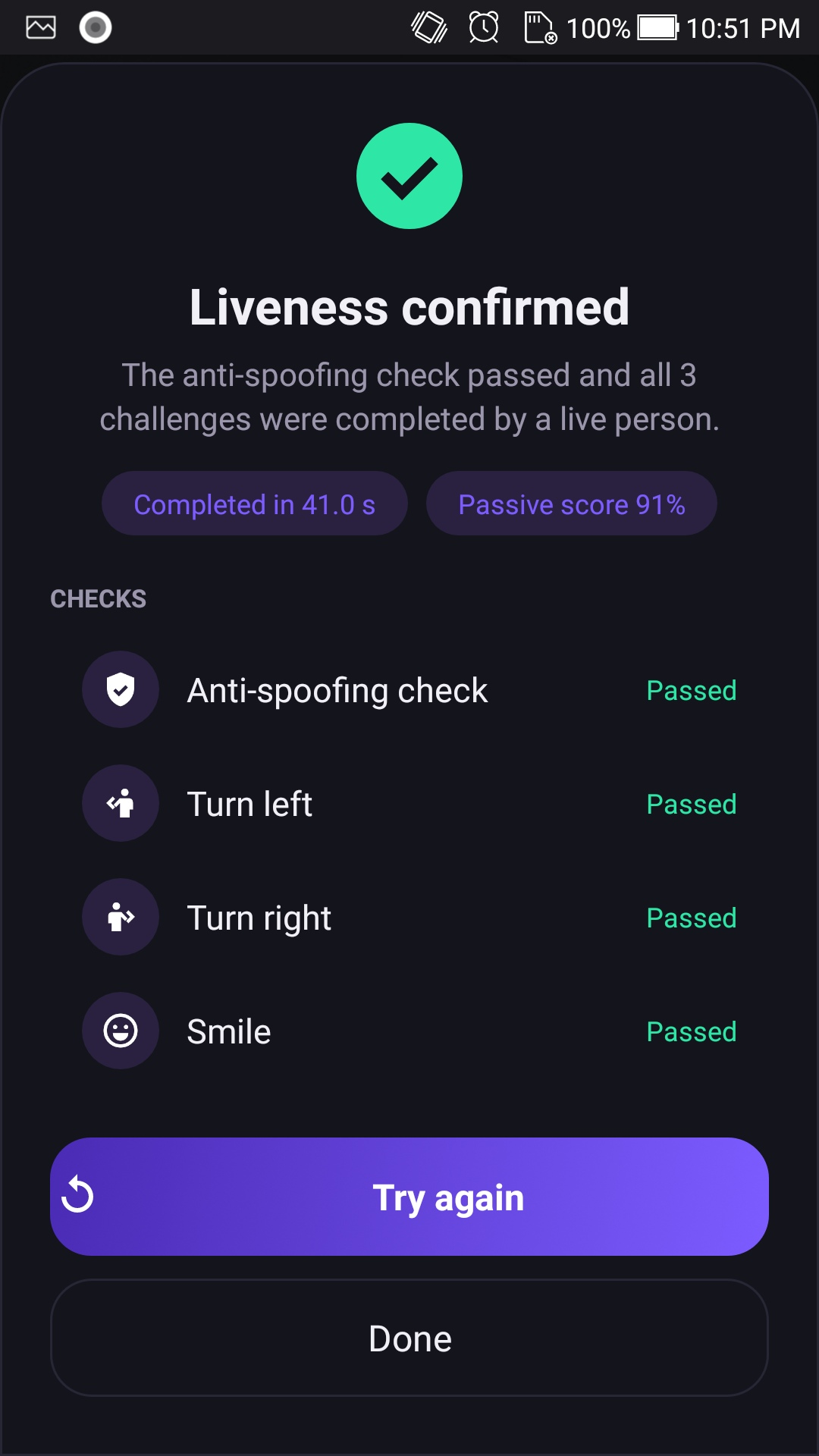
| Active liveness | Anti-spoofing gate, then a guided challenge sequence — face frame, progress ring, per-step instructions, and a pass/fail result listing every check | Native |
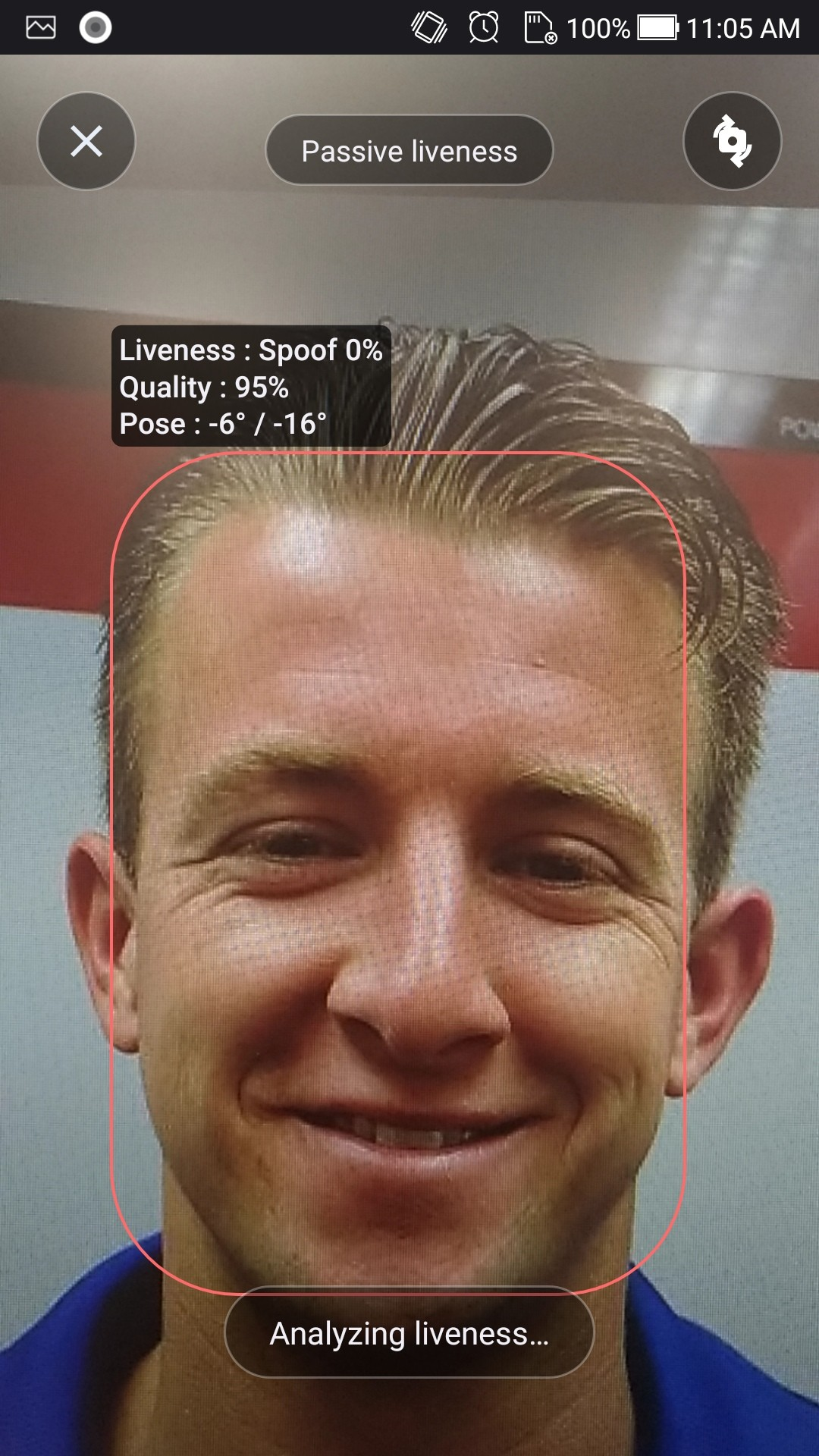
| Passive liveness | Live camera anti-spoofing with a face box and a liveness / quality / pose HUD | Native |
| Home | Engine status, the two liveness demos, settings and about | React Native |
| Settings | Camera lens, passive score threshold, the challenge pool, how many are asked, random order and every engine threshold | React Native |
| About | FacePlugin Face Liveness SDK — on-device anti-spoofing | React Native |
| Platform | Repository |
|---|---|
| Android | FaceLivenessDetection-Android |
| iOS | FaceLivenessDetection-iOS |
| Flutter | FaceLivenessDetection-Flutter |
| React Native | FaceLivenessDetection-ReactNative (this repo) |
| Ionic Capacitor | FaceLivenessDetection-Ionic-Capacitor |
| Ionic Cordova | FaceLivenessDetection-Ionic-Cordova |
| .NET MAUI | FaceLivenessDetection-DotNet-MAUI |
| Linux / Docker | FaceLivenessDetection-Docker |
| Windows | FaceLivenessDetection-Windows |
- Face Recognition + Liveness — FaceRecognition-LivenessDetection-ReactNative — Recognition + liveness + attributes
Product hubs: Face Recognition · ID Document Recognition · ID Document Liveness
| Step | What you need |
|---|---|
| 1 | Node 18+, Yarn, and a physical phone. The emulator has no usable camera for liveness |
| 2 | example/android/libfacesdk/facerecognitionsdk.aar — see Get the engine |
| 3 | For iOS: macOS, Xcode, and the four frameworks in ios/Frameworks/ |
| 4 | A licence key for your ids. The demo ships one for com.faceplugin.faceliveness |
| Item | Minimum | Recommended |
|---|---|---|
| Android | minSdkVersion 24 (Android 7.0), targetSdkVersion 34 |
Android 10 or newer |
| iOS | React Native's own min_ios_version_supported — the podspec pins no version of its own |
15 or newer |
| ABI | arm64-v8a or armeabi-v7a |
arm64-v8a |
| Device | Physical device | Same; the emulator is not for camera work |
The engine is the same binary the native apps run, and it is not in git.
Android — one file, as a flat artifact module:
example/android/libfacesdk/facerecognitionsdk.aar
Download facerecognitionsdk.aar from the
FaceRecognition-LivenessDetection-Android Releases
page, or run python run_android.py — it downloads missing binaries from Releases. AGP
refuses implementation(files("…aar")) on a library module — which is what a React Native module
is — so the engine always arrives through :libfacesdk.
iOS — four bundles from runtime.zip on the
FaceRecognition-LivenessDetection-iOS Releases
page (run_ios.py downloads and stages them if missing):
ios/Frameworks/facerecognitionsdk.framework
ios/Frameworks/FacePluginSDK.xcframework
ios/Frameworks/FacePlugin.xcframework
ios/Frameworks/FaceDetect.xcframework
pod install fails with a named list if any is missing, so a missing engine is reported before the
build rather than as a link error.
python run_android.py # or: python run_ios.pyThe runner checks for a device, downloads the engine from GitHub Releases if it is missing, and starts the app. By hand:
yarn install
cd example && yarn android # or: yarn ios| Platform | Identifier |
|---|---|
Android applicationId |
com.faceplugin.faceliveness |
| iOS bundle id | com.faceplugin.faceliveness.app |
- Wait until the home status shows Ready.
- Active liveness runs the gate, then the challenges, and ends on a result card.
- Passive liveness scores every frame: a green box is Real, a red box is Spoof, at the threshold from Settings.
| Active liveness(Result) | Passive liveness |
|---|---|
|
|
Licences are offline and bound to your applicationId / bundle id, so your own app needs its own
key. The demo ships the key for com.faceplugin.faceliveness.
This build changed engines. The app now runs on
facerecognitionsdk, which checks licences with its own library. If the home status shows Invalid license! or No activated! on a clean install, the bundled key predates the change — contact us for one issued for these ids on this runtime.
The key lives in example/src/license.ts. After activation,
FaceLivenessEngine.license reports what it unlocks: both liveness screens stay locked unless the
key grants Liveness.
yarn add face-liveness-sdk- Copy
example/android/libfacesdk/into your Android project, dropfacerecognitionsdk.aarthere, and addinclude(":libfacesdk")tosettings.gradle. - Set
minSdkVersion 24and keepabiFiltersto the engine's ABIs. - For iOS, put the four frameworks in
ios/Frameworks/, add the camera usage description, and runpod install. - Start the engine once, then launch a screen:
import { FaceLiveness, FaceLivenessEngine } from 'face-liveness-sdk';

await FaceLivenessEngine.start(yourLicenseKey);

const result = await FaceLiveness.startActiveLiveness({ count: 3 });
if (result?.passed) {
  // live person
}// Engine lifecycle
await FaceLivenessEngine.start(licenseKey); // activate + load the models
FaceLivenessEngine.state; // 'loading' | 'ready' | 'licenseInvalid' | …
FaceLivenessEngine.license; // LicenseStatus: liveness / recognition / label
FaceLivenessEngine.addListener(onStateChange);
await FaceLivenessEngine.machineCode(); // for a node-locked key
// Active liveness — the gate, then the challenges
const result = await FaceLiveness.startActiveLiveness(options);
result?.passed; // gate cleared and every challenge completed
result?.passivePassed; // did the anti-spoofing gate clear?
result?.passiveScore; // averaged score, or -1 when never measured
result?.outcomes; // one StepState per challenge
failedCheck(result); // the challenge that ended the attempt
// Passive liveness — one frame at a time, with a HUD
await FaceLiveness.startPassiveLiveness({
useFrontCamera: true,
livenessThreshold: 0.5,
});ActiveLivenessOptions carries every threshold the native session judges against — the challenge
pool, how many are asked, random order, head-turn and tilt angles, smile and eye-closed confidence,
blinks required, the move-closer growth, the start alignment tolerance, the minimum face size and
the minimum image quality. Every field is optional and the native side falls back to the engine's
own operating points, so the defaults match Android and iOS exactly.
Head-pose direction. Which way
yawandpitchcount as positive is a property of the engine build. If a turn challenge accepts the opposite direction on your device, flip Settings → Invert left / right (or Invert up / down) — no rebuild needed.


