Skip to content

Add comic-strip-browser - #4704

Merged
probonopd merged 1 commit into
masterfrom
discover/comic-strip-browser
Oct 3, 2026
Merged

probonopd merged 1 commit into
masterfrom
discover/comic-strip-browser

Conversation

@probonopd

Copy link
Copy Markdown
Member

Repository: https://github.com/DerLudditus/comic-strip-browser

A standalone PyQt6 application for browsing a selection of comic strips from GoComics and Comics Kingdom.

  • Stars: 5
  • Latest release: v3.0.0 (2026-08-30T22:26:08Z)
  • AppImage asset: comic-strip-browser-3.0.0.AppImage
  • License: MIT

Found by .github/workflows/discover-apps.yml, which looks for GitHub
repositories that publish AppImages but are not in the catalog yet. This
entry was not tested by a human; please review it before merging.

Discovered on GitHub as publishing AppImages on its releases, by
discover-apps.yml. Needs a maintainer's review.
@github-actions github-actions Bot added error-app-exits Test failed: the application quit or crashed right after starting error-glibc-too-new Test failed: built on a too new system (needs a newer glibc) labels Sep 27, 2026
@github-actions

Copy link
Copy Markdown
Contributor

❌ Test failure

@DerLudditus: this pull request adds the AppImage from your GitHub repository to the AppImage catalog; the test reports the following. Could you have a look?

Compatibility: not self-contained: uses the C library of the system; references glibc 2.14

  • The AppImage was built on a system that is too new. Please build it on the oldest still-supported Ubuntu LTS release so that it runs on all supported systems.
  • The application quit or crashed right after starting. The error below usually shows why.

First error in the log:

[PYI-5:ERROR] Failed to load Python shared library '/tmp/_MEI00000004gc3Vtp/libpython3.12.so.1.0': /lib/x86_64-linux-gnu/libm.so.6: version `GLIBC_2.38' not found (required by /tmp/_MEI00000004gc3Vtp/libpython3.12.so.1.0)

ERROR: The application exited within 11 seconds instead of showing a window

Commit cb34b13. Full log

@DerLudditus

Copy link
Copy Markdown

The root cause is that build.yml has this:

build-linux:
runs-on: ubuntu-24.04

I don't build anything locally; GitHub builds everything, and I guess this was the default when I first created this workflow.

My goal wasn't to ensure this AppImage works on distros older than 2024, but to cover the cases where a .deb and an .rpm don't help.

@probonopd

Copy link
Copy Markdown
Member Author

Could you change it to ubuntu-22.04 please? Then users with older distributions can also run your AppImage. Thanks!

@DerLudditus

Copy link
Copy Markdown

Will

Could you change it to ubuntu-22.04 please? Then users with older distributions can also run your AppImage. Thanks!

I'll do it in version 3.0.1, planned for next week.

@probonopd

Copy link
Copy Markdown
Member Author

Cool. Please ping me here then, thanks!

@DerLudditus

Copy link
Copy Markdown

@probonopd Release 3.1.0 was built on Ubuntu 22.04.

@probonopd

Copy link
Copy Markdown
Member Author

/retest

@probonopd probonopd closed this Oct 3, 2026
@probonopd probonopd reopened this Oct 3, 2026
@github-actions github-actions Bot removed error-app-exits Test failed: the application quit or crashed right after starting error-glibc-too-new Test failed: built on a too new system (needs a newer glibc) labels Oct 3, 2026
@github-actions

github-actions Bot commented Oct 3, 2026

Copy link
Copy Markdown
Contributor

✅ Test passed

Please check that the screenshot shows the application's main window.

comic-strip-browser

comic-strip-browser

Compatibility: not self-contained: uses the C library of the system; references glibc 2.14

Notes:

  • File name 'comic-strip-browser': all-lowercase names are typically used for command line tools, but the desktop file does not set Terminal=true. If this is a graphical application, please name the file after the application as it is spelled, with capitals where it has them (e.g. 'Krita'); if it is a command line tool, set Terminal=true in its desktop file.

Warnings:

  • The screenshot may show an error message; please check it.
  • The AppImage contains no update information, so users cannot update it with AppImageUpdate or similar tools. Please consider embedding it when building the AppImage (e.g., appimagetool -u) and publishing the .zsync file next to the AppImage; see https://docs.appimage.org/packaging-guide/optional/updates.html

Commit cb34b13. Full log

@probonopd probonopd added the screenshot-ok Test passed; the screenshot was checked and looks fine label Oct 3, 2026
@probonopd
probonopd merged commit db56001 into master Oct 3, 2026
4 of 5 checks passed
@probonopd
probonopd deleted the discover/comic-strip-browser branch October 3, 2026 22:45
@DerLudditus

Copy link
Copy Markdown
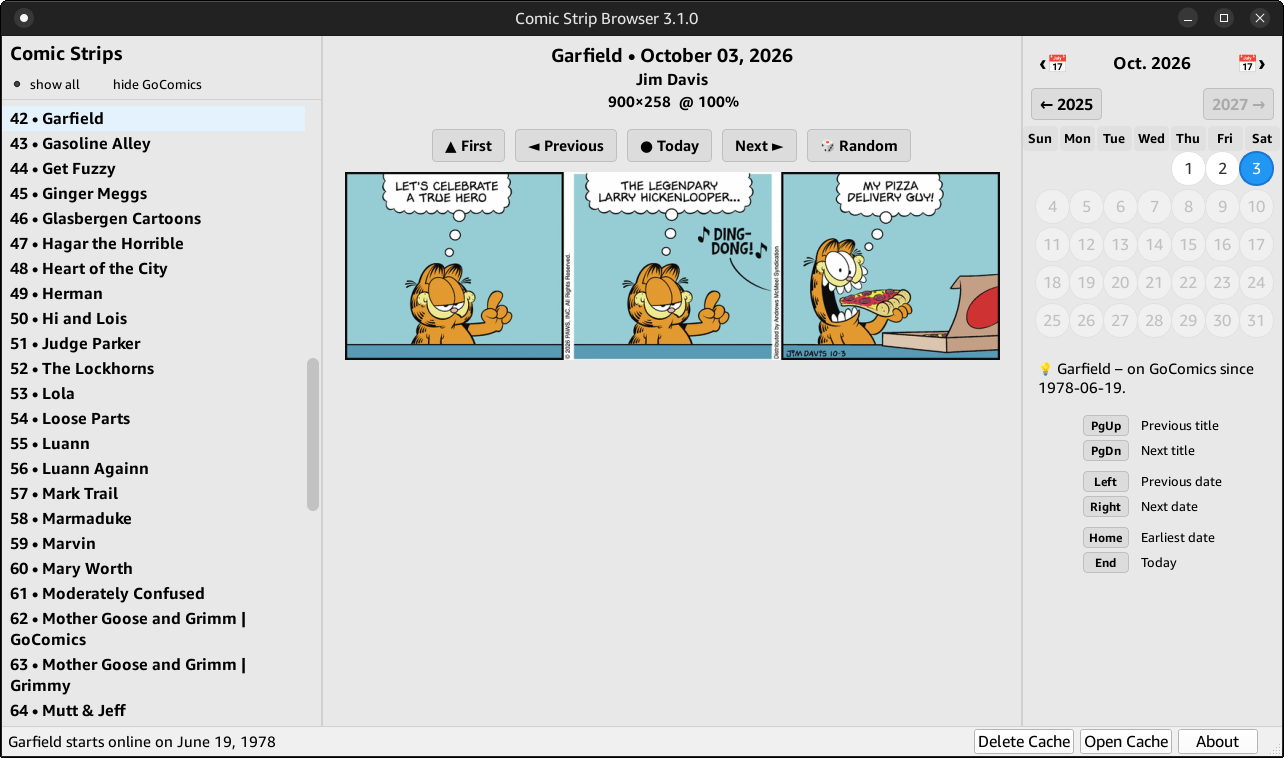
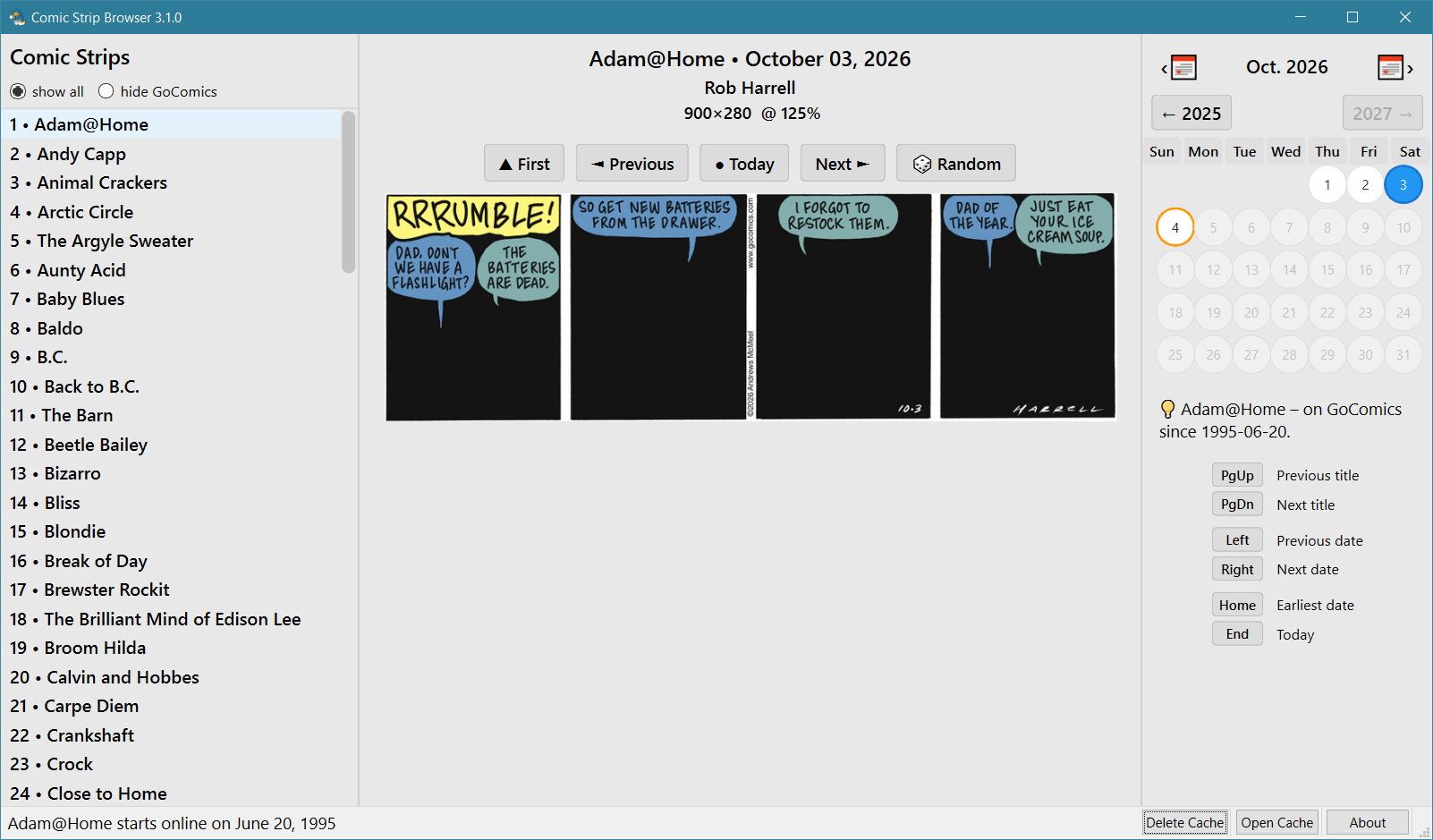
  1. Nah, the automated test is not illustrative: it lacks Internet access, it has a low resolution and possibly a high DPI, and it didn’t even show any window decorations.

It should look something like this, with the initial comic being this one right now.

I tested it on Kubuntu 22.04.5, but didn't take a screenshot.

  1. Yes, the all-lowercase name is unorthodox, but will not change to preserve backwards compatibility (only on Windows it’s ComicStripBrowser).

  2. The AppImage does not attempt to check for updates, and this is how most Linux apps behave, even when not installed from a repo that provides updates. However, the About box (bottom-right button) includes a link to the project’s GitHub, where users could look for new releases.

@probonopd

Copy link
Copy Markdown
Member Author

/appstream

@github-actions

github-actions Bot commented Oct 4, 2026

Copy link
Copy Markdown
Contributor

How to add AppStream metadata (and your own screenshots)

The catalog page of an application can show a description, a summary, links and, above all, screenshots of your choice. They come from an AppStream metainfo file inside the AppImage.

1. Write the file. Save it as usr/share/metainfo/<id>.metainfo.xml inside the AppDir (the directory the AppImage is made from), where <id> is the <id> of the file, e.g. io.github.yourname.YourApp:

<?xml version="1.0" encoding="UTF-8"?>
<component type="desktop-application">
  <id>io.github.yourname.YourApp</id>
  <name>YourApp</name>
  <summary>One line saying what it does</summary>
  <metadata_license>CC0-1.0</metadata_license>
  <project_license>MIT</project_license>
  <description>
    <p>A few sentences about the application.</p>
  </description>
  <launchable type="desktop-id">yourapp.desktop</launchable>
  <url type="homepage">https://github.com/yourname/YourApp</url>
  <screenshots>
    <screenshot type="default">
      <caption>The main window</caption>
      <image>https://raw.githubusercontent.com/yourname/YourApp/main/screenshots/main.png</image>
    </screenshot>
  </screenshots>
  <releases>
    <release version="1.0.0" date="2024-01-31"/>
  </releases>
</component>
  • <launchable> names the .desktop file of the AppImage.
  • The screenshot is a web address (https://…) of a PNG image that stays there, e.g. a file in your repository. The file itself does not go into the AppImage.
  • <project_license> is the license of the application, as an SPDX identifier.

2. Check it: appstreamcli validate --no-net usr/share/metainfo/<id>.metainfo.xml (from the appstream package of your distribution).

3. Put it into the AppImage.

  • appimagetool, linuxdeploy, and other tools that build from an AppDir: copy the file to AppDir/usr/share/metainfo/ before building. appimagetool checks it while building.
  • electron-builder: add it to the AppImage with extraFiles, e.g. in package.json: "linux": { "extraFiles": [ { "from": "build/<id>.metainfo.xml", "to": "usr/share/metainfo/<id>.metainfo.xml" } ] }.
  • Other tools: see https://docs.appimage.org/packaging-guide/optional/appstream.html

4. Publish a new release with the new AppImage, then comment /retest on the pull request.

Note about screenshots: the automated test still runs the application and takes a screenshot of its own. The test needs it to check that the application starts and shows a window, so the test has to pass as before. But if the AppStream metadata names a screenshot, the catalog page shows that screenshot (the one marked type="default", else the first) instead of the automated one.

Sign up for free to join this conversation on GitHub. Already have an account? Sign in to comment

Labels

auto-discovered screenshot-ok Test passed; the screenshot was checked and looks fine

Projects

None yet

Development

Successfully merging this pull request may close these issues.

2 participants