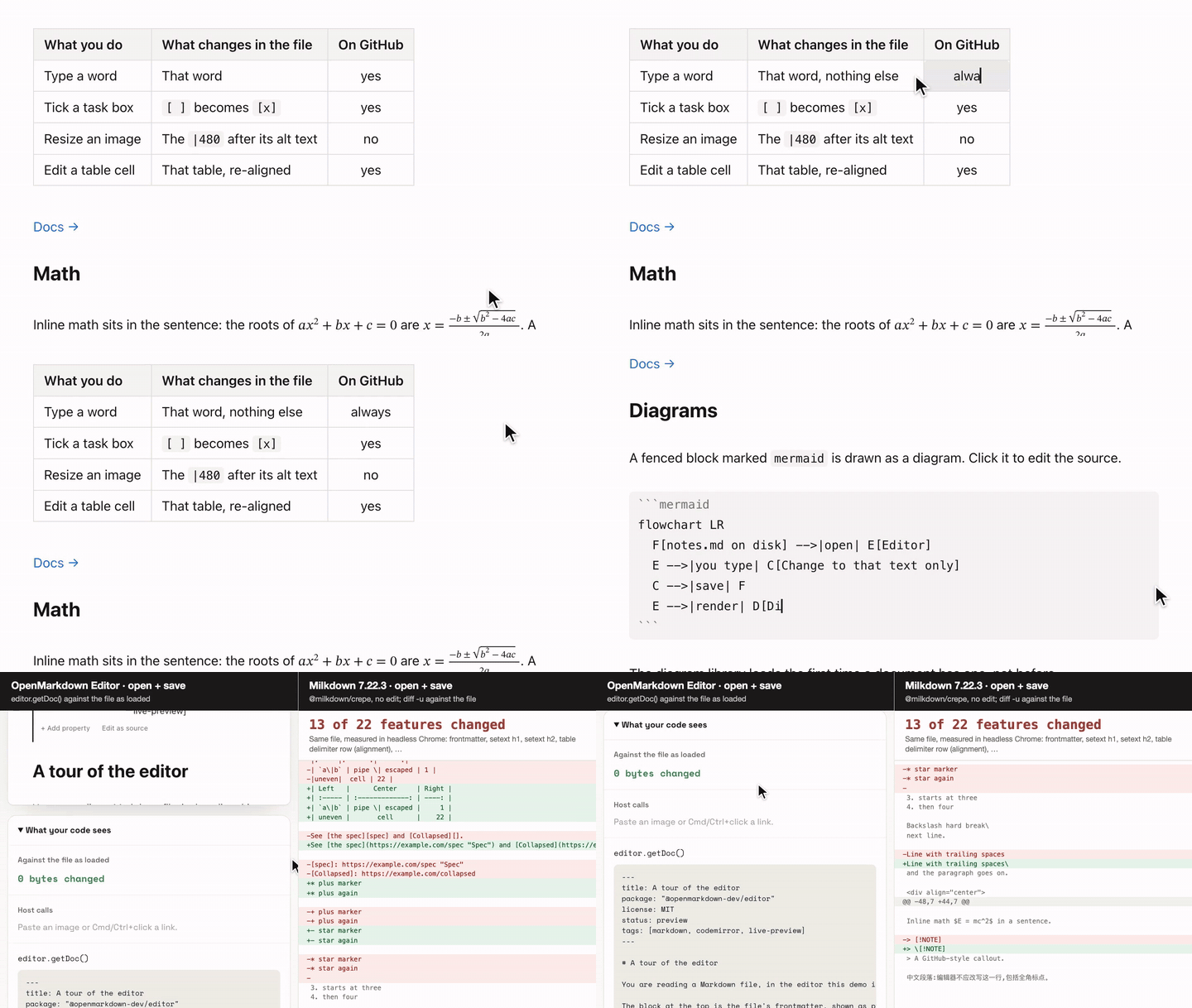
A live-preview Markdown editor on CodeMirror 6 that edits the Markdown source itself, so the file you save is the file you wrote.
npm install @openmarkdown-dev/editorimport { createEditorState, mountEditor, openMarkdownFile, saveMarkdownFile } from "@openmarkdown-dev/editor";
const file = openMarkdownFile(new Uint8Array(await (await fetch("/notes.md")).arrayBuffer()));
const editor = mountEditor(document.getElementById("editor")!, createEditorState({ doc: file.text }));
const bytes = saveMarkdownFile(editor.getDoc(), file); // unedited: the file's own bytes- Live preview: headings, lists, tables, math, Mermaid diagrams, callouts and YAML properties render in place; the Markdown shows under the caret.
- Your file stays yours: open and save without editing, and the file is byte-for-byte what it was.
- Tables in place: edit a cell where it is drawn.
- Images: paste or drop them in, drag a corner to resize.
- Framework-free: plain TypeScript and DOM. Works with React, Vue, Svelte or nothing. Not build-free: with no bundler, self-host it.
- No CSS to import: every color and font is a
--ome-*custom property you can override. - Safe with untrusted documents: rendering a document never runs its script.
- Diagrams optional:
@openmarkdown-dev/editor/no-diagramsis the same editor without Mermaid, for a smaller build or a strict style policy. - SSR-safe import: importing in Node does not touch
window. Mounting needs a DOM.
Website · Demo · Examples · Docs
Extracted from the OpenMarkdown app, where it is the editor people and AI agents write in every day. MIT licensed. The docs folder holds the guides in plain Markdown.
Lossless round-trip: open a Markdown file and save it without editing, and the file is byte-for-byte what it was.
That names one sentence of the claim below. For edits, the claim says exactly what changes. This is the whole claim. Every sentence is backed by a test:
OpenMarkdown edits your Markdown source text directly; it never rebuilds the file from a document tree. Open and save without editing, and the file is byte-for-byte what it was: line endings (LF / CRLF), BOM, final newline, whitespace, tabs, escapes and Unicode spelling untouched. When you edit, only what you touched changes, with a few exceptions, each pinned by a test: a table you edit (or click into a cell of) is re-aligned as a whole when you leave it — alignment, cell text and escapes kept; table commands rewrite that table the same way; indenting a list item or pressing Enter in a numbered list renumbers the affected items; Enter in a list item drops trailing spaces before the cursor; a file with mixed line endings gets uniform ones once you edit it.
The claim holds when your host reads and writes the file with the package's
openMarkdownFile and saveMarkdownFile. The editor keeps the document as a string in \n
with no BOM; these two keep the rest of the file:
import { createEditorState, mountEditor, openMarkdownFile, saveMarkdownFile } from "@openmarkdown-dev/editor";

let file = openMarkdownFile(bytes); // strict UTF-8; notes the BOM and line endings
const editor = mountEditor(document.getElementById("editor")!, createEditorState({ doc: file.text }));

const out = saveMarkdownFile(editor.getDoc(), file); // unedited: the original bytes
openMarkdownFile throws InvalidUtf8Error for bytes that are not UTF-8, so a damaged file is
refused instead of silently rewritten. Unedited, saveMarkdownFile returns the original bytes,
even for a file that mixes line endings. Edited, it writes the BOM back and uses the file's
dominant line ending (the most frequent one; on a tie, the first) for every line.
After a save, make the bytes you wrote the new baseline: file = openMarkdownFile(out). Then
editor.getDoc() !== file.text tells you whether there are unsaved edits.
We opened the same 56-line Markdown file in six embeddable editors (their npm packages, in headless Chromium), saved it without editing, then changed one word and saved again:
| Editor | Open → save, no edit | Change one word → save |
|---|---|---|
| @openmarkdown-dev/editor (CodeMirror 6) | byte-identical | only that word changed |
| Atomic Editor (CodeMirror 6) | byte-identical | only that word changed |
| Milkdown Crepe (ProseMirror) | 13 of 22 tracked features changed | the same 30 changed lines, plus the word |
| Toast UI Editor (ProseMirror) | 15 of 22 changed | the same changes, plus the word |
Tiptap + @tiptap/markdown (ProseMirror) |
17 of 22 changed | the same changes, plus the word |
| MDXEditor (Lexical) | refused the file (reference links); 13 of 19 changed without them | the edit was lost on the full file |
Atomic Editor ties with us here, because it is built the same way: the source is the
document. The difference is with editors that rebuild Markdown from a tree. When we
edited one table cell, both CodeMirror editors re-aligned that table. Ours kept the
column alignment. Atomic's rewrote the delimiter row to | --- | and lost it.
The method, an example diff, the run date and the caveats: How we compared editors.
npm install @openmarkdown-dev/editor @codemirror/state @codemirror/view @codemirror/commands \
  @codemirror/language @codemirror/language-data @codemirror/lang-markdown \
  @codemirror/search @codemirror/autocomplete @lezer/highlight @lezer/markdown
CodeMirror and Lezer are peer dependencies: your page must hold exactly one copy of
@codemirror/state. If you already use CodeMirror, the editor shares your copy. npm 7 and
later install peers for you. temml (math) and mermaid (diagrams) are regular
dependencies. They are loaded with import() only when a document contains math or a
diagram, and your bundler splits them into separate chunks.
@openmarkdown-dev/editor/no-diagrams is a second entry with the same API, built from the same
code, minus diagram support. Nothing it imports reaches Mermaid, so your bundler emits no
Mermaid chunks at all; a ```mermaid block stays a code block and the diagrams option
is ignored. Use it when no page needs diagrams, or under a style policy Mermaid cannot meet
(see Security). npm still installs mermaid, because the main entry depends on
it.
import { createEditorState, mountEditor } from "@openmarkdown-dev/editor/no-diagrams";Framework-free is not build-free. A page with no bundler of its own can load the editor from a CDN once the package is published there, or build it once and serve the files itself: self-hosting gives the build script, the output to deploy and the Content Security Policy.
import { configureEditorEnvironment, createEditorState, mountEditor } from "@openmarkdown-dev/editor";

// Optional, once per page: language, color scheme, clipboard, links, spelling.
configureEditorEnvironment({ language: "en" });

const state = createEditorState({
  doc: "# Hello\n\nSome *Markdown*, a table and $E = mc^2$.\n",
  host: {
    onChange: (doc, isUserEdit) => {
      if (isUserEdit) save(doc);
    },
  },
});
const editor = mountEditor(document.getElementById("editor")!, state);

editor.getDoc(); // the current Markdown, as a string
editor.setMode("source"); // "live" | "source" | "reading"
editor.view.focus(); // setMode does not move focus; give it back after a button click
editor.destroy(); // when the editor leaves the page
Give the parent element a height. The editor fills it and scrolls inside it.
There is no React wrapper to install. Mount the editor in an effect:
import { useEffect, useRef } from "react";
import { createEditorState, mountEditor, type MarkdownEditor } from "@openmarkdown-dev/editor";

export function MarkdownField({ value, onChange }: { value: string; onChange: (doc: string) => void }) {
  const parent = useRef<HTMLDivElement>(null);
  const editor = useRef<MarkdownEditor | null>(null);
  const latest = useRef(onChange);
  latest.current = onChange;

  useEffect(() => {
    const state = createEditorState({
      doc: value,
      host: { onChange: (doc, isUserEdit) => isUserEdit && latest.current(doc) },
    });
    editor.current = mountEditor(parent.current!, state);
    return () => editor.current?.destroy();
    // Mount once; later `value` changes are pushed in below.
    // eslint-disable-next-line react-hooks/exhaustive-deps
  }, []);

  useEffect(() => {
    if (editor.current && editor.current.getDoc() !== value) editor.current.setDoc(value);
  }, [value]);

  return <div ref={parent} style={{ height: 480 }} />;
}
host is read through the object on every call. You can mutate it, or read the latest
props through a ref as above, without rebuilding the state.
Three functions to make an editor, two to read and write its file, and their types. The complete, commented surface is
api/editor.api.d.ts, and the build checks that it matches. The
API reference is generated from it.
Builds a CodeMirror EditorState with the whole editor installed. Every option is optional:
| Option | Type | Default | What it does |
|---|---|---|---|
doc |
string |
"" |
The Markdown source. |
mode |
"live" | "source" | "reading" |
"live" |
Live preview, plain colored source, or rendered read-only. |
docPath |
string | null |
null |
The document's absolute path. Relative links and pasted images resolve against it. |
selection |
{ anchor, head? } |
start of document | Where the caret starts. |
host |
EditorHost |
none | Per-document callbacks (below). |
checkSpelling |
boolean |
true |
Draw spelling squiggles when the environment's spell service is on. |
diagrams |
boolean |
true |
Render ```mermaid fences as diagrams. With false they stay code blocks and Mermaid is never loaded. |
extensions |
CodeMirror Extension |
none | Your own CodeMirror extensions, installed beside the editor's in every mode. |
One state is one document, with its undo history, folds and mode. A host with several
documents can keep one state each and swap them into one view with
editor.view.setState(state), then call editor.syncAmbient().
Appends an editor view to parent and returns a handle:
| Member | What it does |
|---|---|
view |
The CodeMirror EditorView, for anything not covered here. |
getDoc() |
The current Markdown source. |
setDoc(doc) |
Make doc the document, for example after the file changed on disk. Only the part that differs is replaced, so the reader's scroll position and selection stay. Not a user edit, not an undo step. |
refreshImages() |
Ask resolveImage again for every image, after its answer changed (the reader allowed remote images, say). |
mode() / setMode(mode) |
Read or switch the mode. The document, selection and undo history are kept. Focus does not move: call view.focus() to type right away. |
docPath() / setDocPath(path) |
Read or change the document's path, for example after a rename. |
syncAmbient() |
After swapping a state in, re-apply the current light or dark scheme. |
destroy() |
Remove the view and stop following the color scheme. |
Every callback is optional. When you leave one out, that feature is switched off and nothing errors.
| Callback | Called when | Without it |
|---|---|---|
onChange(doc, isUserEdit, docPath) |
The document changed. isUserEdit is false for setDoc and other programmatic changes. |
Nothing happens. |
resolveImage(src) |
An image is shown. Return a URL the page may load, or null to show the source. Script-capable URLs are dropped whatever you return. |
Only absolute https: images load, from any host. Pass () => null to load none. |
openLink(absPath, fragment) |
A link to a local file was followed (Cmd/Ctrl+click; a plain click in reading mode). fragment is its #fragment without the #, or null. |
Local links do nothing. |
getFolder() |
Link completion needs the root of the user's files. | Completion uses the document's own directory. |
listFiles(root) |
Link completion lists linkable files under root (root-relative paths). |
Completion offers headings only. |
saveAttachment(docPath, bytes, hint) |
An image is pasted or dropped. Store it and resolve the relative path to link, or null. |
Pasting or dropping an image inserts nothing. |
onUnsupportedPaste(reason, count) |
Images were pasted or dropped but could not be stored: reason is "no-save-attachment" or "no-doc-path". Use it to tell the user. |
The images are dropped silently. |
onMoved() |
The selection or scroll position moved (debounced). Use it to remember the position. | Nothing happens. |
onOutline(items) |
The heading outline changed (OutlineItem[], or null when the view goes away). |
Nothing happens. |
The host's file codec, pure and DOM-free (it runs in Node too). openMarkdownFile decodes a
file's bytes as strict UTF-8 and returns:
| Field | What it is |
|---|---|
text |
The text to edit: no BOM, every line ending as \n. Unicode is not normalized. |
bytes |
A copy of the original bytes. |
bom |
Whether the file started with a UTF-8 BOM. |
ending |
The line ending an edited save writes: "\n", "\r\n" or "\r". |
mixed |
Whether the file mixes line endings. |
Invalid UTF-8 throws InvalidUtf8Error (code: "INVALID_UTF8"). saveMarkdownFile returns
file.bytes while doc equals file.text, and otherwise encodes doc with the BOM and
ending. See Fidelity.
Window-wide capabilities. Call it before the first editor mounts. A later call replaces the whole environment. Every member is optional:
| Member | What it does | Without it |
|---|---|---|
language |
The editor's own UI words: "en", "zh", "ja" or "ko". |
English. |
colorScheme |
{ current(), subscribe(cb) }: the page's "light" / "dark" scheme and its changes. |
Always light. |
copyText(text) |
Put text on the clipboard (the code-block copy button). | No copy button action. |
openExternal(url) |
A web link was followed (Cmd/Ctrl+click; a plain click in reading mode). Your policy decides how it opens. | Web links do nothing. |
refusedLink(url, scheme) |
The editor refused a script-capable link (javascript:, data: and similar). Use it to tell the user. Never open the URL. |
The refusal is silent. |
spell |
A SpellService that draws spelling squiggles and offers suggestions (isOn, onChange, newDocument, check, suggestions, closeDocument). |
No spell checking. |
handleKey(view, event) |
Sees each key before the editor's defaults. Return true to consume it. |
The editor's keymap only. |
A color scheme that follows the operating system:
const media = matchMedia("(prefers-color-scheme: dark)");
configureEditorEnvironment({
  colorScheme: {
    current: () => (media.matches ? "dark" : "light"),
    subscribe: (cb) => {
      const on = () => cb(media.matches ? "dark" : "light");
      media.addEventListener("change", on);
      return () => media.removeEventListener("change", on);
    },
  },
  copyText: (text) => navigator.clipboard.writeText(text),
  openExternal: (url) => window.open(url, "_blank", "noopener"),
});The editor paints only with --ome-* custom properties. Each one has a light and a dark
default. To restyle the editor, set them on .cm-editor. Setting them on :root has
no effect, because the editor's own defaults win over inherited values.
.cm-editor {
  --ome-bg: #fffdf7;
  --ome-accent: #0b6bcb;
  --ome-font: "Inter", system-ui, sans-serif;
}| Token | Used for |
|---|---|
--ome-bg |
The document surface. |
--ome-fg |
Body text and the caret. |
--ome-muted |
Quiet surfaces. |
--ome-muted-fg |
Secondary text: Markdown marks, placeholders, resting controls. |
--ome-border |
Hairlines: table rules, quote bars, frames. |
--ome-accent |
Links, selection, find hits, focus, list marks. |
--ome-danger |
Errors, such as a search with no match. |
--ome-agent |
The @agent mention. |
--ome-spelling |
The spelling squiggle. |
--ome-code-bg |
Inline code, code blocks, table headers (translucent). |
--ome-callout-note, --ome-callout-tip, --ome-callout-important, --ome-callout-warning, --ome-callout-caution |
The five callout kinds. |
--ome-state-hover, --ome-state-selected |
Hover and selected layers on controls. |
--ome-radius |
The corner radius of controls. |
--ome-font, --ome-font-mono |
The prose and code font stacks. No font files are shipped. |
--ome-syntax-keyword, --ome-syntax-string, --ome-syntax-number, --ome-syntax-function, --ome-syntax-type, --ome-syntax-property |
Code highlighting. One value is used for both schemes. |
The editor's own words are the find panel, copy and fold buttons, the properties block,
and image and link chips. They ship in English, Chinese, Japanese and Korean. Choose one
with configureEditorEnvironment({ language }). The editor does not guess from the
browser. Your document text can be in any language.
The editor is built to render documents written by someone else, such as a teammate or an AI agent:
- Raw HTML is shown as source, never rendered.
- Math (Temml,
trust: false) and the editor's icons reach the DOM only through one sanitiser with an allowlist of elements and attributes. Unknown elements make the formula fall back to its source. Unknown attributes are dropped. - Mermaid runs with
securityLevel: "strict"and no HTML labels. Its SVG goes through the same allowlist. - Links are classified the way a browser reads them, after decoding entities and
removing control characters.
javascript:,vbscript:,livescript:anddata:links are never passed toopenLinkoropenExternal, however they are obfuscated. YourrefusedLinkis told instead. - Images: without a
resolveImage, only absolutehttps:images load. With one, script-capable URLs are still dropped.
npm audit reports one advisory in a fresh install; npm counts it as 3 low severity vulnerabilities, one for each package on the path (katex, mermaid and this package). We
assessed it, and it does not apply to the editor:
- GHSA-238p-pmpm-9mq7 (low;
katex, installed throughmermaid11.17.2): "KaTeX: Existing prototype pollution can bypass trust restrictions". Exploiting it needs a prototype pollution already present in the page and KaTeX output inserted without sanitising. The editor renders math with Temml, not KaTeX. Mermaid runs withhtmlLabels: false, so its labels are plain SVG text. Every piece of markup the editor inserts goes through its one sanitiser, which refuses anything outside its allow-list. The fix exists only in Mermaid 12, which adds a dependency under a license this package cannot take (EPL-2.0 OR GPL-3.0). With theno-diagramsentry, neither Mermaid nor KaTeX reaches your bundle. Next review: 2027-02-04.
The release check fails on any advisory that is not assessed here.
Content Security Policy is your page's job. CodeMirror injects <style> elements, so a
strict style-src needs a nonce through CodeMirror's EditorView.cspNonce (pass it with
extensions). That nonce is all the editor and math need. Mermaid sets inline styles while it
draws, so diagrams also need style-src-attr and style-src-elem to allow 'unsafe-inline',
or turn them off with diagrams: false or the no-diagrams entry
(self-hosting). Report vulnerabilities
privately through GitHub security advisories.
Every build is tested by mounting, typing, rendering math and a diagram, and switching mode and scheme in headless Chromium, WebKit (Safari's engine) and Firefox. The package is ES2022 JavaScript. Mounting needs a DOM. Importing does not.
Measured from the 0.1.0 build:
- The package's own code: about 78 KB gzipped (shipped unminified; your bundler minifies it).
- A Vite app with the editor, first load including CodeMirror: about 245 KB gzipped.
- Loaded only when a document needs them: Temml about 58 KB and Mermaid about 160 KB for its core, gzipped. Mermaid's diagram types load as separate chunks.
- With the
no-diagramsentry, first load is the same, and the whole build (every chunk a page might ever load) drops from about 1.6 MB to about 680 KB gzipped: no Mermaid chunks.
The code is MIT. The MIT license covers the code, not the name: "OpenMarkdown" and its logo are trademarks, and TRADEMARK.md says what you may do with them. Contributions require a CLA. See CONTRIBUTING.md.