- Changing the URL prefix
- Metadata
- Permissions
- Filtering the list
- Dependency injection
- Overriding an entity's __toString
- Overriding the default behaviour
?> Crud controllers are the core of the bundle. They are more than controllers, they contain some metadata about their managed entities, such as their fields configurations, names, roles and actions.
The most basic Controller you can have is this one:
<?php

namespace App\Controller\Admin;

use App\Entity\Category;
use Arkounay\Bundle\QuickAdminGeneratorBundle\Controller\Crud;

class CategoryController extends Crud
{

    public function getEntity(): string
    {
        return Category::class;
    }

}
This creates a Crud Controller that manages the "Category" entity. You can have multiple Controllers for the same entity.
By default, the generated URL will be /{prefix-defined-in-routes.yaml}/{controller-name}/{action} and its path name qag.[controller-name]_[action]
e.g, for our CategoryController, the list route path will be /admin/category/ its name qag.category.
You can change this by overriding getRoute.
public function getRoute(): string
{
    return 'custom-route';
}
The generated routes will then be:
qag.custom-route                    ANY      ANY      ANY    /admin/custom-route/
qag.custom-route_delete             ANY      ANY      ANY    /admin/custom-route/delete/{id}/
qag.custom-route_delete_batch       ANY      ANY      ANY    /admin/custom-route/deleteBatch
qag.custom-route_create             ANY      ANY      ANY    /admin/custom-route/create
qag.custom-route_edit               ANY      ANY      ANY    /admin/custom-route/edit/{id}/
qag.custom-route_filter_form_ajax   ANY      ANY      ANY    /admin/custom-route/filterFormAjax
to override /admin part, just change the prefix in routes.yaml:
qa_routes:
    resource: 'Arkounay\Bundle\QuickAdminGeneratorBundle\Crud\RouteLoader'
    type: service
    prefix: '/new-admin'
Remember to add the corresponding access_control in security.yaml!
Override the getName method to change an entity name. It should be the singular name.
public function getName(): string
{
    return 'Custom Name';
}
By default, the plural name will be guessed automatically using an inflector. You can manually override it through the getPluralName function.
You can add an icon by setting its name. Use a name that is valid in tabler.
public function getIcon(): ?string
{
    return 'arrow-right';
}You can add a badge that has a number by overriding getBadgeNumber, eg:
public function getBadgeNumber(): ?int
{
    return $this->repository->count(['important' => true]);
}
And to override its class:
public function getBadgeClass(): ?string
{
    return 'bg-azure';
}In the listing, you can add a description by overriding the getDescription method. It can contain HTML.
By default, the responsive mode of the list view will be simplified, showing only an entity's __toString.
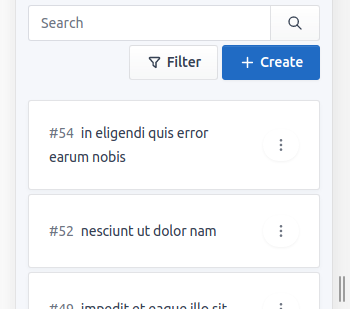
This will disable batch actions and hide certain information, making the view more simplified for mobile devices.
To disable this, override the simpleResponsiveMode method and return false.
protected function simpleResponsiveMode(): bool
{
    return false;
}
You will get a full table:
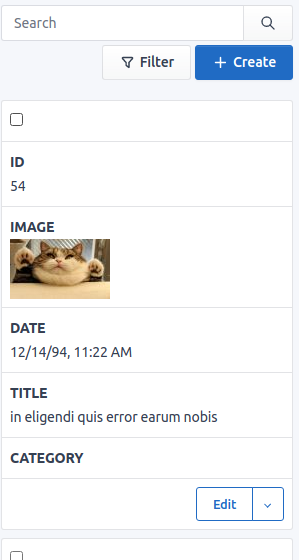
Keep in mind you can change how simple responsive mode looks by overriding the corresponding twig block. (simple_responsive_item)
There are multiple functions that can be overridden to configure permissions:
isEnabled()checks if the entire controller can be loaded. If it returns false when trying to access any route within the controller, it will throw an Access Denied exception and automatically remove the corresponding link from the menu.isCreatablechecks if an element can be created. If it returns false, it will prevent the user from accessing the "create" route and remove the "Create" action from the menu.isEditable($entity)checks if an element can be edited. If false, will prevent the user from going to the "edit" route and remove the "Edit" action.isDeletable($entity)checks if an element can be deleted. If false, will also remove the "Delete" action and the "Delete" batch action.isSearchablechecks if an element can be searched. If false, will prevent text search and remove the search bar (filters can still be applied if they exist).isViewable($entity)checks if an element can be viewed. False by default, if true will add a "View" action that displays an entity's detail.isExportablechecks if an element can be exported. False by default, if true will add an "Export" global action that will create a CSV file containing all entities that match the current filter.
Example:
public function isEnabled(): bool
{
    return $this->isGranted('ROLE_SUPERADMIN');
}When accessing a route action, the checkSecurity(string $action, $entity = null) method is automatically called before actually entering the action method.
This method uses the above permissions and throws exceptions if the conditions are not met.
For example, when accessing viewAction, checkSecurity is called with view as $action parameter.
checkSecurity will ensure that the entity isViewable etc.
Then viewAction is called after checkSecurity.
This way, when completely overriding viewAction, you don't need to manually for permissions.
If you create a custom route withing a controller that extends Crud, you can either check permissions there or extend the checkSecurity function and add the checks there.
You can use the Query Builder to filter through a list. The query builder uses e as the entity name by default.
Example :
protected function getListQueryBuilder(): QueryBuilder
{
    return parent::getListQueryBuilder()->andWhere('e.id > 70');
}
However, the user will still be able to directly access an element through the URL. To prevent this, you have 3 solutions.
- Solution 1: override
hasQuickListQueryBuilderSecurityand return true:
protected function hasQuickListQueryBuilderSecurity(): bool
{
    return false;
}
this will make an extra request when accessing an entity to check if it was filtered out by the Query Builder or not.
- Solution 2: use doctrine filters and listeners
- Solution 3: manually override isDeletable and isEditable
Filtering through Filters can work in conjunction with the Query Builder. Filters allow the users to specify how they want to filter a list.
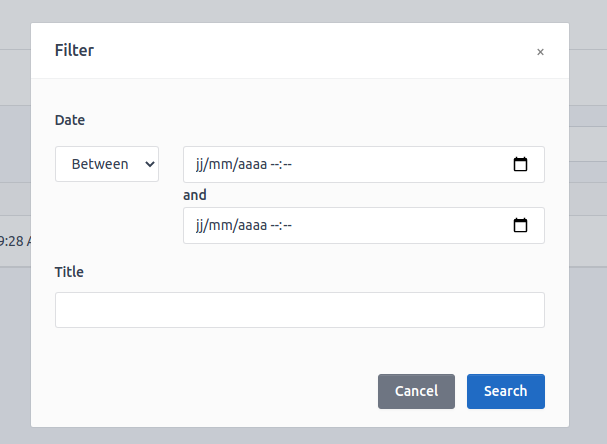
To add a filter, override the getFilters method:
protected function getFilters(): Filters
{
    return parent::getFilters()
        ->add('date')
        ->add('title')
    ;
}
to add a custom filter, you can do like so:
protected function getFilters(): Filters
{
    $filter = new Filter('title');
    $filter->setFilterForm(new StringDifferentFilter());

    return parent::getFilters()->add($filter);
}
A filter needs a Filter Form, that will handle both the form and the query builder filter:
class StringDifferentFilter extends FilterForm
{

    public function addToFormBuilder(FormBuilderInterface $builder, Filter $filter): void
    {
        $builder->add($filter->getIndex(), TextType::class, [
            'required' => false
        ]);
    }

    public function addToQueryBuilder(QueryBuilder $builder, FormInterface $form, Filter $filter): QueryBuilder
    {
        $index = $filter->getIndex();

        return $builder->andWhere("e.$index not LIKE :$index")
            ->setParameter($index, "%{$form->get($index)->getData()}%");
    }

    public function isEmpty($data): bool
    {
        return empty($data);
    }
}
Dependency injection works the classic Symfony way. You can override __construct() and inject your dependency there, as well as injecting directly through functions.
Examples :
public function __construct(ServiceA $serviceA)
{
    $this->serviceA = $serviceA;
}
public function customAction($entity, ServiceB $serviceB)
{
// do something
}Sometimes, you might want a different entity's __toString method for the admin, or you might find yourself in a situation where you can't easily override __toString().
To override it you can listen to the qag.events.entity_to_string event, and set a reponse:
class ToStringEvent implements EventSubscriberInterface
{

    public static function getSubscribedEvents(): array
    {
        return [
            'qag.events.entity_to_string' => 'test',
        ];
    }

    public function test(GenericEvent $event): void
    {
        $entity = $event->getSubject();
        if ($entity instanceof MyEntity) {
            $event->setArgument('response', $entity->getName());
        }
    }

}Keep in mind you can create an abstract controller that extends from Arkounay\Bundle\QuickAdminGeneratorBundle\Controller\Crud and have many child controller of this one.
This way, you can easily override the default behaviour of the base controller.
For example, if you want to add a "position" fields for every entity that have a $position value, and you want this one to be at the left of the list view.
You can do something like so:
namespace App\Controller;

use Arkounay\Bundle\QuickAdminGeneratorBundle\Controller\Crud as BaseCrud;
use Arkounay\Bundle\QuickAdminGeneratorBundle\Model\Fields;
use Symfony\Component\HttpFoundation\Request;
use Symfony\Component\HttpFoundation\Response;

abstract class Crud extends BaseCrud
{

    public function movePostAction(Request $request, $entity): Response
    {
        if (!method_exists($entity, 'setPosition')) {
            throw $this->createAccessDeniedException("Entity {$this->getEntity()} must have a Position field (use Moveable trait?)");
        }

        $position = $request->request->get('position');

        $entity->setPosition($position - 1);

        $this->em->flush();

        return $this->redirectToRoute('qag.' . $this->getRoute(), $request->get('referer', []));
    }

    protected function getListingFields(): Fields
    {
        $fields =  parent::getListingFields();

        if (isset($fields['position'])) {
            $fields->moveToFirstPosition('position');
            $fields->remove('id');
        }

        return $fields;
    }

    protected function getFormFields(): Fields
    {
        return parent::getFormFields()->remove('position');
    }


    protected function createFields(): Fields
    {
        $fields = parent::createFields();

        if (isset($fields['position'])) {
            $fields->moveToFirstPosition('position');
            $fields->remove('id');
        }

        return $fields;
    }

}
Every entity extending this controller will have a "MovePost" action, that can be called for every entity that has a setPosition method. You could override the field's twig and add a form that will allow to move their position for example.